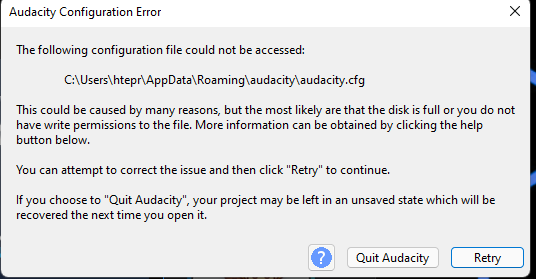
Audacity was working perfectly until i installed FFmpeg for audacity and all the sudden whenever i launch audacity it shows this little window https://imgur.com/a/MV9hBnq
i looked up the error and found that it might be a permission problem but in my case it’s not, i double checked the permissions of the file and the folder and audacity has 100% control on it i even ran it as administrator. i got too much more space in my drive so it’s not a storage problem.
can you please help me fix this problem.
Infos you may need:
OS : windows 11
Audacity version: 3.1.3
There is no picture.
Pictures in PNG, JPG, JPEG and GIF formats can be uploaded directly into your forum post. See: https://forum.audacityteam.org/t/how-to-attach-files-to-forum-posts/24026/1
I’m sorry for the mess conserning the image file, here it is
That may be a misleading coincidence. Does Windows do automatic updates on your computer?
It certainly looks like a permission problem. Perhaps it’s this new “privacy” setting in Windows: Windows file system access and privacy - Microsoft Support