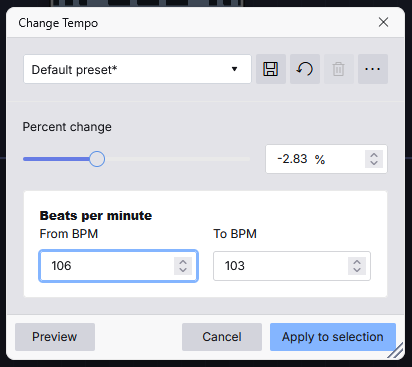
Where is the change tempo located?
I do not want paul stretch or sliding stretch. I just want to change the tempo of the entire track from 106 BPM to 103 BPM!
Where is the change tempo located?
I do not want paul stretch or sliding stretch. I just want to change the tempo of the entire track from 106 BPM to 103 BPM!
Audacity 4 does not feature the Change tempo effect at the moment. I have added it to my web version of Audacity instead though:
Right click on a clip header (or click on the “…” in the clip header" and choose “Open pitch and speed dialog”. You’ll need to calculate the speed change needed to affect the BPM change you want.
For example, to change from 106 to 103 BPM (slower speed) is 103 / 106 ~= 97.17%.
This is just a work-around. I’m hoping we’ll get a dedicated tempo function at some point, or that a tempo option is added to the Pitch and Speed dialog.
I’m hoping this will also show the resulting (and/or difference) time length of the clip. For my use, I don’t care about the BPM, just the change percent and resulting length before actually applying.
Honestly, I just want feature parity to Audacity 3 in this particular feature.
Depending on the project, I might be tempo matching and thus want the BPM values, or I might be time/duration matching.
I’ve been trying to use Audacity 4 since it released for my editing purposes (I know how hard change can be!) but I’m constantly having to re-open Audacity 3 solely for tempo change which is something I do a lot!