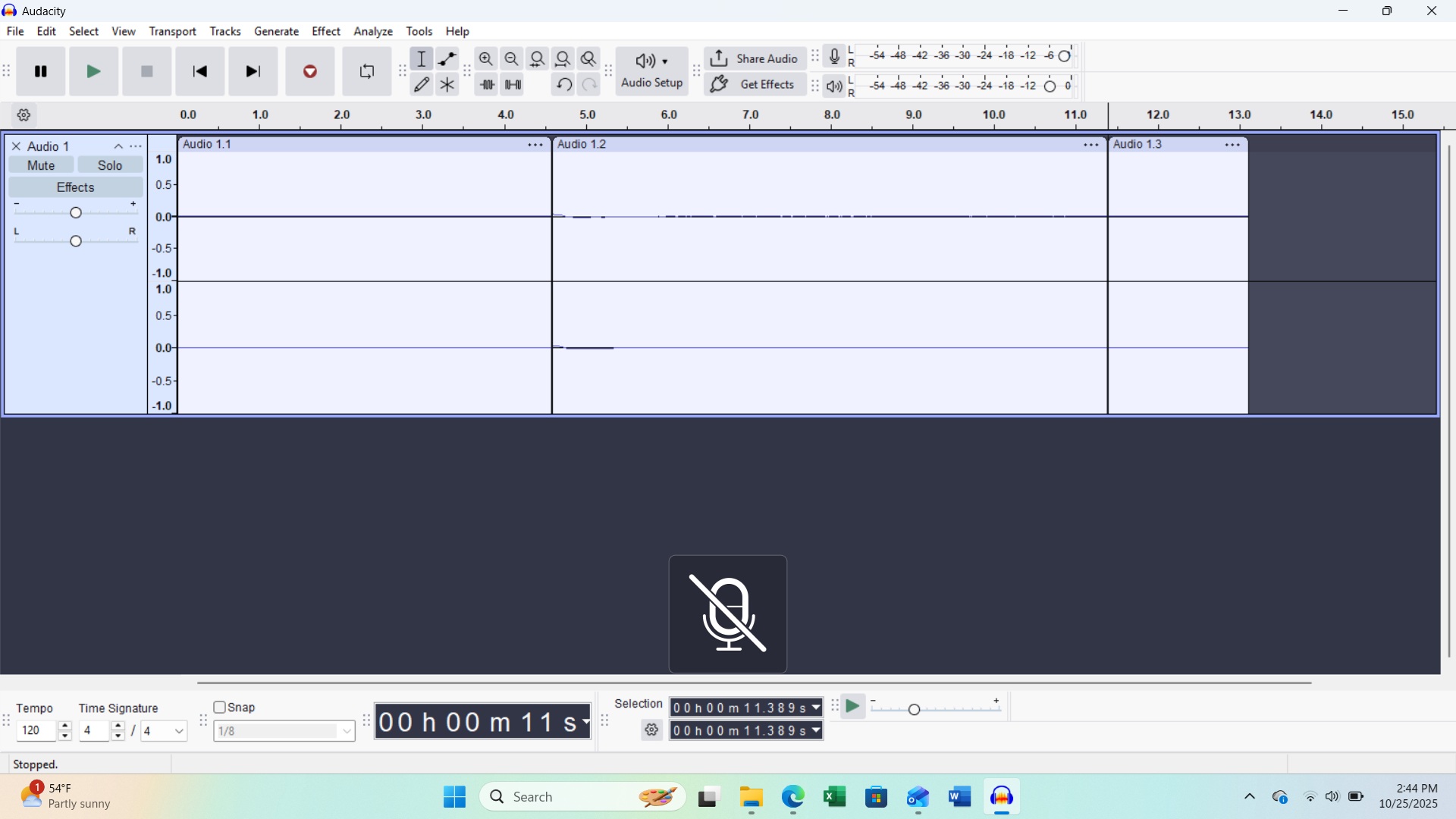
I’m using a Lenovo computer, running Windows 11 with AMD Ryzen 7 7730U Processor and Raeden Graphics. I’ve used this computer with a Gemini Gemine 4000BT Mixer to record a weekly syndicated radio show for almost 2 years, and recently, moved all of my radio show files to One Drive.
Audacity is no longer recording in either channel. and gives me a dark line on the top channel while recording. I also get a mic image periodically, superimposed on the screen (see screen shot).
Does it start working if you ignore Microsoft One Drive and do the work on your internal drive? Even further, can you disconnect your network and try doing production? Audacity doesn’t much like connecting directly to outside drives.
You can do production on the internal drive, finish, close Audacity, and then shuffle things in and out of One Drive? Move work back to the internal drive and open Audacity. Don’t let Audacity see you trying to work on external, network, internet, or cloud drives directly.
What is your show? Simple interview in your house? Music Production? Monolog? You can have troubles depending on how complicated the show is.
The problem with recording began before I moved the files to One Drive. Also, I’ve been on 3.7.5 for at least 3 weeks without issue.
Note the “phantom” microphone image at the bottom of my screen shot. I’ve not seen that before, and didn’t see it listed as issue here in the Forum. Is that a bug?
FYI, the Show is an “oldies” show, variety pop, rock, R&B, cross-over country for low power stations heard across the country through the Audioport network.
Yes, I’m producer and voice “talent”, but no Bluetooth involved. I use the Gemini mixer to mix various CD’s, two turntables, and two separate USB ports for importing music. There is Bluetooth access as well which I haven’t used. I’m also only using home WiFi to get to the Internet. After recording and editing, I submit my MP3 files to the Audioport network where stations pick up the two, one-hour Show segments weekly.
And yes, previously I used my saved files from my internal hard drive to produce my Show files.
Have you any other way to produce your show? I’m not an Audacity 3.7.5 user and I’m not on Windows. Note that there are no Windows users racing to help. This is a forum—users helping each other. Not a Corporate Help Desk.
I know you’re waiting for me to tell you which button to push to clear everything up. I’ve never met this problem before.
I would be “backing up” to a known, good, working system so you can continue with your show. Then we can take some time solving the issue. What would you do if the computer never comes back?
I have several different ways to record my voice and post on the forum. I could produce voice work on my phone in the car if I had to. I’m not joshing. I tried it.
I’m betting significant chocolate that the One-Drive connection is messing things up. That’s why I said to disconnect the WiFi before you shut down and reset everything.
Sorry to be slow responding but Sunday is a very busy day with church music and choir rehearsals.
I’m not low on space, quite the contrary as I have 930 GB of space, 849 GB free.
Yes, I tried replacing the “translator” cable with new. I bought two originally knowing my dependency on the connection between the mixer and computer. I started buying a duplicate cable/jack for every “dependent” cable/jack after traveling in a band almost 50 years ago!
Also, and finally, Yes I have about two years of “backup” shows to submit as needed.
Haven’t tried the “reboot” yet, but will give it a go.
Again Many thanks for your helpful questions and directions. Is there not a direct technical support team at Audacity? The Forum is great but I may have a unique issue.