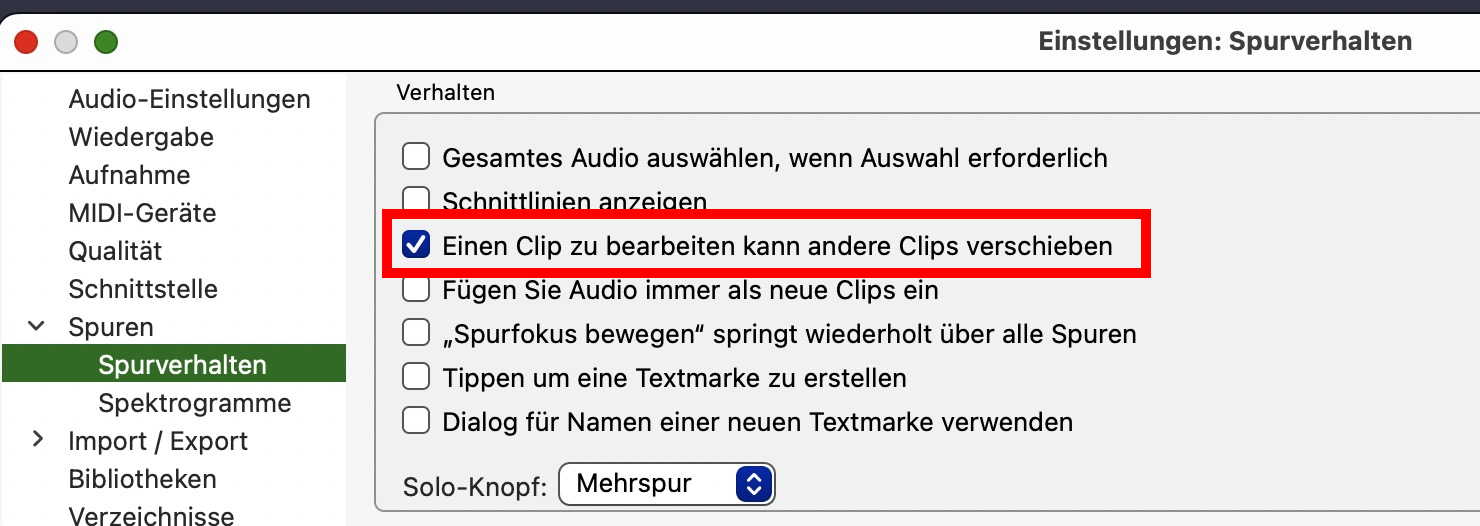
I’ve recently uploaded Audacity 3.7.3 onto a computer running Windows 10, and there are a couple of issues that I have that I didn’t have in any previous versions. I wonder if anyone can help -
I’m using several stereo tracks that are layered, with music on one, conversation on a second, sound effects on a third etc
- when I go to cut out a selection from one of the tracks (a section where there is no sound) so as to move all of the subsequent soundbytes on that particular track, nothing moves. In the past, cutting out a piece would bring every subsequent soundbyte on that track forward
- when I drag one of the soundbytes forward, in the past it would drag every subsequent soundbyte on that track forward too. Now, only the dragged soundbyte moves and the subsequent ones do not move.
- If I go to add in something in the middle of a track, quite often I’m presented with the error message “you do not have enough space to add that” or something like that. In the past, I would simply add in something and every subsequent soundbyte would be shunted backwards accordingly.
- If I go to “Keep tracks suncronised” and then try to cut out a piece (as in 1 above), it cuts out a similar piece in every track
I’ve obviously missed a box somewhere that I need to tick in order to revert to how I would like my Audacity setup to perform, and I wish I knew which one it was . Does anyone have any ideas please?