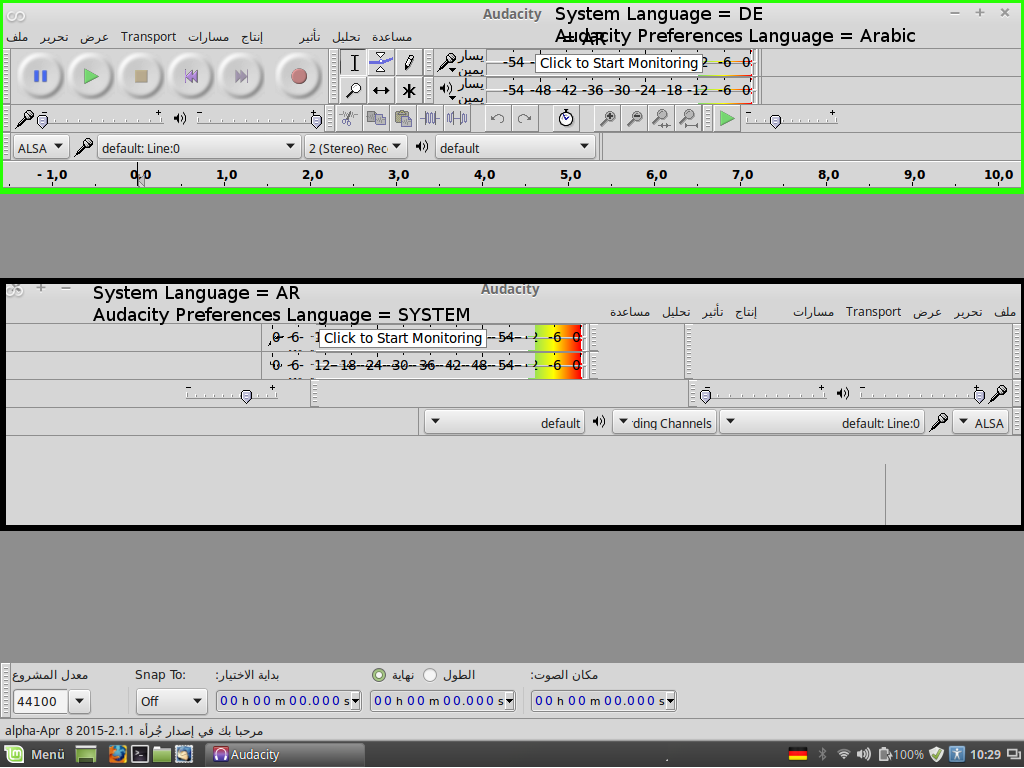
I’m facing a very strange behaviour with Audacity User Interface when changing the language in the settings .
I am using Linux Mint 17.1 Rebecca, but also with 17.2 it is the same. System Language is German
I have actually installed the daily version, but having the same using the distribution release (only tested on 17.1).
Now the problem: I installed audacity and use it with Standard Settings and everything is working fine. Even if I change language in audacity to English it works.
But if I change the language of the Linux-User in the System Settings of Linux Mint and restart, audacity will open but will not show any buttons in the toolbar - they are all empty. Changing the Users’s language back to German all works fine again - in all languages.
I’ve googled and searched in the forum, but did not find that someone had the same problem so far.
Please give me advice how to fix it - I need it for a friend who is using my computer but doesn’t speak german.
Audacity does not work properly with right-aligned GUI. Note the left-aligned text in Device Toolbar when you have left-aligned system language, but right-aligned when Arabic is system language.
OK,
that means there is an arabic translation, but you cannot use it if your OS is also arabic.
Sounds strange to me, but anyway - thank you for your efforts.
Markus
Most languages are left to right. Arabic is right to left.
Proper right to left support has not been implemented yet in Audacity. This is probably a huge task. Progress dialogues move backwards. Waveforms are drawn backwards. And so on.
 .
.