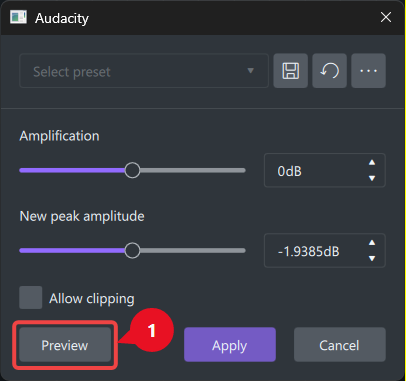
We cannot check out the current settings of any given effect, or continuously adjust till we get the desired extent of the effect.
The current UI for the effect has a “Preview” button, but it does not allow us to switch between the “dry” and “wet” sounds (the “A/B test”).
Further, if we click on this button, it plays the modified sound only once. There should be a provision to play the clip in a continuous loop mode, so that we can listen to the wet sound for as long as we wish, and go on adjusting the parameters till we are satisfied.
This is a very valid usability point, especially for anything involving audio processing where perception changes over time.
Right now the “Preview” workflow sounds too one-shot oriented, which makes fine-tuning difficult. A few improvements would directly solve what you’re describing:
A/B toggle (Dry / Wet switch):
Instead of only previewing processed audio, there should be a quick toggle or blend control so users can instantly compare original vs effected sound without restarting playback.
Looped preview playback:
A continuous loop mode would make a big difference. Being able to hear a short segment repeatedly while adjusting parameters is basically essential for precise tuning (especially for EQ, reverb, compression, etc.).
Real-time parameter adjustment during playback:
Ideally, changes should update live while the loop is running, so users can hear immediate differences instead of clicking “Preview” each time.
Optional split-view or slider mix (Dry ↔ Wet):
A simple mix slider often works better than separate preview states because it gives instant comparison control.
What you are describing is basically the difference between a static preview tool and an interactive audio editor workflow. Most modern audio tools move toward continuous playback + real-time adjustment because it speeds up decision making a lot.
If this is for a specific platform or plugin it would be worth framing it as a UX improvement for iterative sound design workflow that usually resonates with developers because it’s not just a feature request, it’s a productivity issue.
Yes, that’s what I wished for, except the wet/dry slider mix.
When we mix the wet+dry, we cannot assess the exact effect.
It is best to let the UI play the wet+dry (A/B) clips alternately, in endless loop mode.
An indicator should show us which version is playing right now: wet or dry.
On second thoughts, I realized that some of the effects will have a built-in dry+wet mixer knob.
If the UI does have a wet+dry mixer knob, its final output should be compared with the original.
That is because the UI is designed NOT to use the wet sound alone.
So the comparison should be between the raw (unprocessed) sound and the final output (a mix of dry+wet).
The preview should play the raw sound and the processed sound (wet+dry) alternately, in an endless loop.
An indicator (LEDs) should show which sound is being played at the moment.