Adjustable Fade

Normally we prefer to avoid text in the ;info line other than credits and license details, but in the case of this plug-in I’m starting to think that brief explanatory text in the ;info line may be justified.

If this were a built-in effect there would be several options open to us:

  • The “Gain” controls could have a labelled box around them (like in the Leveller effect).
  • Disabled controls could be greyed out.
  • Controls could respond to preset choices.

Unfortunately none of these are available for Nyquist plug-ins.

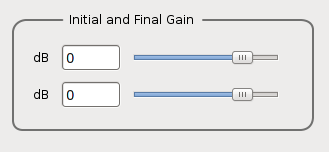
Something like this for the gain controls would be perfectly clear:
sliders.png
But sadly this is not supported in Nyquist plug-ins.
To work around this limitation I think that for this plug-in it may be justified to have brief explanatory text in the ;info line.

Would something like this be sufficiently clear?
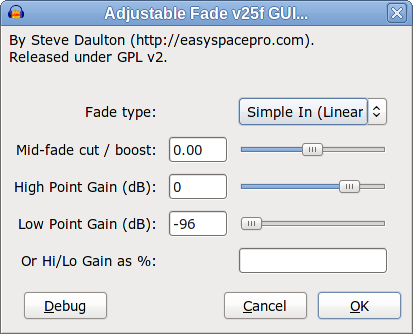
Adjustable Fade GUI.png
The defaults are as shown.

Options:

Fade type

  • Simple (Linear)
  • Sine (‘S’ shape)
  • Logarithmic
  • Exponential

The default fade shape for “Simple (Linear)” is linear.
The default fade shape for “Sine (‘S’ shape)” is “S” shaped raised cosine.
The default fade shape for “Logarithmic” is an “Equal Power” curve.
The default fade shape for Exponential is a “medium curvature” exponential curve.

Fade In, Out, Up or Down

  • Fade In
  • Fade Out
  • Fade Up
  • Fade Down

For the gain controls, -96 dB is interpreted as absolute silence (-inf dB).

Version 24
adjustable-fade-24.ny (4.84 KB)

Thanks for your work on the log/exponential curves. Presets or modifiable, I think we want these, both logarithmic (fade in becoming “slower”) and exponential (fade in becoming “faster”).

I did not mean Equalisation, but equal power. When the curve slider was +/- 1.25, the equal power point was +0.5. Now an “equal power” curve is achieved when you choose a logarithmic type with a zero mid-fade setting, if I understand it aright. I think this is OK and the preset "types"are all good.

My “favourite” on balance was still your modification of my suggestion with the single preset control turning off all the other controls (which included a fade direction control).

Irrespective of what the default should be for the “single preset” control, that version meant that the majority who will be fading only with presets only ever need to change one control. It’s less confusing than the “two"preset controls” version, only one preset of which actually disables the sliders. I’m inclined to think the preset that disables the sliders should be at the top, even if we keep the v24 layout.

I note you support the “Use Controls” default in the “single preset” alternative on the basis of the requests for a “quick linear fade from say 0.8 to 0.2, much simpler and quicker than the Envelope Tool”. I am still not convinced “Use Controls” would be the correct default because so many more people would be changing it more than they otherwise need to. I think you may have a valid question whether linear should be the default.

I still contend this plug-in does not offer 0.8 to 0.2 in any “simple/quick” way, because many of the voters within those want % or target level controls (I state the “target” votes as a fact only, I’m not getting into the practicalities of that here).

Getting to v24 in detail. my first impression is that the idea of different fade up/in/down/out settings instead of just fade direction has quite considerable potential for confusion.

  • If you leave the sliders alone, “fade in” and “fade up” produce identical results for both linear and sine types, but if you move the sliders then of course fade in and fade up produce different results (for all types, the sliders have no effect with “fade in”).
  • If you leave the sliders alone, “fade in” and “fade up” produce different results for both log and exp types.
  • Exponential fade up (without moving the sliders) seems to rise too late to be useful.
  • Exponential fade in (where the sliders have no effect ) rises earlier, but although this is “from silence”, the only fade up that looks identical to it (in waveform view) is from -61 dB. I know I should look in Waveform dB view, but it still “looks” odd.
  • Log/exponential fade in/out are described as being “from silence” but can they be without “jiggery pokery”?
  • Many people may feel that -96 dB is “silence” (I thought earlier versions of this plug-in treated it as such?

Although I know “why” you changed to not specifying which slider is which (to try and show that the sliders only worked with Fade Up/Down) I think that with the other confusions listed above, it’s a mistake not to use “High Point Gain”/ “Low Point Gain”. Otherwise, there are just too many up/down/in/out statements and choices.

So, do we really need Fade Out/In/Up/Down rather than just “Fade In”, “Fade Out” (or “Fade Up”, “Fade Down” if you must) and “Use Controls”?


Gale

Could you point to, or post, which one that was.


Yes. That’s why I didn’t use that for the “Fade In” option.
Fade Up would be even worse if it went down to -145 dB (like the Envelope Tool).


I think that the Exponential Fade In and Fade Out “presets” produce nice sounding exponential fades.
The technical description for these fades is that it is an exponential curve from -60 dB to 0 dB, normalized to a range from silence to unity gain (reverse for the Fade Out).


The “jiggery pokery” is “normalizing” the range.
Without normalizing the range an exponential fade will only reach silence when the format runs out of bits, which is -96 dB for 16 bit format, -145 dB for 24 bit, and around -1000 dB for 32 bit float.

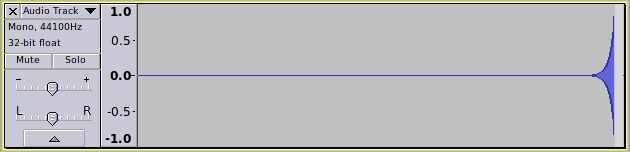
Without normalization, this is an exponential fade in that fades in from 32-bit float silence. As you can imagine, it’s not very useful because it is totally inaudible until almost the end.
firsttrack000.png

Yes, version 24 also treats -96 dB as silence.

What this means for the exponential curve with the sliders is that at -95 dB a full-scale signal that is faded in will fade in from -95 dB. At -96 dB it will be faded in from -96 dB, but then normalized so that it starts from silence. I considered leaving the Fade Up and Fade Down Exponential fades not-normalized, but decided to normalize at -96 dB for consistency with all the other fades.

A pragmatic approach is required for exponential fades as a “true” exponential fade in from silence would be silent for the entire selection, with the gain rising to unity on, or after the final sample.

Yes, the default Logarithmic curve (Mid-fade = 0) is an “equal power” shape.

“Sine (‘S’ shape)” with Mid-fade = +0.5 is a similar but very slightly different “equal power” shape.

Now that we have the Log and Exp fades and nice default values for Linear, “S” curve and Logarithmic, the other way to avoid the “two preset control” would be for all of the “presets” to be fully adjustable. That is, with the Mid-fade, and Gain sliders at default, the “choice” options would be:

  • Simple In
  • Simple Out
  • Sine In
  • Sine Out
  • Log In
  • Log Out
  • Exponential In
  • Exponential Out

If we don’t mind truncating the last couple of characters we could include descriptions of the default shapes in parentheses:

  • Simple In (Linear)
  • Simple Out (Linear)
  • Sine In (‘S’ Curve)
  • Sine Out (‘S’ Curve)
  • Log In (Eq Power)
  • Log Out (Eq Power)
  • Exponential In
  • Exponential Out

The only feature that we lose with this is the “Normalized Logarithmic” Fade In/Out. However, the “Simple” type with a negative Mid-fade setting provides a very similar shape should it be required.

What we gain by this is:

  • 1 click fade selection.
  • Sliders always work.
  • Only one “preset control”.
  • Fade shape and direction selected in one click.
  • Additional ;info text not required.

I’ll mock-up the GUI and post it shortly.

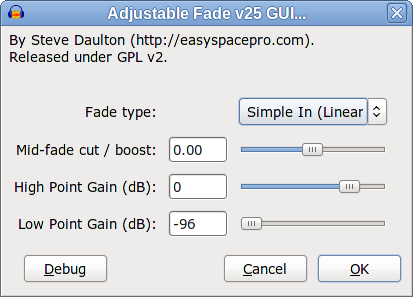
Here’s the mock-up for a possible version 25.
The gain scales are -96 dB to +24 dB
v25-dB.png
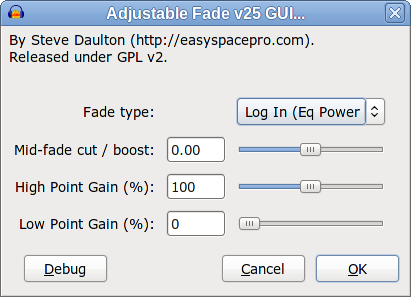
Here’s the same but with linear percent gain rather than dB.
The gain scales are 0 to 200%, which is equivalent to -inf to +6 dB.
v25-percent.png
There are pros and cons to both dB and linear scales for the gains.

  1. Linear scale works very nicely if you want to reduce the level to say 1/4 of the original level - just set the gain to 25%. With a dB scale it is a little more difficult unless you know that 1/4 of the original level is -12 dB (one click on the slider).
  2. Above unity gain a linear scale has a limited range. +24 dB is 1585 % which is obviously impractical on a linear scale.
  3. The dB scale works well in conjunction with the Amplify and Normalize effects. For example, to fade up to exactly 0 dB, the end of the selection can be “measured” using the Amplify effect to find the current peak level, then the “High Point Gain” set to that level.
  4. The dB scale does not go down to silence, so where silence in required the low end of the scale (-96 dB) must be “interpreted” as silence,
  5. The linear scale does go down to silence, but an Exponential fade from or to silence will produce only silence, which will “look” like a bug.
  6. The “standard” way to specify gain in both hardware and software is in dB.

The deal breakers for me are items 2 and 3.

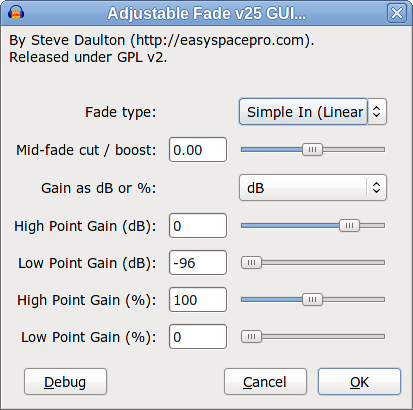
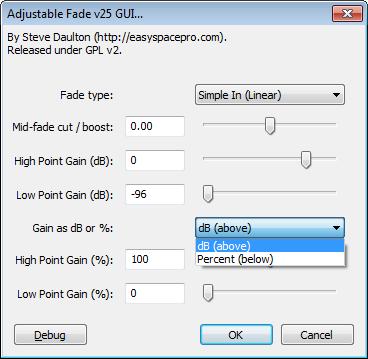
Here is the same but with a choice of dB or Linear percent scales. In my opinion it looks cluttered and it is confusing that some of the controls do not work (but are not grayed out). It offers ample opportunity to get the wrong result by not noticing that the “Gain percent” (or Gain dB) sliders are disabled by default. It also looks more intimidating because it’s a “big scary complicated screen with lots of sliders”.
v25-dB-and-linear.png
And here’s the .NY file for the GUI:
Adjustable-Fade-v25-GUI.ny (996 Bytes)

This one Adjustable Fade - #68 by steve .


Gale

Thanks. Yes I quite like that one too. Are you (or anyone else, because this is not only between Gale and myself) tempted by “Adjustable-Fade-v25-GUI.ny”?

I’m looking at this one and “Adjustable-Fade-v25-GUI” side by side.
It’s quite a bit of work to code these up as fully functional plug-ins so I’d prefer to not do that for both when one will not be used.

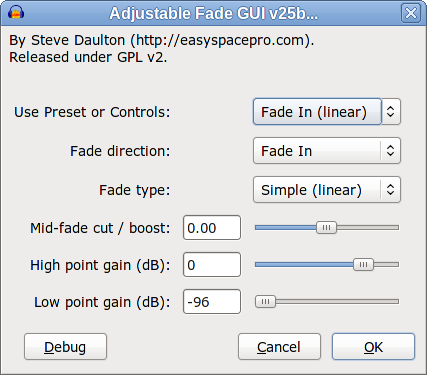
v25b-dB.png
Comparing what you would need to do for some tasks:

Linear Fade In:
Version 25 GUI

  • Linear Fade In is the default

Version 25b GUI

  • Linear Fade In is the default

Linear Fade Out:
Version 25 GUI

  • Select “Simple Out (Linear)”

Version 25b GUI

  • Select “Fade Out (linear)”

Linear Fade down by 6 dB:
Version 25 GUI

  • Select “Simple Out (Linear)”
  • Set “Low point gain” to -6 dB

Version 25b GUI

  • Set “Use Preset or Controls” to “Use Controls”
  • Set “Fade Direction” to “Fade Out”
  • Set “Low point gain” to -6 dB

“S” shape fade down by 6 dB:
Version 25 GUI

  • Set “Fade type” to “Sine Out (‘S’ shape)”
  • Set “Low point gain” to -6 dB

Version 25b GUI

  • Set “Use Preset or Controls” to “Use Controls”
  • Set “Fade Direction” to “Fade Out”
  • Set “Fade type” to “Sine Out (‘S’ shape)”
  • Set “Low point gain” to -6 dB

Simple fade up by 3 dB with maximum curve:
Version 25 GUI

  • Set “Mid-fade cut/boost” to +1
  • Set “High point gain” to +3 dB

Version 25b GUI

  • Set “Use Preset or Controls” to “Use Controls”
  • Set “Mid-fade cut/boost” to +1
  • Set “High point gain” to +3 dB

Sine fade down by 3 dB with minimum curve:
Version 25 GUI

  • Set “Fade type” to “Sine Out (‘S’ shape”
  • Set “Mid-fade cut/boost” to +1
  • Set “High point gain” to +3 dB

Version 25b GUI

  • Set “Use Preset or Controls” to “Use Controls”
  • Set “Fade Direction” to “Fade Out”
  • Set “Fade type” to “Sine Out (‘S’ shape)”
  • Set “Mid-fade cut/boost” to +1
  • Set “High point gain” to +3 dB

The work-flow is improved in most cases for Version 25b if the default for “Use Preset or Controls” is “Use Controls”, but it is still often less efficient that Version 25 and there is the potential confusion in 25b that “Preset = Fade In” overrides “Fade direction = Fade Out” and “Preset = Fade Out” overrides "Fade direction = Fade In.

I almost suggested version 25 (there are no real presets, all the controls work with each other) but I thought there would be two drawbacks:

  • Novice users could easily knock the sliders without any understanding of how to “reset” them, so lose any “easy” way to make a fade to/from silence
  • Power users would lose the feature of being able to retain “custom” slider settings while still being able to do a preset fade to/from silence.

I think these are fairly substantial objections?

Yes. It can be mitigated by labelling, for example "Use Preset [PR] or Controls " and for the drop-down “PR:Fade In (Linear)”.

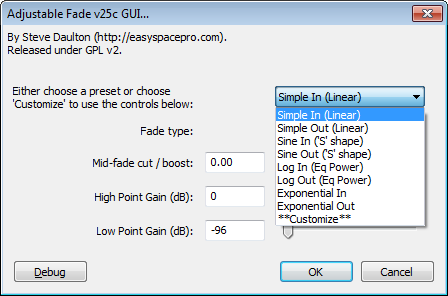
Then I got to playing around with 25b. Does it help power users if we combine the custom Fade Type and custom Fade Direction into one control as in 25c below, so that the the contents of the control for “Either choose…” and the contents of the control for the custom Fade Type are identical except for the addition of "Customize in “Either Choose…”:
v25c.png
The obvious disadvantage is the near identical contents of the first two controls, but conceptually I think this one is very easy to understand and looks clean.

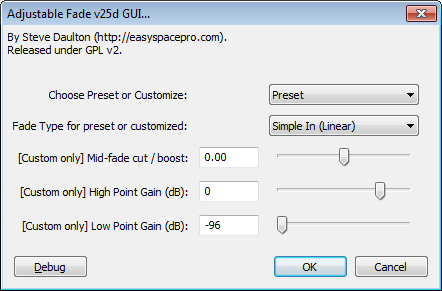
Or, how are the workflows if we combine the almost identical controls for “preset” and “custom” fade types in 25c and have a “simple” first control that chooses either “Preset” or “Customize”; then the control below for fade types applies to both presets and customised (v25d below):
v25d.png
Perhaps this might work better with the Fade type first, then the “Preset or Customize” control could be labelled to refer to the sliders below.

I don’t see how that is a showstopper for you against linear - I am assuming if we have linear at all (or offer it commented out) it has to be in addition to the dB choice. In many ways having both gives the best of both worlds.

While the positive end of the linear scale is a problem I think it’s only a minor problem if text entry is allowed. Also we could just tie the linear slider to 0% to 100% for easier understanding and have users enter values > 100% in text. Would it look less confusing (though functionally I prefer not) if the two % controls were text only?

I agree four gain sliders “looks” a little intimidating though I don’t think it’s hard to understand in comparison to say, Sliding Time Scale. In the below I tried putting the dB / % choice between the slider pairs but I am not sure I like it:
control_between_%_or_db.png
I feel getting the workflow optimised (ideally with a real preset that disables sliders) is a little more important than including % choices, though that is only the case if we ship a plug-in like Text Envelope that includes a % choice.

I assume v24 (Fade In/Out/Up/Down) is out of contention? I don’t like that one.

For any of these v25’s, can one make a line of text e.g. “GAINS” above a set of controls without making it a control itself?


Gale

I think that is a very minor issue - certainly a lot less of an issue than accidentally knocking a control in any of the built-in effects because, unlike built-in effects, Nyquist effects always reset to their defaults at the start of a session.

Having an indicator (of some sort) for the default position of sliders is a feature request for ‘all’ effects (not just Nyquist effects).


I don’t think that is a big issue either. It would be nice to be able to save user presets (like in the Equalization effect) but that is not an option for Nyquist plug-ins. In practice I think that it’s useful to be able to retain settings from one occasion to the next occasion within the same session (for example when fading down and then back up again) which the current offerings will do.

I don’t see the slider controls as an optional extra, but rather as the primary purpose of this plug-in. I agree that we should try to make the effect as easy as possible for less able users, but not at the expense of what the plug-in is intended for.

In effect, a control that chooses either “Preset” or “Customize” is the same as an option to “Disable All Sliders”. As disabling the sliders disables the core feature of this effect it should definitely not be the default. The Equalization effect does not have the presets as the default option, though I’m sure that some less able user would find that easier, but such an idea would not be entertained by either the developers or the vast majority of users because it would cripple the effect for what it is intended for.

I could live with an option to disable the sliders as long as the default is off, though I really don’t think it is necessary.
With the version 25 GUI, this effect is by no means the most complicated effect in Audacity. I suspect that most users that are likely to struggle with it are unlikely to even find the effects that are below the divider.


It would be a show stopper for me if % was the only option. I think consistency is important as it allows the tools in Audacity to work together, not against each other.


No, not compared to “Sliding Time Scale”, but you also seem to be arguing that having any sliders is too complicated for some users as the reason for having default presets. I think that we need to accept that anything more that the standard linear Fade In and Fade Out will be too complicated for some users.


A linear scale is an option in the current “Text Envelope” effect and I’m strongly in favour of keeping that option.

I would not against having a linear scale in this effect if it could be done in a clear way without duplicating controls that can’t be greyed out. If Nyquist plug-ins supported greying out controls then I’d say yes, let’s have both. If Nyquist plug-ins supported tabbed interfaces so that we could have a simple and an advanced interface, then I’d say let’s have linear on the simple and dB on the advanced (provided that the simple or advanced selection persisted from one session to the next). Unfortunately the Nyquist plug-in interface does not allow these options, which leaves the choice between duplicating controls or deciding on dB OR linear. With a choice of one or the other I think we have to go for dB.

There is one other option that occurs to me, though I’m not sure how much either of us will like it :wink:

Rather than having a choice drop-down selection for dB or linear plus sliders (or text boxes), we cold have one text box below the sliders.
If the text box is empty (or invalid), then the dB sliders control the high point and low point.
If the text box contains exactly two numbers, then they are the high point and low point on a linear scale.
Perhaps called something like:
(Optional) Gain as %: [___________]


Version 25 is currently my favourite. I much prefer it to version 24.
The only place that text can go is as ;control text (before and/or after the control) and the ;info text (at the top of the interface).
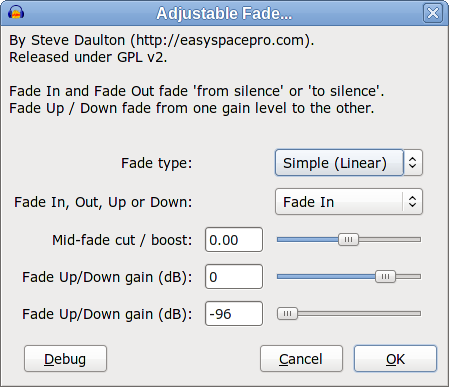
25f.png

Hi

I’m interested in this effect but think the presets have importance. Too few Audicity effects have presets - of course this is why a person shall look for vst effects instead.

Often you shall find programs where the developers like yourself think only of how they like to use the effect in advanced state and not how those with less understanding shall use it. So I think with fades tools like this, most people shall use it just for different shapes to and from what they understand silence is (like fade in and fade out with no prompt) .

And of course fade to and from other levels is important new feature , but maybe you make it more diffcicult if you dont offer a percent choice or don’t offer a preset to half or from half.

Also I have seen pro fade out and it is very accomplished.

IS there an index of optional nyquist effects for download?

Thanks for the feedback yulac, it’s really useful to hear from other users.

The problem with presets in Nyquist plug-ins (as opposed to built-in effects or other types of plug-in) is that the Nyquist interface does not support presets very well. It’s fine if there are ‘only’ presets, but the problems arise when you want both presets and manual controls. Where, for example, you can select a preset in the Equalization effect and the settings will all jump to the appropriate places, Nyquist plug-ins can’t do that - it is a very primitive interface.

I’m not really “a developer” - I don’t have a clue about C++. I’m a musician that also writes Nyquist plug-ins. There is a wide range of Audacity users, from very young to very old, from people that dabble occasionally for transferring a cassette to CD, to people that regularly mix projects with dozens of tracks. Finding the right balance between functionality and ease of use can be difficult. In the case of this plug-in, users have requested a fade effect that can fade from one level to another level, and that is a central feature of what this plug-in provides. I want to make it as easy as possible to do that, which as you can tell from the length of this topic is not an easy matter. Sometimes the “obvious” solutions don’t work in practice - for example the Envelope tool allows increasing the level by 100%, but users often complain that it is not enough (and as an Audacity user I’ve experienced that myself). Percentage increase or decrease seems like a simple idea, but it falls down badly if you need to raise the level by more than a few dB (+6 dB = 200% linear).


I did consider a preset to half and from half, but for which type of fade? Some people will want that with a linear fade, others will want it for log fades, others for ‘S’ shaped fades, and of course there are In and Out versions of each - then there are those that want to fade to or from a quarter. Some programs have so many presets that you can’t find the one that you want, so again it needs to be a balance.

On of the things that I like about the “version 25f” is that for fading to or from half (50%), all that you need to do is to type 100 50 into that box, and it works for Fade In and Fade Out and all of the fade shapes. Similarly to fade to or from a quarter, just type 25 100 (or “100 25”). I think this could be a close as we can get to the best of all worlds. :wink:


Thank you - and it is extremely easy to use :smiley:


There are a lot of Nyquist plug-ins on the Audacity wiki - the index for those is here: Missing features - Audacity Support
All of the plug-ins there should work, but please let us know if you find any that don’t.

There are also a lot of plug-ins in various stages of development here on the forum (this section New Plug-Ins - Audacity Forum). These are not indexed and not fully tested. Feedback about these plug-ins should be posted in the relevant topic. One of the main things holding up transferring these to the indexed list on the wiki is the lack of testing and user feedback, so if you do try these, please do post your experience with them (good or bad).

I’m really starting to like version 25f


  • It provides a very quick and easy way to make a fade to/from silence - just enter 100 0
  • A fade from/to silence can be performed without losing the gain fader positions.
  • Because it is text entry, the gain can be set to very high levels if required.
  • It looks less intimidating than having lots of controls.
  • In many cases it can improve workflow.

AND

  • It provides the benefits of setting the gains on a linear (percent) scale.

The one downside that I can see is that it may not be immediately obvious to all users that they need to enter two values if they use the text box, but this can be greatly mitigated by providing a verbose error message if an invalid entry is made. Anything entered other than exactly two positive numbers would trigger the message, which could even be like a help screen that explains exactly how to use the text entry box. There would be little need for a user to get it wrong more than once.

If we use this text box there is the question of the scale being: Unity gain = 1.0 or 100%
I have a slight preference for % because:

  1. There is less chance of confusion between “gain” and “target level”.
  2. The old problem with continental comma as decimal separator is less likely to occur.

I’ve been steering clear of this for a day or two as I have spent a long time on it (as you have). I was also interested to see if yulac came back with any response.

I see a greater degree of issue than you do with not having a preset (that disables the other controls). From the power user point of view, a preset control that was just “bolted on top” of the 25f model (in the manner of 25c) doesn’t present much issue does it? There is the extra control to be changed to “Customize” once at the start of each session, if that control initialises to a preset. And there is some gain even to power users in that they can get back to a known, common fade using a preset without changing their custom settings. I can see that a separate linear control does that too, but on a different scale and in a rather less intuitive way than a “real” preset, and you can’t then use the percent box as a second custom non-zero setting.

I think the worst feature of 25c is the similarity of the first two controls (without raising the Fade In/Out/Up/Down distinctions again or otherwise increasing verbosity).

Obviously I prefer to have one (or two) percent controls to none, though perversely the single box might actually raise requests for multiple pairs of points (not a problem with sliders).


Gale

“Text Envelope…” ?


Would a “Disable All Sliders” option suffice? I would much prefer that to duplicating all of the options.

You mean the v25d idea, however worded ?


Gale