I’ve just uploaded the latest Audacity (3.7.7) onto a Windows 11 computer, but “Adjustable Fade” seems to be no longer offered.
It was one of the most useful effects for me in the whole of the Audacity Army and I’m lost without it. Is it a fault with my installation or has Audacity dropped it? And how would I reproduce the same effect by another means?
It probably got moved. It is still found on this page.
Thanks for the reply. I’ve not been able to find where it’s been moved to, though
Effect menu > Fading > Adjustable Fade …
Hello - thanks for the post. That’s what I used to have in previous versions but on this screenshot of my new setup, you‘ll see that “adjustable fade” is no longer offered. The only options that I have on mine are “Fade In” and “Fade Out”
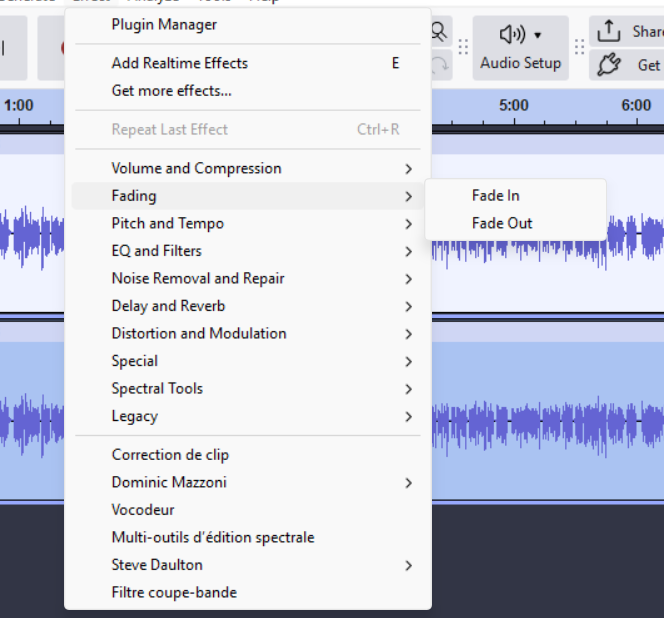
I don’t have access to the program right now, so I’ll ask. What is in the Legacy section?
Thanks.
In the “Legacy” section there’s “Classic Filters” - viz “Butterworth”, “Chebyshev Type I” and “Chebyshev Type II”
And also the “Legacy Compressor”.
That’s all there is
Go to Effect → Plugin Manager and make sure it’s enabled.
Thanks for the reply. It’s now reared its ugly head once I “rescanned” the list and enabled “Nyquist tools”. Phew!
Thanks everyone for your help
This topic was automatically closed after 30 days. New replies are no longer allowed.