Catskill Farms Audacity VT2 Gain 50.aup3 (1.9 MB)
I have the following on my ACX mastering macro:
Noise Reduction
Graphic EQ
RMS Normalize
Limiter
Tried position B for the microphone.
Gain set half way up the dial.
Catskill Farms Audacity VT2 Gain 50.aup3 (1.9 MB)
I have the following on my ACX mastering macro:
Noise Reduction
Graphic EQ
RMS Normalize
Limiter
Tried position B for the microphone.
Gain set half way up the dial.
That sounds OK, but the idea is for you to read Catskill Cows and Export it Clean with no processing, filters, or effects as a WAV (not an aup3 project file) and then post that on the forum.
I’m going to try my hand at mastering it.
Can you leave only a second and a half of hold your breath at the top instead of two, and read it slightly faster.
Thanks,
Koz
Hey -
I originally tried uploading it as .wav file but it was way larger than 2 mb and I’m not sure how to fix that.
I also didn’t realize I had mastered this one. I’m so sorry. I must have done that by accident.
Catskill Cows was composed so it comes in close to 2MB WAV (Microsoft) when I read it with the two seconds of hold-your-breath at the beginning.
That’s 942KB in mono (one blue wave). So when you double it for stereo, 1.9MB.
That’s also television commercial style. I’m trying to sell you milk. If you have a slower reading style, it’s going to be longer. Just do what you did and cut off words at the end until it fits.
There is an oddity. You posted an aup3 sound file which is almost always larger than WAV. So where you got the big WAV file is a mystery.
I’m guessing. Remember, I’m a forum helper elf working blind from many time zones away.
Some guesses work better than others. I’ve said many times that if you shoot correctly in a quiet, echo-free room, you can get close to ACX—full stop. Trim here and there and good to go. I think that’s what the ACX designers were thinking when they worked out the submission standards.
Koz
Maybe I misread KB for MB


There is a warning. Let Audacity figure out the Channels. Do Not try to set that manually.
44100, 16-bit (but the stereo version) is the sound standard for an Audio CD. So this is not magic.
Koz
Let’s try this again.
Catskill Audacity Forum VT 4.aup3 (1.9 MB)
There are some sound quality issues but we need to clear this up first. You posted another Audacity Project aup3 file instead of a WAV file.
I’m going on about this because that’s the same process that you will need later to make the MP3 file for ACX audiobook chapter submission. If you can’t make the WAV file, you can’t make the MP3, either.
Can you see this whole filename of the work you sent?

Unless you change it, Windows likes to hide filename extensions, that dot and three or four letters at the end. So you may not see the complete name of the file. That can be all fuzzy-warm and who cares until something goes wrong and you have to start unscrambling technical failures.
You should be able to upen the aup3 and export the WAV (Microsoft) with no loss in quality. Let’s try that. Follow the three pictures I posted up the message thread.
Koz
I’m so sorry - I was in the middle of cooking lunch for my kids and sent the wrong file extension again! I appreciate your patience.
Ding! That’s the right one.
Now I’m on the wrong computer so we get to wait until daylight in California.
As we go.
Koz
That’s from way at the top of the message thread.
Where is the computer? Is it in the tent with you? Are you announcing into the side grill of the Yeti just up from the company name?
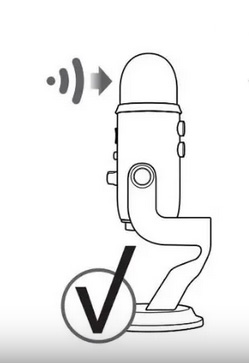
The sample WAV file posted is really low volume.
The Yeti had a really odd introduction. It’s a terrific microphone, but how to use it isn’t obvious and it didn’t help that the instructions are waaaaaay in the back of the manual. I had trouble finding the guide and I knew it was there. The microphone became popular with people using it wrong—people announcing into the rounded end instead of the side.
OK, now say you’re Blue Promotion and Publicity department. How do you tell about a million successful performers they’re using the microphone wrong? The newer manual has that illustration.
Koz
Do you know where your MBP microphone is? I always thought mine was behind the speaker grill just left of the left-hand Shift Key. But now I’m not so sure. Searching for the manual.
Koz
My really, really, really old MBP user guide tells me the built-in microphone is just above the EXC key. I’m going to take the machine out in the sunshine and see I can find it.
And clean the machine while it’s out there.
Koz
My Mac is in the closet with me. I read off the Mac.
For this recording I placed the microphone to my side as it was in the first drawing you sent me, with the blue yeti logo pointed in my direction.
No, I do not know where my MBP is.
Actually the mbp mic is on the left of the Mac
The microphone is the two tiny dots to the left of the keyboard on the Macbook Air. I did check that.
I’m pretty sure the built-in microphone is recording your voice and not the Yeti.
You changed the Gain knob from 0.25 to 0.5, got closer, moved the Yeti to the side, and read more expressively. The sound file you posted is almost exactly the same volume.
Ignore the settings—do the scratch test. Never blow into a microphone but you can talk or yell as loud as you want —or scratch.
Start a recording. Announce and scratch the Yeti grill just above the company name. Then announce and scratch the MBP microphone.
There’s another test that isn’t really a test. See if you can overload Audacity. It should be possible to speak or yell loud enough to cause the blue waves on the timeline to go to 1.0 or 100%.

I bet you can’t do it by yelling into the Yeti.
Koz
Where I’m going with this.
Your last sound test was perfectly clear and very low volume. When I boost the volume in Audacity processing, the background noise increases, too. Suppressing the background noise causes essing-sibilance and talking in a wine glass distortion.
Remember, this is where we started.
Koz
I’m going with the easy path, here. The Yeti could be broken. Do you still have your papers?
Koz
I don’t think my yeti is broken. When I do a scratch test it picks up sound.
