I have a string of .au data files that were a phone recording originally. I have sorted them by date created. I believe I need to create .aup files, whatever those are in order to combine these snippets into one short message. I have 11 files. Is there still an Audacity Recovery Utility that can append them into a single file if I rename them in order? This message is very important to me, but it is so scrambled sounding and needs to be slowed down also. Can anyone help please?
Audacity 3 does not have .au data files or a .aup project file. Which version of Audacity do you have?
Those are really old audio files that were recorded by an early voicemail system. You can probably play them on your computer using VLC and rearrange the playlist to find the right order. From there you can convert them into a more modern format.
The .au files could be from an old version of Audacity (2020 or earlier). The format changed to .aup3 (and no .au files) with Audacity 3.0 which was released March 2021.
Before opening the AU files in Audacity, change the project rate to low value like 8000Hz
Steve, thanks. I had a really old version and just upgraded to the newest.
YES! I figured this out, trying to open them. They were completely gibberish!
How can I change the Project rate before I even open them?
Go to preferences : Audio settings , and change 44100Hz to 8000Hz …
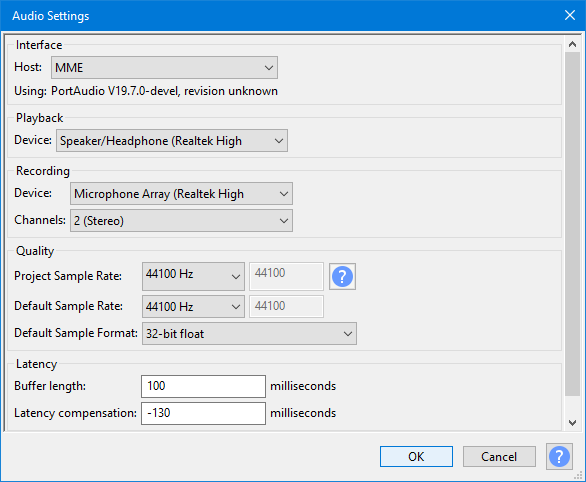
https://manual.audacityteam.org/man/audio_setup_toolbar.html#Audio_Settings
8000Hz is just an educated guess, (it’s typical for phone recordings). If the speed is then too slow try one of the higher project-rate presets. 11025,16000,22050, 32000.
You can change the sample rate of a track after you’ve imported it by way of the Audio Track drop down menu.
This way you can experiment to find the right sample rate.