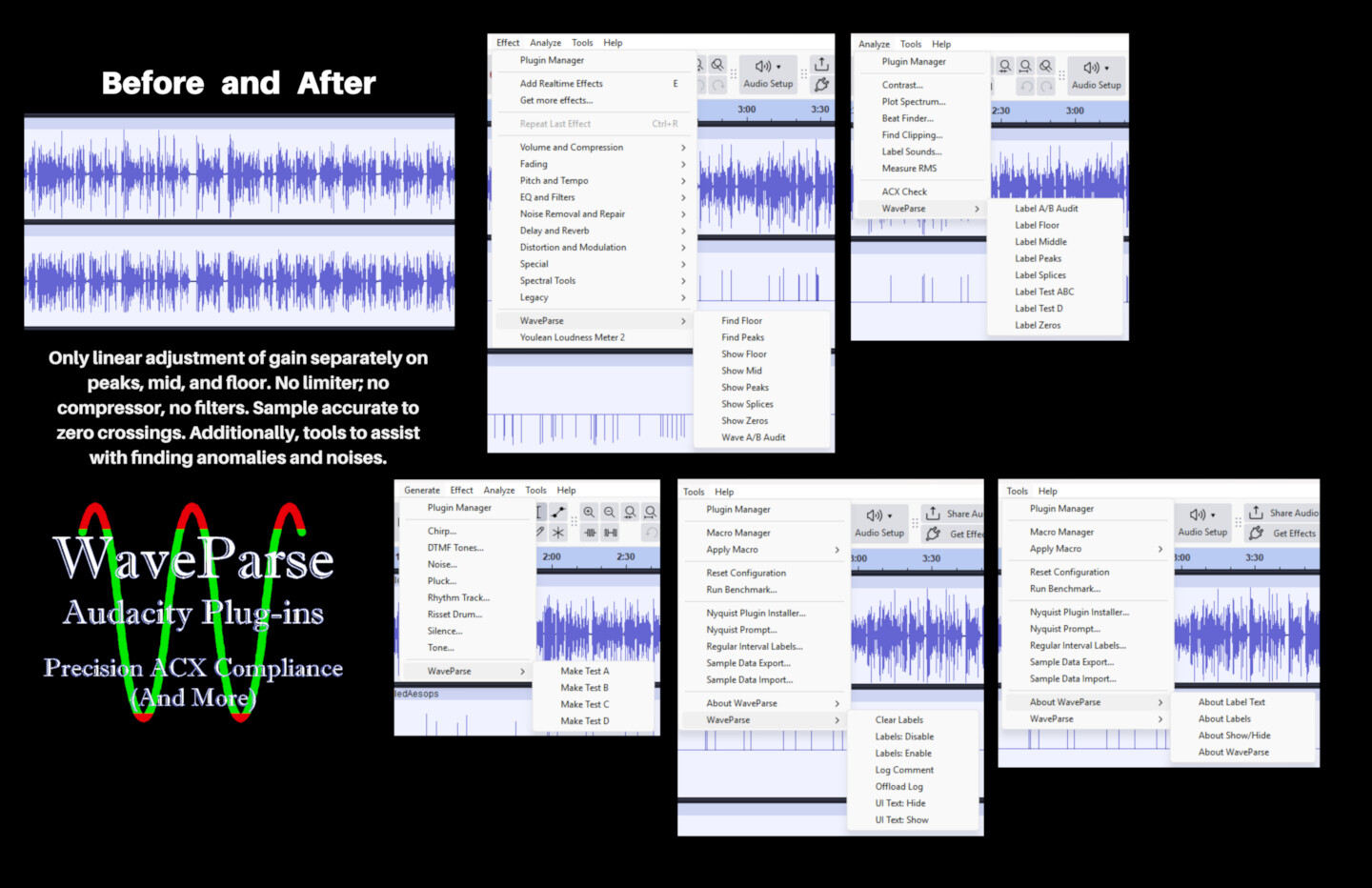
A comprehensive forensic suite of 32 VST3 and Nyquist plugins designed for precision ACX compliance without the use of limiters or compression

Subject: WaveParse: Free Forensic Plugin Suite for ACX Compliance (mix of VST3 & Nyquist plugins)

The Philosophy: Divide and conquer. Typically, no need for limiters, “smart” filters, squashing, or anything else. Just linear gain, zero-crossing accuracy, and forensic transparency with extreme precision.

The Tools: A suite of 32 plugins (8 VST3, 24 Nyquist) designed to help narrators and engineers hit ACX standards with independent gain adjustments to floor, peaks, and body. Tools also for spotting anomalies in files (pure- or near-zero intervals, bad splices, and noises).

Isolate & Identify: Use “Find” plugins to label Peaks, Floor, and Mid-range without changing the audio. A label track will mark them for you.

Surgical Correction: Use “Show” plugins to expose floor, peaks, and body for independent adjustment. Remix to final output track.

Zero-Crossing Accurate: Every cut is sample-accurate at a zero-crossing. Gain changes by Audacity will not produce clicks. The ability to adjust without interaction among floor, peaks, and body prevents need for limiters, compressors, and other artifact-inducing processing.

Forensic Markers: Issues are tagged in a Label Track for manual audit. There is a facility for A/B audio comparison without resorting to manual track switching.

The Platform: WaveParse is currently available only for the Window x64 environment. The distribution ZIP includes a Windows batch file to handle the installation of all 32 plugins automatically, saving you from manual folder navigation. There is a complementary ‘uninstall’ batch file as well.

The Price: Free, now and forever. Currently in functional Beta (additional Tools and Analysis plugins are in active development).

Details: https:/ /waveparse.com; questions to info@ waveparse There are more images in a gallery at the website. The two images shared here are limited resolution for size, please open in your browser with https://drive.google.com/file/d/1TNrWxmFhLRrDdWKkhNEAPQGy2ij3qOBH/view?usp=sharing and https://drive.google.com/file/d/1_EzFh6hZKgnYsosxvx744xYdJD766gFE/view?usp=sharing.

To obtain the link to the distribution ZIP file, please request via info@ waveparse .com. I repeat a promise made in the readme files: “Your email address will be used ONLY to provide update information from time to time; there will be no other use and your email address will not be provided to any third party.”
OK…

But most people here making audiobooks are not audio engineers and 32-effects are out of the question!

The hard part is setting-up a “soundproof” studio and getting a good recording. Then they can run the Audiobook mastering macro, confirm with ACX check, perhaps apply some noise reduction, and they are done!

…It’s usually impossible to meet the ACX standards without limiting so I’m not sure what you’re saying about that. (The peaks & RMS levels have to be set independently and limiting makes that possible.)

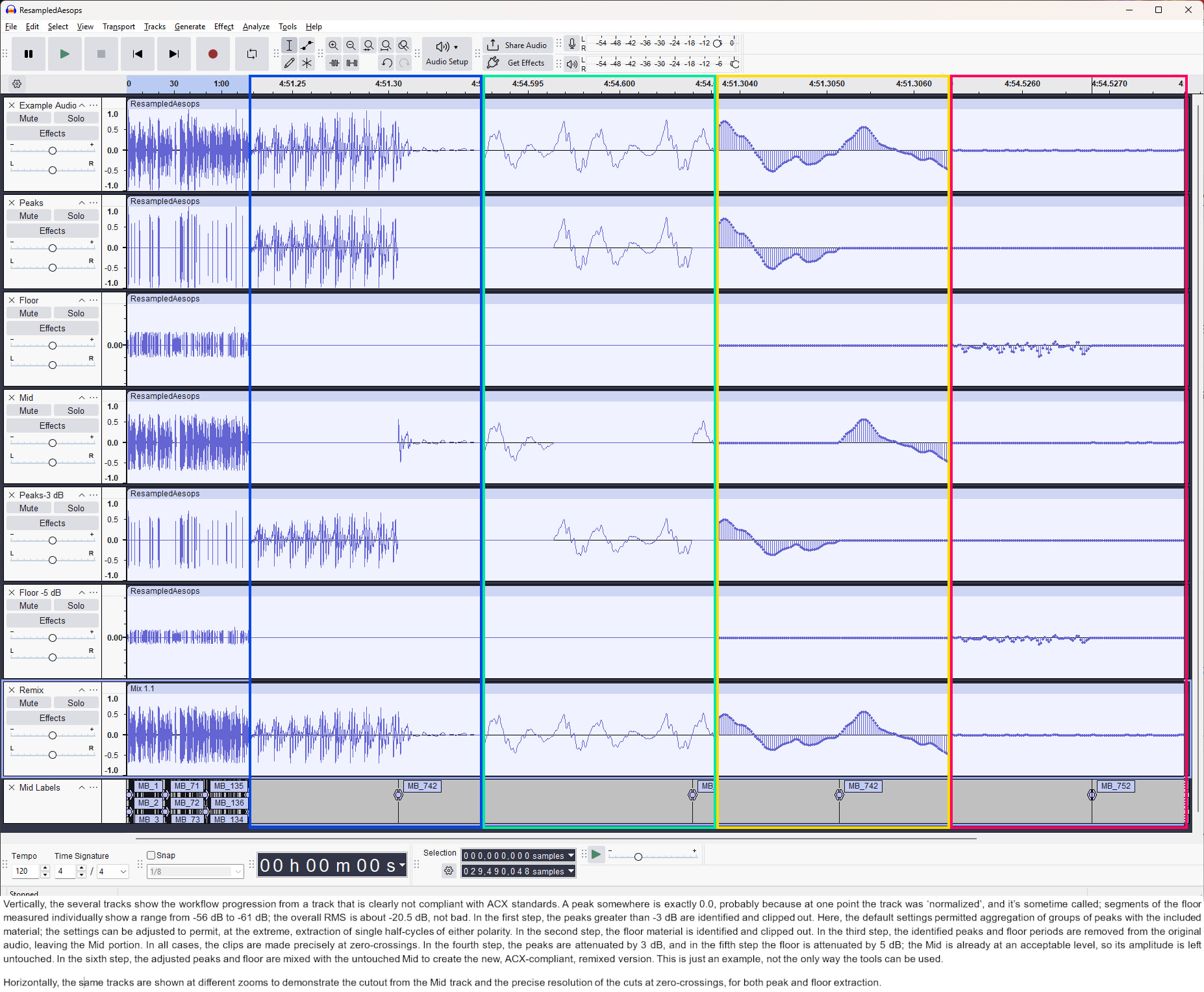
Hi, Doug, thanks for your comment. You don’t need all 32 plugins to do the work, of course; the workflow is really quite simple. In the simplest form it’s only a little harder than applying a limiter, and far more certain. Duplicate your audio track three times. On the first, run FindPeaks at -3 dB and then run Show Peaks to clip them out of the audio.

In the second duplicate, run Find Floor at -50 dB if you have a good recording, -40 dB if you don’t, then run Show Floor to clip them out of the audio track.

In the third duplicate, run Show Mid to clip out the found peaks and floor, leaving only the body.

Adjust the peaks-only track by -3 dB. Adjust the floor track by whatever is needed, say by -10 dB; adjust the body track if needed (there is a caveat, sorry, if you have to turn it up, but that’s easily handled).

Remix the three duplicate tracks. Both Gain and Mix are handled by existing Audacity functionality.

That’s all. After the image, I’ll discuss the other plugins so you’ll know why there are so many, and why there will be more. Note the image is more than the tracks discussed, because I included the attenuated floor and peaks as separate additional tracks for the sake of the demo. In the horizontal I’ve paste the tracks at different zooms, mostly so you can see the zero-crossing precision.

So far you will have used 5 of the 8 vst3 plugins. Each of them took about 5 seconds to process an eleven-minute track.

The other three are:

1 Show Zeros, which would have been used before the peaks/floor/mid procedure; it will find any intervals in the track that are essentially pure silence, way below floor. These typically result from editing where a narrator moves things to increase spacing – in my experience, the narrator was trying to improve cadence or dramatics. It’s also good at spotting the ‘keep-alive’ semi-silences inserted by some DAWs.

2 Show Splice, which identifies suspicious first and second derivative deviations, usually resulting from noise or inaccurate splicing at non-zero-crossing points. There’s a snip of one of these in the image I’m linking below.

3 Wave A/B Audit, which permits setting up two tracks to play in alternation with fades and beeps at the transitions, so you can listen to before and after versions of your track, to let those with ‘Golden Ears’ decide if the changes are correct enough.

Then there are 8 Analyze plug-ins, each of which merely makes a label track corresponding to each of the 8 vst3 plugins. Snips from such a label track are included in the above.

There are 4 Generate plug-ins. They are primarily there to Give controlled situations for practice.

There are two kinds of Tools plug-ins. There is an ‘About’ set (4 so far) which allow quick help without heading for the website or the manual. There allow for turning off the ‘training-wheel’ text in the control, so advanced users won’t be irritated, for turning of label generation to speed up the Show Zeros and Show Splices functions, and the ability to put manual entries into the WaveParse log (each label-track-making plug-in makes a log-entry which memorializes the setting used (which appear in the track as well).

Thus you see that the 32-count was not meant to scare anybody or imply great functional diversity; at the base, it only does five things, dealing with peaks, floor, mid, zeros, and splices. I invite you to look closely at the second image (the forum wouldn’t let me include it) that shows the controls for the eight vst3 plugins. https://drive.google.com/file/d/1_EzFh6hZKgnYsosxvx744xYdJD766gFE/view?usp=sharing.

I hope this is helpful.

And I always like to point out that Find Peaks is capable, at one end of its settings, to isolate single half-cycles that violate the threshold, either positive or negative.

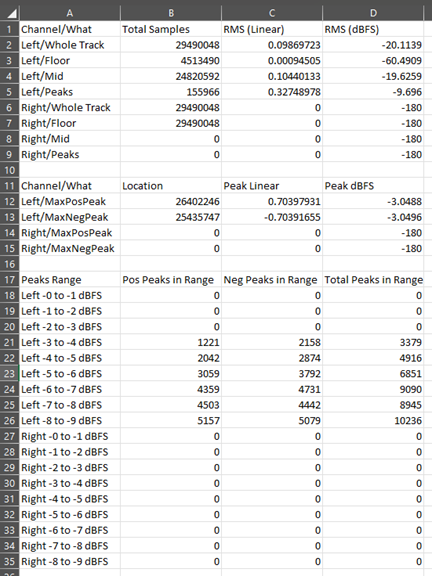
WaveParse is now complete with the addition of the final core-functions vst3 plug-in, called Wave Stats. Please see new main–level post.

Sample:

Thanks.

Mark Gardner

1 Like