You can add labels to help you find your way back to part of a recording … Audacity Manual
Zooming in and out on the horizontal time scale avoids the need for a lot of tedious scrolling … Audacity Manual
If you click on the button I have coloured green the entire recording fills the window [ same as maximum zoom out]
If you select part of the audio and click on the button I have coloured red, the selected portion will fill the window.
Hi Trebor,
I hope you have been well? I have been using your last couple of workflow protocols, and they have worked flawlessly. I had four sections that I needed to adjust the speed with the “Change Speed” filter, and all the others I was able to repair as well. However, I have a new challenge. I understand how to remove the hum at the start of the sample, but there is a lot of distortion and other hum on the back end. I’m not sure if the dehummer filter will help on the back end distortion, or if there is a better approach for resolving this issue? So hopefully you can assist in this issue? I really try to resolve these issues on my own, before I contact you for help. I realize that you are helping others, and I want to respect their time, as well as yours. So… with that said, take a listen and let me know what if anything I can do to fix this new issue.
As always, thanks again for all you assistance with this project.
Buffo
The first 1.3 seconds at the start , when the woman talking, is not severely affected by mains hum : only the first 10 harmonics of mains hum are conspicuous. So this occasion , where there are less than 20 hum harmonics , Steve’s Hum Remover plugin would produce better results than my dehummer plugin …
My dehummer plugin applies a notch filter to all the possible mains hum harmonic frequencies , typically that’s hundreds of notches , [ ( (44100Hz sample rate / 2) / 60Hz) = 367 notches ]. Each time a notch filter is applied it makes the recording sound a little like you’re listening to it via a tube. So making more notches than is necessary makes the recording sound more tube-y than is necessary.
If you see mains hum harmonics, (the parallel lines on the spectrogram at multiples of 60Hz), extend beyond 3000Hz then my dehummer may produce better hum reduction than Steve’s. If the hum-harmonics are below 1000Hz then Steve’s plugin will produce better, less tube-y, results than using my dehummer.
When the man says “Chrysler Plymouth Dodge” from 2 to 4 seconds, there is a buzzing noise which is not mains hum, ( it’s like the noise made by a valve* TV / Radio) . Even my paid-for non-Audacity software can’t reduce that buzz , sorry.
Hi Trebor,
Well I did use Steve’s Hum Remover and it did improve the audio, but I’m still hearing quite a bit of hiss in the recording? Now… I’m not sure if I understood the proper sequence of workflow adjustments in this instance? I have been using the following workflow protocols that you provided.
Normalize -1.0dB/dehummer mains Feq.1Hz Hum:15.0 Hz Anti-Reverb 20.0 Hz/ Notch Filter(Twice w/default Feq. 60Hz Q value 1.0 Hz, and then again Feq.5275.0 Hz & Q value 15.0 Hz/Noise Removal Reduction 3dB, Sensitivity 3.00dB, Feq. Smothing 500Hz, Attack/decay 0.50 secs.
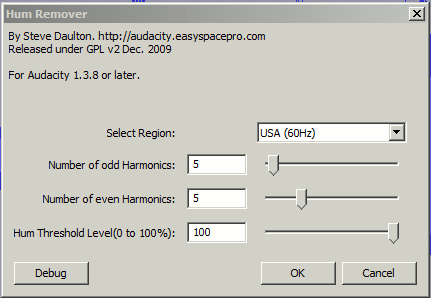
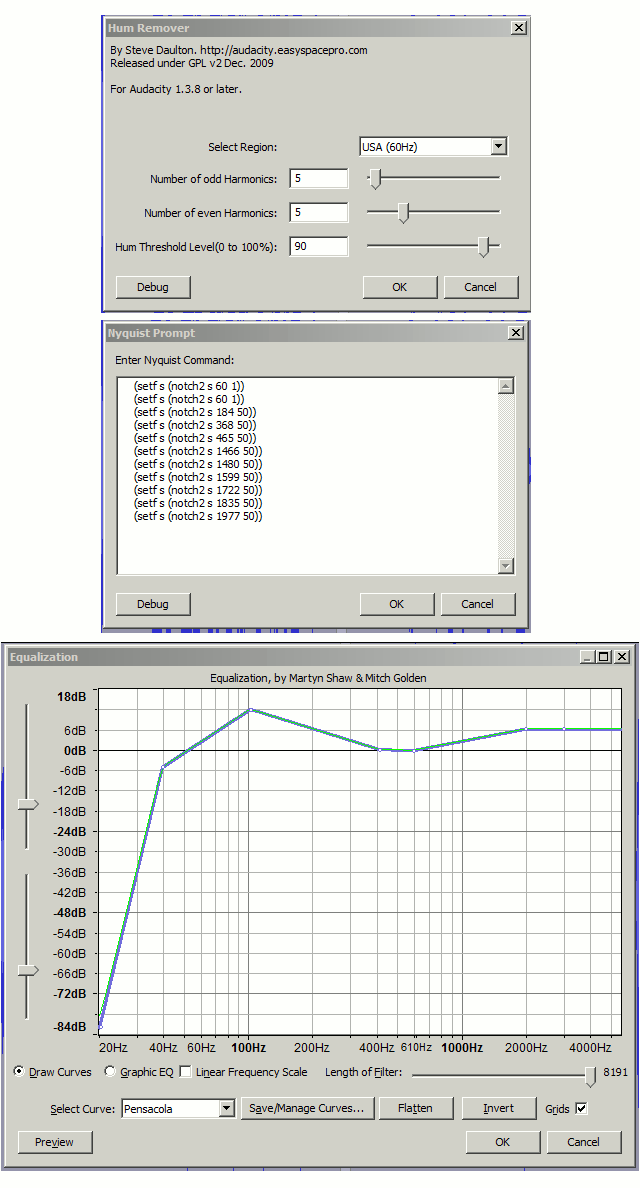
My assumption was to follow the same protocols, however I substituted your dehummer filter for Steve’s Hum Remover in its place, using the settings you suggested. Odd Harmonics 5, Even Harmonics 5, Hum Threshold Level 100%. Should I have only used Steve’s filter without Normalizing or using the Notch or Noise Removal filters? I have included a sample of the hiss I’m hearing for you to analyze. It may well be that this section of the recording is too damaged to hope for much else, but I wanted to review it before I moved on. As far as the end section with “buzzing noise which is not mains hum, ( it’s like the noise made by a valve* TV / Radio) . Even my paid-for non-Audacity software can’t reduce that buzz , sorry.” Like I said, “there is a lot of distortion and other hum on the back end. I’m not sure if the dehummer filter will help on the back end distortion, or if there is a better approach for resolving this issue? So hopefully you can assist in this issue?” So… I was skeptical that there was anything I could do to recover that portion of the recording. But thank you again for your all your help and opinions regarding this project. Without your assistance, I know I would not be have been able to achieve what I have so far.
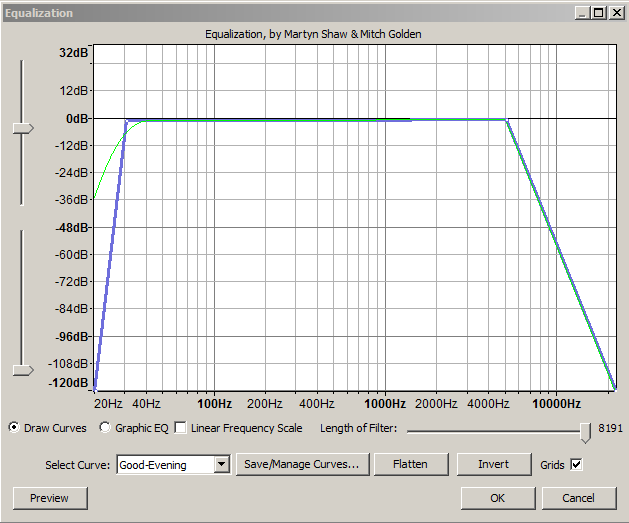
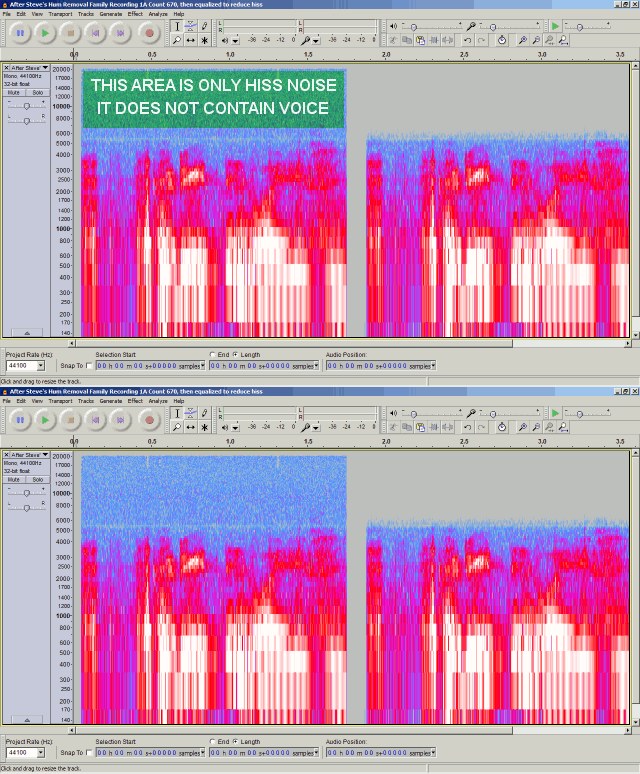
A side-effect of my dehummer is that it attenuates the higher frequencies , (where hiss lives), this is a beneficial side-effect in your case as your tape-recordings only have hiss above 6KHz, no signal (no voice content). Steve’s hum remover doesn’t have that side-effect. However you can cut the hiss after applying Steve’s hum remover by cutting back the higher frequencies with equalization like that shown below …
Audacity spectrogram showing only hiss noise, no voice, above 6KHz on your recording , which was removed with the equalization shown in my previous post
Trebor,
I’m almost finished with editing the first of four tracks much thanks to you. Hopefully the other three will go faster? I think they will… both due to your help and assistance and that I’m pretty sure there’re isn’t as much information recorded on those tracks? But I decided to go back and take a look at when I started editing the first track, and it begins with a recording of local DJ’s off the radio. My first edits attempts the audio is a little distorted by using too much noise reduction? However… somehow I was able to remove more of the radio hiss? So I pulled the master and re-edited that portion using the same protocols you gave me starting back on Fri Jan 10, 2014 1:46 pm posting. But with this section I first tried using your 50/60 Hz dehummer 2.0, but I felt that the result was minimal? So I used Steve Daulton’s hum remover instead, and the other settings you provided on Fri Jan 24, 2014 3:03 am post, and I also used the Good-Evening.xml Equalization file from your Sun Jan 26, 2014 7:26 am post as well. I think with this section it is about the best that I can hope for, but I do feel that I improved the audio over my first attempt. However… your analytical skills might help in cleaning it up more of the hum so that it’s cleaner like my first edit? But this may well be the best that I can hope for? This section may be similar to the situation where you said, “When the man says “Chrysler Plymouth Dodge” from 2 to 4 seconds, there is a buzzing noise which is not mains hum, ( it’s like the noise made by a valve* TV / Radio) . Even my paid-for non-Audacity software can’t reduce that buzz, sorry.” What I’m really looking for here is if I’m overlooking something or not? And your confirmation or suggestions regarding my edit.
Again, as always… Thank you for any and all of your assistance with this project.
Buffo
PS: I am attaching three file samples for your review.
Of the three “3rd.Master” sounds like the original, un-processed.
There’s two lots of mains hum on that , one with a fundamental frequency of 61.33Hz , due to the tape running slightly fast, and a second lot of mains hum with a fundamental of 60Hz , (maybe added by the tape player when the recording was captured by the computer).
My suggestions for processing that are shown below …
Steve’s hum remover , notch-filters via Nyquist Prompt to remove the non-standard hum-harmonics due to tape speed inaccuracy, then equalization to boost higher frequencies. IMO Don’t bother with noise reduction on “3rd.Master”, the noise on that occupies the whole sound spectrum, removing this noise just reduces the amplitude of all frequencies and adds processing artfacts, i.e. does more harm than good.
If the tape speed is wobbling rather than constant these notches will vary in their effectiveness.
    (setf s (notch2 s 60 1))
    (setf s (notch2 s 60 1))
    (setf s (notch2 s 184 50))
    (setf s (notch2 s 368 50))
    (setf s (notch2 s 465 50))
    (setf s (notch2 s 1466 50))
    (setf s (notch2 s 1480 50))
    (setf s (notch2 s 1599 50))
    (setf s (notch2 s 1722 50))
    (setf s (notch2 s 1835 50))
    (setf s (notch2 s 1977 50))
Pensacola.xml (440 Bytes)
“1st Edit” , sounds like too much noise-reduction has been applied.
Sometimes people mistakenly use the entire track as a noise-profile, rather than just selecting a “silent” section where no-one is speaking/performing. Using the entire track as a noise-profile will remove too much from the recording : it will sound similar to the “1stEdit” you posted.
Removing all hiss and hum at the expense of comprehensibility is counter-productive.
Sorry to ressurect this but I can’t private message anyone .
I’m curious why Trebor never added his dehummer to the list of plug-ins? It working great for some music video I’m trying to clean up (bad ground between the camera and mixing board) but I’m wondering is there is something better, either free or not too expensive? Thanks!
Sorry about that. Unfortunately we had to disable PMs for newly registered users because a few individuals thought it was fun to send spam and viruses via PMs.
Thanks for your comments.
Part of the hold up for moving plug-ins to our list is simply lack of time. We are all volunteers and there is always much to do.
The other reason is that we like to get feedback from users so that bugs can be fixed and improvements made before they go fully public. Sadly not many users provide feedback, so thanks again for your comments.
Actually the only reference to either Trebor’s or your dehummers was in these forums, and I think they both date back to 2009? If either of yous guys are interested in “finishing” your dehummers maybe a new topic over in the Nyquist forum? I’d be happy to supply a sample of the nasty buzz I am dealing with. Trebor’s filter worked great on it (better than the denoiser) but it does have artifacts - I didn’t mess with the “controls” at all. I suspect something that varied the notch depths vs music signal volume would be better at killing it in the quiet parts but not being so artifacty? In any case thanks to you both for these tools .
Correcting the speed of the tape would be beneficial for the pitch of the music thereupon.
If the speed is corrected first then fine adjustment to the hum fundamental frequency isn’t required.
[ Unfortunately the tape speed is probably wobbling rather than constantly fast or slow, which requires something like “capstan” to correct it ]
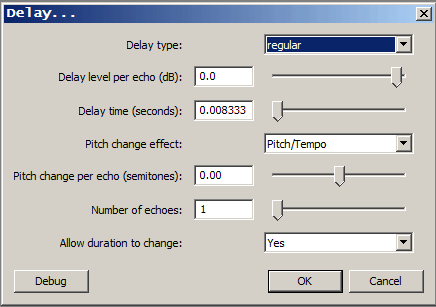
Hmm… The artifacts from Trebor’s Dehummer sounded just like the comb filtering from a short delay to me so I tried this:
Sounds the same to me (or maybe even a bit less buzz?) and MUCH faster, what do yous guys think?
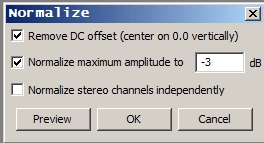
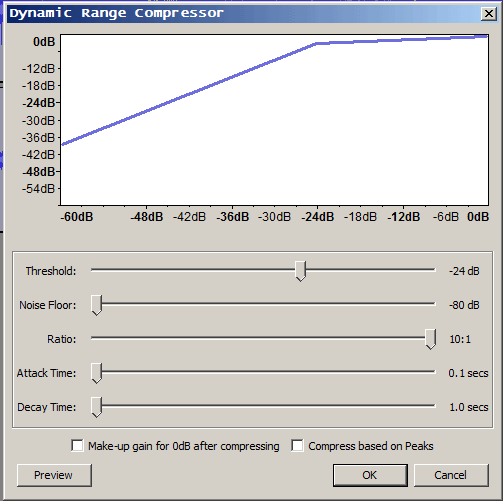
Ooo… even better take the original track after normalizing to -3dB (mono in my case), duplicate it and shift it over 8.3333 ms (400 samples at 48K), then compress the delayed track like this:
MUCH reduced artifacts .
Note: the 8.3333 ms is 1/120 seconds so that the 60 Hz cancels out as do all the odd harmonics. As Steve found, it appears in my case also that you don’t have to worry about the even harmonics.
Now somebody just has to get ambitious enough to make this a plug-in .
^ Actually I ended up using a 4:1 ratio instead. I’m pretty darn happy , this is a three set concert from 11/3/2012 that was unusable before . I could probably crank the threshold down lower but the little bit of “doubling” left sounds kinda good - IMO the original mix was a bit “dry” anyways.
When developing a plug-in, one has to consider both the common / typical case, and the less usual cases.
Often, to work as well with unusual cases and to still work optimally with common cases will require additional features and additional settings.
There also has to be a balance between, on the one hand, making the plug-in simple and convenient for the majority of users, and on the other hand making it flexible enough for less common cases.
Audacity provides limited options for Nyquist plug-ins. For example, you can’t have an “advanced settings tab” so as to hide “extra” settings from the majority of users that do not need those additional options. All that the Nyquist plug-in developer has to work with is a single column of simple controls (slider, text or multi-choice).
In order to handle the most unusual cases is likely to make the plug-in interface so complex that it becomes virtually unusable for the majority of users.
To strike a suitable compromise, the plug-in needs to be as flexible as possible while not being overly complex for the majority of users. Inevitably this means that unless a plug-in is designed to handle one specific use case, jobs that are highly unusual will often require either multiple steps with multiple effects, or Nyquist code that is specially crafted for that one case.
The audio sample posted in this topic is highly unusual in that the “mains hum” is not a steady frequency. The frequency of the hum and its harmonics “wobble”. The ideal way to restore this audio sample would be to use an effect that is able to analyse and track the frequency of the hum, dynamically adjusting the centre frequency of each notch filter. This would be extremely complex to code. At commercial rates, the cost of developing such a plug-in is likely to run to thousand of dollars, but for the vast majority of use cases it would offer no benefit over the existing plug-ins.
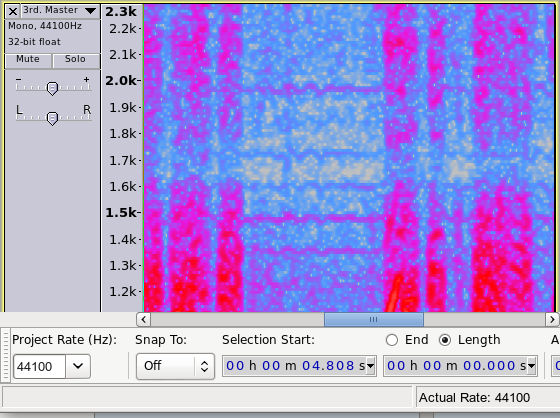
Here we can clearly see the upper harmonics “wobbling”.
For this specific audio sample, I would suggest using one of the current hum filters to remove the worst of the low frequency hum and then use the Noise Removal effect (which will help to reduce the upper hum harmonics as well as reducing other noise).
Alternatively, use the “delay and compression” method described in the last post if that gives better results.

 .
. .
.
 .
.