The steps are described in the following multi-part post.
- Equalization to remove 100 Hz rumble
This removes low rumble, however I also found solved most of the popping “p” sounds. A pop filter on my mike would have helped with this up-front as the best solution, but I did now have that, and this equalization with Audacity solved the problem nicely.
Used the regular Equalization effect, with the 100 Hz rumble preset:
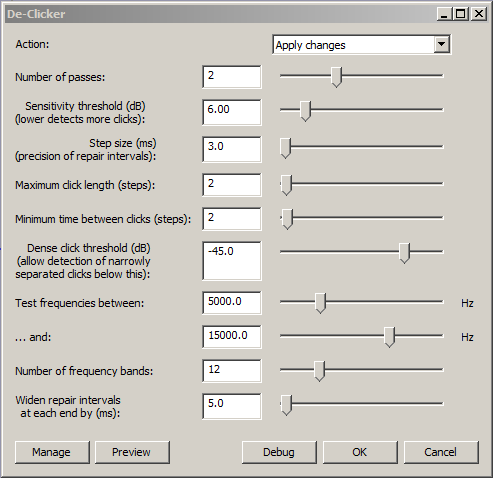
2. De-Click to remove clicks

This effect removed almost all of those little mouth clicks that so often show up in audio. You can get the plugin here.
The settings:
3. Increased the tempo
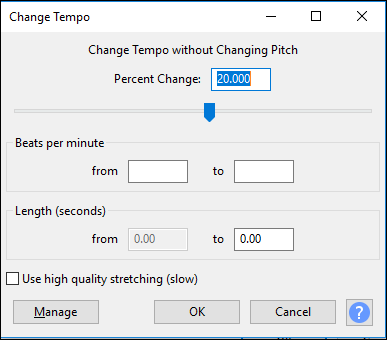
I had read the script way too slow. That might be ok in a classroom or on a stage where you make eye contact and use your body to add emphasis, but was boring in a recording. I sped mine up about 20%. That is a lot. Make your own judgements listening to your audio, ending up with fast enough to keep attention, not so fast it is an oppressive fire hose. You will find a range of advice on this. My take-away is that for in person speaking, the more charismatic you are and important your subject, slower is better. For audio with no or few visuals, faster is better. My sped up audio ended up being about 140 words a minute.
I found the “High quality” checkbox on the Change Tempo took much longer, and more importantly significantly distorted my voice - this option is apparently more useful for certain types of musical sounds.
4. Decreased the pitch
My voice was higher pitched than I wanted. I wanted it to be deeper, “warmer”, and found using the Change Pitch effect and decreasing the pitch by -5% was about right for me. Btw, it changes this number by itself to something close, in my case to -5.011, and that is fine - close enough.

(Multi-part posting continued in next post.)