My 2p is that the function menu isn’t overloaded with choices, so we could have “RIAA-cancelled curve (33)” and “RIAA-cancelled curve (45)” if it is possible to calculate the latter. Shortness of wording would help (“EQ Curve & RIAA Cancelling” has the “ng” cut off on Win 7, and it’s probably worse on Linux).
I’m +1 on saving time by having the two EQs rolled into one if it’s valid to do that. For some, this may be a many times repeated processes.
It may not be worth a lot of effort given the path is not persistent after restart. If the file path includes the file name, it could be awkward to scroll through if people use a longer path like “C:/Program Files/Audacity 1.3 Beta (Unicode)”. I think making the file name the same as the curve name is the most important. In that case, call the control “Curve File Name” and maybe “Valid File Output Folder” would be a bit more friendly.
What OS does it do that on? On Windows the popup after processing says it has written to whatever path was specified, and if that path does not exist, the file is actually written to the working directory. If left as is, I think that needs to be in the help, but +1 if you can throw an understandable error.
If you have a selected track present, fortunately another track isn’t created, but it looks if Audacity creates the empty track otherwise. Looks unlikely we should fiddle with that.
Analyze plug-ins would require a track to be selected to activate the menu item.
So my comments are now on lines 170-185, most of which are commented out. Line 174 is still in and I don’t see why (but don’t currently have time to investigate).
I think that we should keep this one simple and not have that, although I appreciate why it is there. I’d like to see a simple plug-in here that can generate EQ curves from parameters, and no more.
Yes.
There is a limit on what we can say in help text, perhaps a link to a good web site would be relevant?
I’m afraid that I have no idea how to do any of this in Nyquist.
I can see both sides of it; the time saving is attractive, the extra complexity (and possibility of user selecting the wrong curve if there were two RIAA cancelling curves) less so.
That said, people recording 78s at 45 rpm really need to do that Inverse RIAA (before they change the speed back). If we only generate the curve without cancelling, I think we should still allude to cancelling in the Help for the plug-in (possibly pointing to the workflow in the Manual to keep the text down).
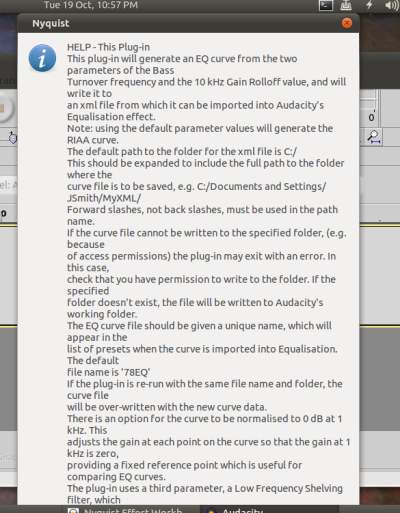
Here is the latest version of the 78EQCurveGen plug-in which takes into account (I hope) all the comments in the foregoing discussion.
Specifically:
All the superfluous code has been removed.
The RIAA-cancelling feature has been removed, though I have made reference in the help text to the need for RIAA cancellation, and pointed users to the manual.
The xml file name is now the same as the curve name.
Frequency points at 25 kHz and 48 kHz have been added.
The help text has been changed as appropriate, and tidied up a bit, though I haven’t checked it at low screen resolutions.
I haven’t yet managed to get an error trap to work, for the case where the plug-in exits with “Nyquist returned a value of 50.00000”
I haven’t tested the circumstances of the error comprehensively, but I have seen it on both XP and Vista.
It appears that the error occurs if I specify a directory which has restricted access permissions, such as C:/, because Nyquist can’t open the output stream.
I’ll keep working on the error trap, but in the meantine, I have put a note in the help text.
(open …) returns NIL if file open was not successful.
(setq err "") ; initialise error message

;; text to print to file
(setq textout "This is a NEW test filenwith two lines.n")

(if
  (setq fp (open filename :direction :output)) ; returns NIL if unsuccessful
  (progn
    (format fp textout)
    (close fp))
  (setq err (strcat err (format nil "~a cannot be opened.n" (strcat (setdir ".")"/"filename)))))
This appears to work in all cases that I’ve tested, but if there are situations that this fails, the file could be read back in and tested against what should have been written:
(setdir "/home/steve/Desktop/") ; I'm on Linux :)
(setq filename "test.txt") ; file name
(setq err "") ; error message

;; text to print to file - MUST have n at end
(setq textout "This is a NEW test filenwith two lines.n")

(if
  (setq fp (open filename :direction :output)) ; returns NIL if unsuccessful
  (progn
    (format fp textout)
    (close fp))
  (setq err (strcat err (format nil "~a cannot be opened.n" (strcat (setdir ".")"/"filename)))))

;; test if file can be read
(if (= (length err) 0) ; only do this if no errors so far
  (progn
    (setq fp (open filename :direction :input))

    (setq textin
      (do ((nextline (read-line fp)(setq nextline (read-line fp)))(readtest ""))
        ((not nextline) readtest)
        (setq readtest (strcat readtest nextline "n"))))
    (close fp)

    (setq err
      (if (equal textin textout)
        err
        (strcat err (format nil "~a cannot be written to.n" (strcat (setdir ".")"/"filename)))))
)) ; end of test

(if (= (length err) 0)(print "success")(print err))
That’s correct - “Generate” plug-ins are the only type that do not require a selection, but if there is no selection they will produce a track if there is a text or audio output.
The only way to suppress creating a track would be to not have any text output.
Perhaps it should go on the Nyquist Wish List that Generate type plug-ins do not create a track if there is no audio returned. What do you think?
Is that possible given the empty track is created before applying the plug-in? Or is Audacity detecting what output the plug-in has before it’s applied? In that case, yes +1 on no track creation if no audio output. Otherwise, the plug-in would have to be able to remove the created track.
I’m on 800x600 on Linux; I don’t think there we are claiming to support lower resolutions. Two solutions would work on both our systems a) carriage return after 50 characters b) put each paragraph on one long line and let the OS wrap the text.
a) might sometimes look better if there is no objection to white space at the right. On my machine, b) creates lines 1, 2 and 4 with a not too excessive space to right, but line 2 goes to the border so really it doesn’t look good. On another font, the result might be different again. On your system, a) would give you more white space to right; for people at < 800 x 600, a) would give an arbitrary result. I suppose although I don’t like always like how b) turns out on my machine I would suggest b) is probably what we should do. Anyone else?
I suspect that when there is no “return”, Audacity sees that as an error, then outputs the error message “Nyquist did not return audio.” and “cancels” or “Undoes” the track creation. Audacity obviously “knows” what sort of output it is, but how easy/difficult it is to “cancel” the track creation for text output, I don’t know. I would have thouht it would be possible.
Here’s a plug-in that demonstrates what happens in each case: generate.ny (327 Bytes)
I’m getting auto-wrap at about 71 characters for long text, and at about 50 characters on short messages. Both look fine.
A new paragraph, with one clear line between adjacent paragraphs is produced by two “new lines”. A “new line” can be either “n” or “~%” or a typed new line (line break). Is that the same on Windows and Mac?
I don’t particularly like the look of b) on my machine (1440 X 900). It produces very long lines (approx. 260 characters) which I think are less easy to read than shorter ones, but it still looks better than Steve’s screenshot.
If we used a newline every 50 characters, how many lines could we fit on an 800 X 600 screen?
(I’m reluctant to change my screen resolution to test it, because it takes me ages to get all my desktop icons back where I want them afterward!)
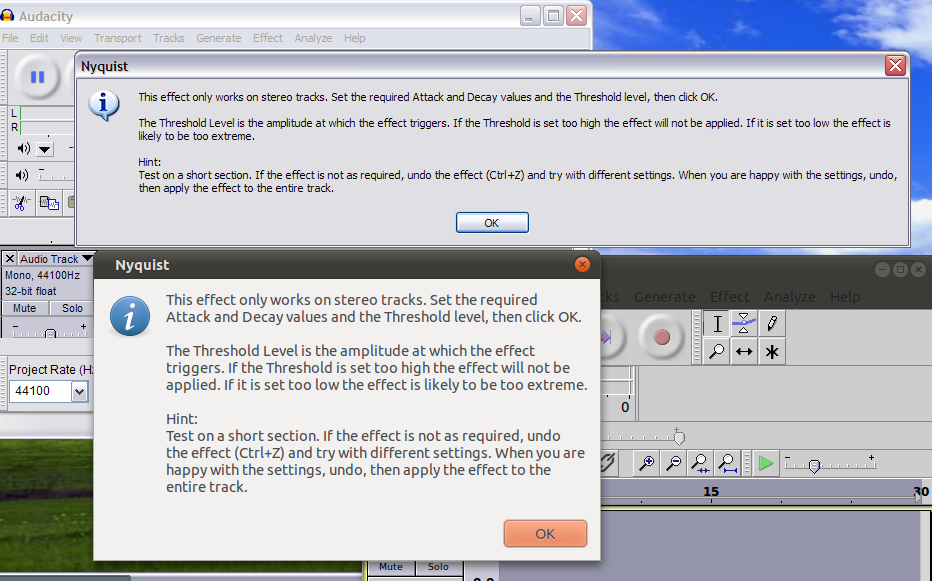
This is without forced formatting on Linux (Ubuntu) and Windows XP
The screen size for XP is 1360 x 638 (on virtual machine)
The screen size for Ubuntu is 1366 x 768
This is the text if you want to do a like-for-like comparison:
"This effect only works on stereo tracks. Set the required Attack and Decay values and the Threshold level, then click OK.
The Threshold Level is the amplitude at which the effect triggers. If the Threshold is set too high the effect will not be applied. If it is set too low the effect is likely to be too extreme.
Hint:
Test on a short section. If the effect is not as required, undo the effect (Ctrl+Z) and try with different settings. When you are happy with the settings, undo, then apply the effect to the entire track."
Here is version 2.2 of the EQ Curve Generator, with two changes:
The Help text doesn’t have forced formatting.
I have included error-checking to trap the cases where:
a) There isn’t write permission for the destination folder.
(This is basically the same as Steve’s first code block above)
or
b) The user-specified path doesn’t exist (non-existent folder or user mis-typing)
I’ve taken a different approach to Steve in this case, which is:
Set the working directory to the user-specified directory.
Get the actual working directory from Nyquist.
Compare the user-specified path and Nyquist’s path and if they are different generate an error.
The only reason they should be different is if Nyquist couldn’t set the working directory as specified, and left it as the default directory (or whatever directory was used the last time the plug-in was run successfully during this instance of Audacity).
Comparing the two strings is a bit tricky because the user-specified path uses forward slashes, while the value returned from Nyquist uses escaped backslashes (). This requires disassembling the string and re-assembling it with forward slashes to do the comparison, but it seems to work in every case I can throw at it on Windows.
It needs testing on Mac and Linux, however.
That’s a very neat approach, but the code appears to be taking a long route to achieve it.
Wouldn’t it be simpler to just strip off any leading/trailing spaces and then compare the entered string with the return from (setdir “.”)?
Users may add a “/” at the end of the path, which is acceptable for (setdir) but I see that needs to be taken into account when testing, so we can also strip trailing “/”
To do this:
Something I’ve started doing with development versions (as suggested by Gale) is to add the date to the file name - this helps everyone know which version is being referred to, and if they are testing the correct version. When the plug-in is finalised the date can be removed.
I think this would be good practice for all of us.
Yes that’ll be it - to use (subst) the string would need to be converted to a list, then converted back again.
I’ll have a think and see if I can come up with a neater method.
I agree.
I had been keeping track of versions by having the version number in the menu and the dialog box, but dating the filename will certainly help.