Single Word Too Loud or High Pitched, Sounds Wrong

There’s a way around that, too. Most breathing noise goes straight in front of your lips. So don’t put the microphone there. Put it to one side. Position B.

Nope. We used to point you to the Audacity non-profit org which did, but the last time Audacity moved, it was to be absorbed into a Russian corporation with business offices in conflicted, worn-torn Cypress.

So, I think we’re good, thanks.

Koz

It is to the side but probably between position A and position B. I’ll swing it it more towards B.

Per your above point about the Zoom H1n audio recorders, I’m using my computer as that’s what I have. BUT the whole point about Zoom calls and such goofing with the settings is hugely helpful. I think that’s what happened a bit ago and I didn’t even know it happened. So thank you again. I am now documenting my settings and process, putting tape and dots to show where dials go.

Sooo…my new Maono dynamic mic literally just showed up. It’s here so I’m going to try it out. Maybe it will give me more flexibility. Worth trying since it’s here and now I know how to test it. Pop filter that goes with it not coming until Sunday. The pop filter I have that I’m using with the Maono condenser mic won’t work with the dynamic mic.

https://www.amazon.com/MAONO-Microphone-Headphone-Broadcast-PD400X/dp/B0BBVY9L7C

Thank you,
Theresa

OK but maybe if we became “friends” I could send you a gift friends give to other friends. I really do want to express thanks. Kindness is underrated and gratefulness is too.

Theresa

Hi There,

I think the 36Audiobook-Mastering-Macro is probably as simple as it can get, at least for me. My audiobook must pass the 3 ACX checks at a minumum, and Koz explained that macro will guarantee the audio passes the first 2 tests. The noise floor may need more work and he explained how to use the Noise Reduction 6, 6, 6 to accomplish this. I can use the Noise Reduction 6, 6, 6 even after passing the noise floor requirement, to drive the floor even more quiet.

What do you think?
Theresa

Your new Dynamic! microphone receives sound from the rounded end, not the side. It’s called Dynamic because it’s a robust, hard to break microphone that’s almost impossible to overload.

You can, however, overload a microphone preamplifier, sound mixer, or sound recorder. These are expecting tiny, delicate sound signals from the microphone, not a flame thrower.

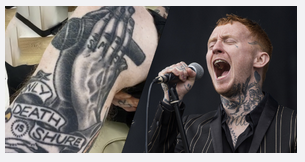
This is the type of microphone rock bands scream into (read the tattoo).

That’s from a Shure Brothers ad.

Its only shortcoming is slightly lower volume than other microphone types in normal operation. You may not have that problem because this microphone has electronics built-in.

To get a dynamic microphone to work, your voice has to shove around a disk of metal and a coil of wire next to a magnet. It does tend to ignore very delicate nuances of vocal presentation. Very few of these in recording studios except drums (see: hard to break).

Your other microphone is a condenser type. If you look into the front, you see a round disk? That’s a very delicate foil disk vibrating to your voice next to another foil disk with a special electronic package sensing the distance between them. This microphone is very sensitive to all vocal works and tones, but you can destroy one by blowing into it.

Koz

Dedicate your audiobook to all the terrific help you got on the Audacity forum.

Koz

I will do that!

This matches what I experienced with the dynamic mic but I wanted to try it out. I watched videos describing the difference between dynamic and condenser. The dynamic did not work as well for me as the condenser and I don’t like the sound as much. It sounds more… tinny? Less… sophisticated? I can’t describe it. I didn’t like it as much.

Plus, as you said, to get the dynamic to pick up even moderate volume of my voice, I had to crank up the P22 Lite pre-amp to even higher gain, than required by the condenser mic. I did the AAAAHHH test with the dynamic and as you said, I could barely get the dynamic to clip unless the P22 was at about 100%. Even then, the waveform was small. But it did do better with noise floor, of course. I’m not singing loudly, I’m just talking in a normal volume voice, telling a story with friends, drinking tea, as you said. And my environment is quiet. The dynamic is going back tomorrow but now I know.

But what I did learn is I could stand to have a better pop filter for my condenser mic. The dynamic came with a windscreen. The pop filter that that came with my condenser mic is metal and small, probably OK but I think one of the bigger ones would help. That is coming on Sunday. My condenser mic is at a 45 degree angle from my mouth (like in your picture) but I figured a bigger pop filter might help reduce my plosives and editing time.

Maybe then… I’ll be ready to record for keeps.

Theresa

Probably not. If you’re recording on the computer and using it for other applications, each application is going to do “updates,” “upgrades,” and “changes” to keep customers coming back. Each of those updates can change the computer enough to affect your performance.

So past not recording on the computer at all, if you do start that way, Do Not update anything until you finish. Yes, I know Windows tries to do Critical, Super Important, Security Updates in the background, but I understand there are ways of pausing that process.

Pop Filter

Classic pop filters fit over the microphone head or go between you and the microphone and prevent large rushes of air. This is p-popping, b-popping, and breathing. It’s not supposed to affect the clear, crisp, professional quality of your voice. It doesn’t affect mouth noises; that’s the bad news. Tongue ticks and lip smacks are going to go straight through. Jury’s out on glottal stops. That’s your throat making noises.

Mouth noises are almost as much fun as room noise. I don’t know of a mechanical way to suppress them. Nothing you can do to the microphone other than throw an actual sock over it and muffle the sound.

You have to not make noises in the first place, get good at slicing them out of your performance in editing, hire an announcer who doesn’t tick or smack, or get a computer to announce it for you (which ACX hates).

There was a recent poster who said he hired out as a super-duper, broadcast, recording, professional announcer. He wasn’t any of those things, and he wanted us to fix up his voice for him.

Not far.

Koz

This audio software package is associated with a specific date.

20100401
I’m pleased to announce the first public “beta” release of the Professional Audio Filter (PAF).

Some of the controls and installers are a little rough yet, and on occasion it’s been known to crash in a shower of brightly colored confetti, but I think it’s worth getting it out there for wider testing.

The object of the filter is to convert whomever you shot in the field and in whatever bad conditions to a quiet, polished, professional-sounding voice track.

Intensity and phase adjustments are provided to suppress “white” or microphone self-noise, proximity effect, competing voices, street noise, engine roar, large and small auditorium echoes, air conditioning compressors, vent whistle, and within reason, clipping, crosstalk, cracking, and overload distortion.

Whimsey is alive and well in Los Angeles. We are preparing an announcer module with pitch, sibilance, and depth controls that we’re calling, for obvious reasons, ‘LaFontaine.’ “In a World…”

I’ve been working with the programmers here in LA and friends at other audio web sites and forums to pull together a lot of different efforts. I aim to be “Welch.”

If you remember in LZW Compression, Lempel and Ziv were the world-class data compression Subject Matter Experts with no organizational or people skills. Welch was the one who got them both into a room and said nobody was leaving until they generated an integrated product. And he had a gun. Nothing like adding Smith and Wesson to the team to polish those people skills.

We’ve included installers for all the major audio software packages: SoundTrack Pro, Audition, Audacity, ProTools, AVS, etc. We even got one to work in the older, revered Cool Edit.

It’s open source on all three platforms.

Enjoy

http://www.kozco.com/PAF/

Not necessarily …
before-after

Even expen$ive recording booths benefit from dynamic EQ.

The sonible pure-EQ plugin analyzes your spectrum and automatically makes dynamic corrections, (you can adjust the strength of the correction).