I’ve just noticed Blue Yeti-X comes with real-time effects software:
compressor, expander, DeEsser, limiter, Noise-Reduction …

https://www.bluedesigns.com/products/yeti-x/
Nice.
I’ve just noticed Blue Yeti-X comes with real-time effects software:
compressor, expander, DeEsser, limiter, Noise-Reduction …
https://www.bluedesigns.com/products/yeti-x/
Nice.
I got Gain-4 to easily pass ACX. Noise at almost -67db. The limit is -60dB, good is -65dB.
I applied the mastering tools just like this.

Two items you might try.
Read at an oblique rather than straight on. You can get closer and louder without P-Popping and other noises. You may not need the nylon pop filter.

If you think there’s any chance noise is coming up from the floor or desk, slide a book and towel under there.
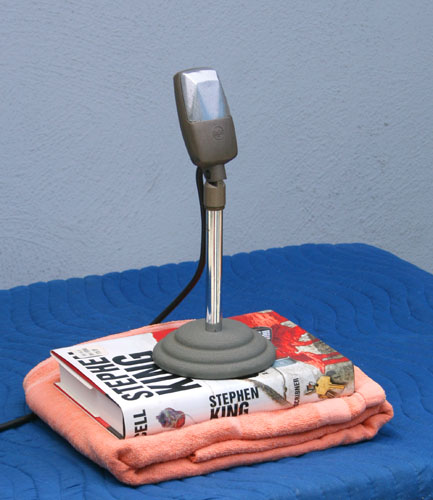
Koz
Hi all,
My issue is really with the RMS Normalization in post.
I set it to -20 db and then when it applies the effect, I get distortion where there was no distortion in the original. After applying the limiter, it just gets everything at ACX-acceptable levels, but the distortion is baked in.
The RAW clip doesn’t have clipping, although it does look like it peaks at -2.6 at the loudest part, which is a little higher than I’d like, but still it’s not 0.0.
The POST clip passes the ACX check, but the distortion is now there after running EQ, RMS Normalization and Limiter. I hate listening to it that way, and I assume ACX would never let it pass because of that.
I had been aiming to get peaks between -6 and -3 for my raw recording levels, but maybe I need to aim lower like -12 and -6? But will RMS Normalization always make the peaks distort no matter what? What checks can I run during my set-up, so I can make sure my raw audio doesn’t need so much amplifying that it results in distorted sound?
Thanks for your advice on this.
Trebor, I haven’t tried out the Blue Yeti real-time software yet. I did try, but it wouldn’t recognize my mic for some reason. And I was more interested in learning how to use a DAW. I think the real-time stuff is particularly for gamers. My experience with using Voicemeeter for some of that real-time features while recording on Audacity was that it mostly just added a lot of terrible hissing and humming. I wouldn’t be surprised if the Yeti software did the same thing, at least on my computer with my lack of interest in figuring out how to make it work.
Koz, the mic placement idea is a good one. I think the side placement is more or less how I have it now. But I might just play around some more with that.
The limiter should be on “Soft Limit”, not “Hard Limit”, (nor any of the other options).
increasing the “Hold” to the maximum (50ms) is also worth a try.
Hi Trebor,
The limiter settings helped some, so thanks for that. What made the biggest difference was using Compressor before RMS Normalization. Not sure if the audio is as pure now, but it definitely helps keep the peaks from distorting. Thanks for your help.
Raw Gratitude.WAV doesn’t have any silence in it for Audacity to measure.
“ANYTHING (tick-gasp) PRACTICE…”
The other between-word or tiny silent stretches aren’t really silent, either.
~~
You have to be doing something wrong. I mastered RAW and got a very different presentation than you did. I don’t have that gritty, sandy sound.
The damage is even visible in the blue waves between yours and mine.
And it passes ACX although as I posted, you can do a lot better if you have 3/4 second of hold-your-breath-and-don’t-move in the file somewhere.
I’m with Trebor. I think you used the wrong TYPE: in the limiter panel . It has to be Soft Limit. The others will create harsh sound damage.
Compressor. I’m not a fan of using additional tools, filters and effects you may not actually need. The mastering suite was designed to be free-standing and create a passing chapter with no or very little difference in sound quality from the original reading.
If it doesn’t do that, then there’s something wrong. All that and if you’re planning on being a business (“Your call is completely irrelevant to us”) then the object is to create a desirable product with as few ingredients and efforts as possible.
It’s the American Way.
Post “Gratitude” raw again only this time make sure you have an actual performance silence in there somewhere (Generate > Silence doesn’t count. It has to be you.) If you stick to a mono show (one blue wave) you can post WAV files out to 20 seconds.
Koz
Things in the ACX check world are going much better. I would send a sample, but someone is doing construction in the apt above, so for obvious reasons, it wouldn’t be a good example.
Could you tell me what I am doing wrong that Generate Silence won’t work? I can do all sorts of other editing and effects, but for some reason, generate silence command results in freezing the audacity screen. I have to push esc to be able to get back to the working order of things.
Thanks!
Generate Silence won’t work?
It works in the sense that your beginning and ending segments are surgically perfect silence, but that’s not the goal. It’s supposed to be background sound or Room Tone. Freeze and hold your breath room sound.
You will be rejected for “too much processing.” Dead silence followed by hissy words.
It’s not the worst idea to make that room tone as a stand-alone performance and cut and paste that where needed. That, of course, assuming it passes and doesn’t change over the course of the book.
generate silence command results in freezing the audacity screen.
That’s not good news. You need an unconditionally stable machine to do this work. Does it still do that after you clean shutdown the machine? Shift+Shutdown > OK > Wait > Start. Don’t let any other Apps start when it wakes up.
Koz
If you’re going to paste-in room-tone “silence” over problem areas there’s an app for that,
see … Punch Copy/Paste
If you are going to do that, do it before applying compression, otherwise listeners may be able to spot the joins, as compression will vary the noise-floor from a constant level.
Hi Koz,
Shutting it down did the trick. I’m working on a different project (not audiobook-related), and wanted to try out the silence feature between spots. Thanks for the help.
Hi everybody!
I was wondering if Audacity has some way to flag or tag or mark a waveform. I find the labeling feature doesn’t do what I am looking for exactly because it is a time marker, and doesn’t differentiate between particular tracks or label a clip that I may want to move elsewhere but keep the label.
What I am looking for is a way to drop a marker on my waveform as I am listening, so I can remember to come back to that point for editing purposes–the equivalent of one of those pointy post-it notes or a yellow highlighter marking I might use if I were marking up a paper document.
Many thanks!
Erica
You can have multiple label tracks - one under each audio track if you want.
You can cut and paste an audio clip and it’s labels - just ensure that the selection includes both the audio track and the label track when cutting and pasting.
A little “trick” that can be handy for temporarily marking a specific point in a track, is to split the track at that point. If you have the “Full” set of shortcuts enabled, then that’s “Ctrl + i” to split. Click on the split line to remove the split.
Hello,
A question about Macros. I was wanting to create a short-cut for deamplifying little selected sections of audio by -3dB and then create a key short-cut for it. After playing around a while with creating the macro for this, I still haven’t figured out which Select option means “highlighting a little section with your cursor”.
Thanks for your help!
Wouldn’t it be better to select the required region manually with your mouse?
Hi Steve,
Yes, I guess that’s what I intended to do. Does a Macro automatically run on what is highlighted? See, I’ve only learned about macros for a mastering chain, and I knew I didn’t want my amplification thing to affect the whole file. Sorry for these silly questions, but I am really new. Thanks!
Macros can run in either of two ways:
Running the Macro in the current Project.
Effects in the Macro are applied to the current selection, unless you have commands in the Macro to change the selection.
Running the Macro on selected files (batch processing).
Effects in the Macro are applied to the entire file, unless you have commands in the Macro to make a selection.
The final command in the Macro should be one of the “Export” commands.
Hi,
I got my macro to work! I didn’t realize I didn’t need to have Start instructions. Sooo much to learn!
Now I have a 2 second playback delay issue–I have since the beginning but just learned to deal with it like having a sore tooth and chewing on the other side. I changed by Punch and Roll pre-roll to 7 sec to compensate. But it’s very annoying to deal with it every day.
I looked up how to fix it, but only found a 2009 Forum entry and the suggestion to do something with Audio I/O doesn’t seem to exist anymore at least under preferences. Can you help me figure out how to deal with this?
Thanks!
An odd question:
I do my editing on a 15" oblong monitor connected to my laptop, and when the drop-down menu for Effects appears, I am unable to view/access any items below Noise Gate because the little arrow falls beyond the parameters of my monitor, and as far as I can tell, there’s no way to scroll down the list unless you have access to the little arrow at the bottom. I’ve tried adjusting my screen resolution and the size of my window I’m working in, but the drop-down menu possesses remarkable constancy and won’t change size no matter what I do. My solution has been to drag my Audacity window over to my laptop screen and choose my low-lying Effects that way. But it’s not ideal. Do other people have issues with this? Is there a special trick for scrolling down that I am not aware of.
Thank you for your help, as always!!
Hi,
Try as I might, I could not recording “feeling lazy” without wet mouth noise. Ls will be the end of me!!!
This audio clip is raw data with no effects or edits. Before I sent it do you I tried doing one pass with the de-clicker at default pre-sets but it didn’t do much. I wasn’t sure what all the categories meant, so I didn’t even know where to start with trying to figure out it there was a way to salvage this clicky slurpy mess. And I can’t figure out from the wave form where it’s at. And then I asked myself, is this even in the de-clicker department. Or is there a different tool I could be futzing around with?
Your advice is much appreciated!
Sincerely,
Feeling Lazy
(but not really – feeling highly motivated…to become a Master of the Audacity Universe, so I just can know the stuff and not have to post questions all day long—many thanks as always!)