See screen shot, attached.
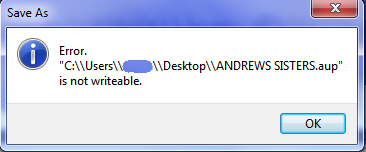
It looks like you are still using the old version of the plug-in.
I used the version provided yesterday.
(“Fri Jul 19, 2019 2:44 am I’ve updated the plug-in for Windows. saveas.ny”).
I just removed that and re-installed it five minutes ago. Same result.
Perhaps the link you provided was to the old version?
Removed and started over. Somehow two copies were inserted in different folders. I disabled one and that did the trick.

I will go back and delete the redundant file ((x86).
So, I finally got it working. However, it still shows double reverse slashes [\] but that doesn’t seem to be a problem.
Thanks for taking all the time to help me on this.
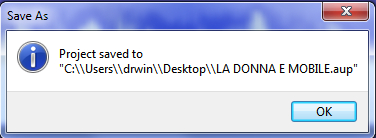
Super 
Unfortunately that is a quirk of Windows.
In the very early days of Microsoft, Bill had the (very bad) idea of using a backslash as the file separator character - apparently without considering the implications of the backslash also being the “escape character” in nearly every programming language. Software developers have been working around this problem ever since. The workaround in Nyquist (and most other languages) is to “escape” the special meaning, by doubling the backslash with another backslash.
Nyquist is optimised for working with audio, rather than text, so unfortunately, users are exposed to this ugly but effective workaround.
Unintended consequences…
Anyhow, the bottom line is that it works and I truly appreciate the time you took to answer my questions and get me set up.
Have a great weekend!