I did turn up the gain until the light started flashing green as I spoke, so that’s the setting I recorded on just now.
And that’s just at the quiet end of normal recording volume. The lights are there to get you quickly into the ballpark. Once you record well, the other tools and corrections should work normally. The goal is to get your voice clear and louder than everything else.
How are you listening? You’re suppose to roll the file forward and set comfortable listening volume on your voice, and then roll the file back and listen to the room tone without touching the volume controls. It’s a new user mistake to crank up the volume on the room tone. That’s not how noise is measured.
I didn’t hear any loud hissing—and I did look for it. I did hear low pitch noises such as coming from vents, air conditioners, heaters, and computer fans. Can you tell if the computer is on just by listening? External drives? Any other computer doo-dads?
The Mastering tools get rid of some of it, but there’s one really sloppy low pitch tone that I can’t fix. Fluorescent lights? Compact Fluorescent lamps?
Anyway, that’s a job for you when you get the rest of your studio set up.
I processed your clip and got it to pass and sound clean.
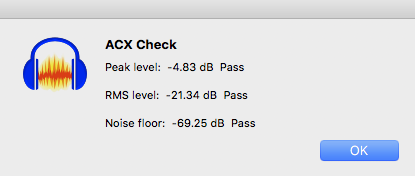
I needed stiff noise reduction to get that, 12, 6, 6. Higher settings than that and reduction will start to interfere with your voice.
So, it’s working. Use all those settings and add room sound proofing.
We published the Kitchen Table Studio. That’s a bunch of hardware store plastic pipes and two heavy furniture moving blankets.
Koz