We publish ACX Check , a plugin which works very much like the testing Robot at ACX. They both check all the “hardware” specifications of your performance sound file: Peak, RMS and Noise and lists them.
https://wiki.audacityteam.org/wiki/Nyquist_Analyze_Plug-ins#ACX_Check
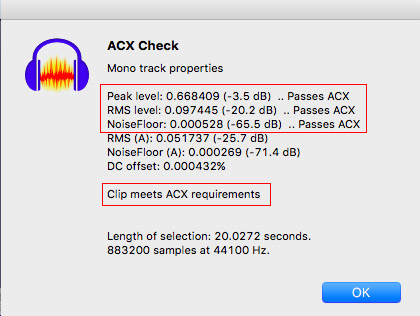
Note it only works well on an actual performance. You can get into trouble by trying to measure a non-sound file and you can freak out the noise measurement by not including at least 3/4 second of pure background sound.
This is how to create a simple sound test.
http://www.kozco.com/tech/audacity/TestClip/Record_A_Clip.html
You don’t have to send it to us. You can measure it right there on your computer.
It’s a very painful New User mistake to read a whole book and only then stop to check if it’s OK or not.
For further reading, this is a description of the three testing values.
https://forum.audacityteam.org/t/measure-between-23db-and-18db-rms/32770/16
Koz