I don’t see anything obvious wrong with the mixer. My mixer is an LPV-6, even though it will only manage four microphones and two really well.
I was all set to cloud up and rain all over everything about powering the mixer from the USB connection, but it doesn’t, does it? The mixer has its own wall power brick and the mixer will run perfectly with no computer. That’s a good thing.
if I send you something should it be a WAV file?
Yes. WAV is an acceptable attachment file type. Mono 20 seconds tops, Stereo 10.
That’s usually best because even though MP3 will allow you to post tons of music, it all comes with MP3 distortion. When we look at a post, we never know if we’re looking at the music or the MP3 distortion.
People one jump down the food chain from you—the ones using home-style USB microphones—can have USB data buzz and whine leaking into their microphones. Listen after I stop talking.
http://kozco.com/tech/audacity/clips/FryingMosquitoes3.wav
Sound familiar? That’s usually not a problem with higher end stuff like your mixer, but you’re getting that noise from somewhere and it sounds awfully suspicious. How new is your USB cable and how long is it? Three or four feet, or did you get one of those long ones that you can drape across the floor?
I’m not shocked that you can plug up the USB many times and have the noise come and go. Your USB connections may be just about shot. That’s not good news. That doesn’t matter much when you plug in a keyboard or mouse, but it can be a real problem with sound.
It’s possible to eliminate a lot of sound problems by not using the computer. Are you picking up on that?
The blue waves down the middle left and right are sound waveforms and tell you the vibration of the air around the microphone. That’s 12 in this manual page.
http://manual.audacityteam.org/o/
The sound meters just turn those waves into numbers and bouncing lights. The sound meters will show you stuff a lot quieter than the blue waves (unless you have custom settings). It may be hard to see the blue waves when you get the noise, but the bouncing light sound meters are still a quarter or a third up from the left. They have a long way to go before they bottom out.
I’m assuming you have Audacity 2.1.2. I forget what you said earlier. The older sound meters were tiny and a lot harder to use.
There should not be a huge difference between the mixer meters and Audacity meters. There usually is some, but it’s usually not anything to write the papers about. If you have a volume split like that, maybe Windows is trying to help you.
Go into Windows setups and make sure none of the “Mic-Boost” and Windows Enhanced Services is turned on.
I’m not a Windows elf, so you’re on your own there.
I also note your mixer has built-in effects controlled by that knob on the right. That should probably live in bypass until we resolve this. Also the blue Ho/Hi Equalizers should be middle/neutral. Red FX knobs should be all be off. Turn off or neutralize anything that’s not part of your show.
As a general, fuzzy rule, record live performances with tips and peaks around -6 on the bouncing sound meters and 50% on the blue waves.
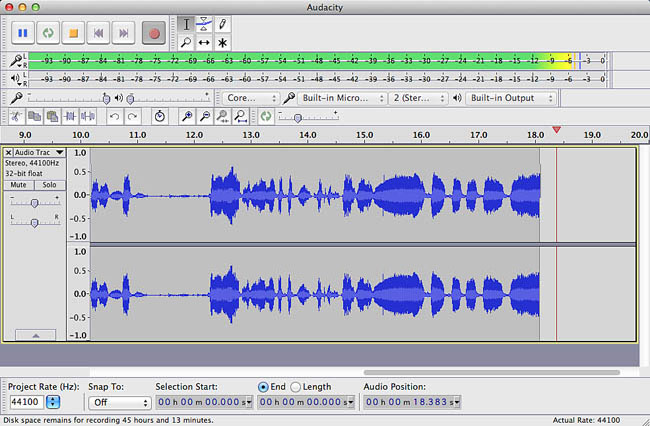
If you like to be expressive and nuts, that may not be enough. DO NOT max either one out. Record lower if you need to.
Overload distortion is obvious, serious, permanent and fatal.
I gotta go for a while.
Can you play the backing track to “Kansas City?” The jump/dance, hand-clap version, not the ballad. If we start shooting longer clips around, my email will handle clips up to 25MB.
Koz
