No. I just made a short sine tone, applied a couple of fades and then amplified it to a suitable level.
Since you asked, I’ve made one for you 
beep.ny (531 Bytes)
Hey, thanks! Simple examples like this will be a big help when I get serious about learning Nyquist. I would have thought what comes after ‘;’ is a comment, since the first character in the file is a ‘;’. Does Audacity read the initial comments in all the .ny files to build the menus? Oops, I’m getting off-topic. bad boy
 Feel free to start a new topic.
(this page will explain about the special “header” comments)
@steve+DickN: Roger had moved (and updated) the page to the Audacity Wiki: Nyquist Plug-ins Reference
Thanks for the reminder Edgar. I’ve now updated the Bookmark in my browser.
The PopMute posted 9/3/11 is the only one of the 4 I’ve downloaded that handles this waveform correctly:
Lookin’ good so far! Haven’t tried it on stereo yet.
Thanks for all your testing Dick.
Unless I’ve made any typos this should be the final version.
A few minor changes:
- Help screen added
- Error checking added to avoid invalid user input
- The minimum time slider values is now 1 millisecond as going below 1 ms is not really useful (in most cases it will create an audible click). If anyone really wants to set either of the time vales to zero they can do so by text entry.
- The “Attack” slider is now called “Look ahead”, which I think is a more descriptive term for what it does.
- Tidied the code.
popmute.ny (2.89 KB)
I’m not sure whether this is a Pop Mute problem or an Audacity problem, but I discovered it with Pop Mute so here it is. I call it the “Pop Mute Ghost Region”:
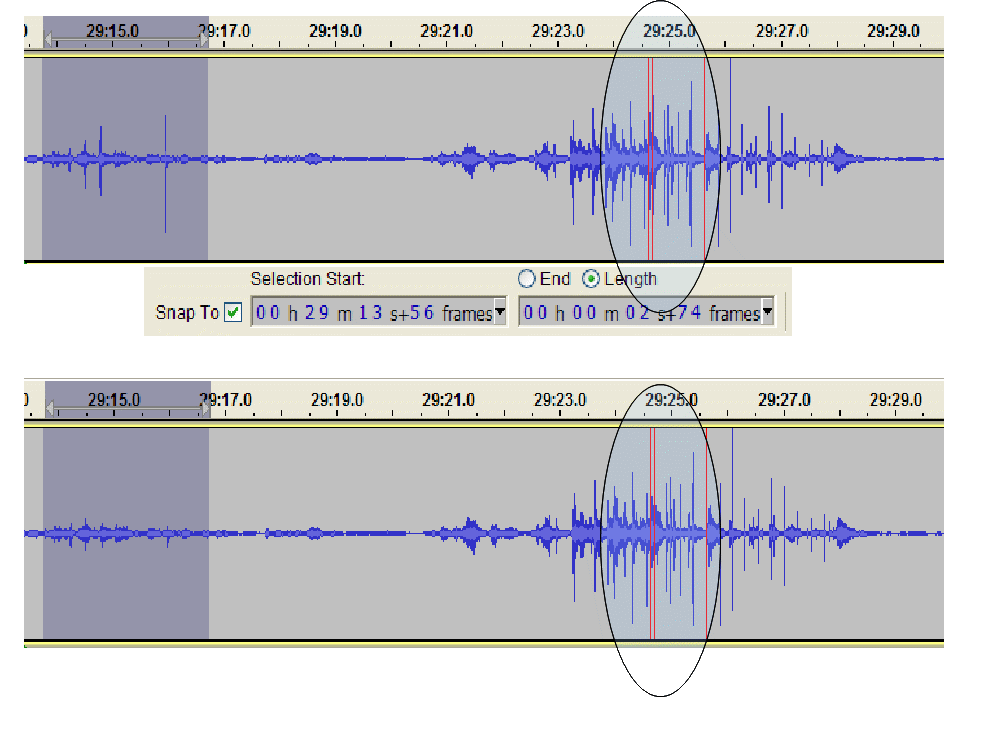
This happens with all 5 editions of Pop Mute. The ghost disappears if I shrink the region from either side (didn’t note what happens if I expand the region). I couldn’t tell from the waveform how long the ghost region is, but it affects a very limited span of the second burst. When I used Pop Mute directly on that part, I had to increase the Threshold to -6 dB.
I’m not quite sure what you’re trying to show me there.
Is it that; at certain zoom levels the waveform can be seen to change slightly to the right of the selected region that has been processed?
I infer from your question that you suspect a display rendering artifact. I’m sorry to report that I didn’t think of that and didn’t check for it. It sure looked to me like 2 spikes in that highlighted area got squashed along with the ones in the select region. I didn’t save the data, so too late to experiment with it.
I should have thought of that. I spend a lot of time searching for spectral lines in the 2-4 KHz range from the reed valves in the AC compressors. Setting the transform length to 8192 helps, and then stretching or shrinking the window a bit sometimes makes them appear. Those things put out a couple dozen different frequencies but only a few at any one time, so I always have to hunt them down.
Why does the forum s/w reject pdf’s? I’d made a pdf of the image and it showed up details much better than the gif, and I betcha more people have pdf readers than gif readers. The pdf was also a smaller file.
Yes I think it may have been.
I agree that it can look quite odd, and while I understand that running the Nyquist effect will cause a redraw I don’t know why the redraw should be any different from one time to another. In the situation when I first noticed it, I checked to see if there was any change in the data outside of the selected region. There wasn’t.
Believe it or not, I think you’re the first person to ask about PDF upload
For uploading pictures I’d recommend either PNG or JPG format. Most screenshot tools support one (or both) of these file types and all of the main web browsers support them so that they can be inserted as images. A PDF file would not display and would have to be downloaded by the user to view it with their PDF viewer (which may or may not be integrated into their web browser).
GIF images are good for diagrams, or pictures that have very few different colours. Gif is also supported natively by most web browsers.
Pop Mute is now available on the Audacity wiki: http://wiki.audacityteam.org/wiki/Nyquist_Effect_Plug-ins#Pop_Mute
I’m trying to install PopMute (OS X 10.7.5) by saving popmute.ny in Audacity/plug-ins, but it’s not showing up in any of the effect/generate/analyze menus in Audacity. Since it was saved from the internet, the popmute.ny file has a type of ‘executable,’ so I even tried re-saving it without the ‘executable’ type, but to no effect. What am I missing?
Nyquist plug-in effect appear “below the line” in the Effect menu.
You should have “Adjustable Fade”, “Cross Fade In”, Cross Fade Out", “Pop Mute” and several others there.
If you see none of those, then you probably have not installed Audacity correctly.
If that is the case, remove your current installation, and follow the installation instructions here: http://audacityteam.org/download/mac
I upgraded my Audacity, and PopMute showed up, so nevermind!
I’ve been working mostly with mono tracks, but today I finally used Pop Mute on a stereo track. I was getting a lot of electrical impulse noise in one mic channel, which was panned right about 75%. The impulses were therefore in both channels, but if I set the threshold low enough to catch the impulse in the left channel it was catching a lot of other things too. I wound up using an old version of Pop Mute which had the “Link Stereo Channels” feature commented out but with instructions for restoring it. It’s an old version with some issues that hadn’t been fixed yet, but I needed the “Linked Channels” feature. Any chance of resurrecting the option?
How about if I put it back in, but comment out the control?
Why not put it back? There are only five controls at the moment. There is a lot of text on its description page on Wiki so there is no guarantee people would see how to enable it.
Gale
Wow! You folks are fast! My post is stamped 6:24 am; Your reply is stamped 6:14 am; Gale’s is stamped 4:01 am.
[This is my flashback, all I have to do to return us to the present is fade my voice out like this and cue the organist. - Firesign Theater]
Either way works great for me, I can read the instructions. IMHO, you almost can’t have too many controls as long as the least frequently used ones default to the most frequently needed settings.
For future consideration, not for this effect because it’s not that complicated: Old TV’s had a door behind which resided the “secondary” controls (Some TVs had them in the back). Some GUI’s have a similar thing called “Advanced (whatever)”. I don’t know whether the Nyquist resources support anything like that, but when there’s a lot of discussion about what controls to omit because they make the panel look too intimidating, it might be worth bringing up the idea of a “secondary controls” box.
Not at present, but it’s a feature that I would very much like
Sorry I’ve not got time to look at the plug-in right now but I’ll take a look next week.