Manipulating Decibels

Wow, Koz! I think the file you made sounds pretty dang good! I feel ya about the Blackness of Space thing on my mp3s - that did sound weird, but I did it because of Chris’s Compressor. It sounds like I don’t even need to apply that.

Down side? I admit, I can be slow sometimes, but this is a funny, right? Not something I need to worry about?

Whoa - not sure how you got all these details but way cool. Even if I don’t really know what they mean, lol.

I dig what you’re saying about cats and dogs. In addition to my cat I also have two dogs, a turtle, and 9 cockatiels (5 are babies just born). I am in reality more of a dog person, but when one is hawking a book about cats one must walk the appropriate walk.

No, I didn’t use Chris’s Compressor on the second process. Just those few simple tools to gently adjust levels and then push the noise level down just a touch.

That’s why I published the screen prints of the values I used. You should do those steps to your WAV master and submit that for testing. I bet it sails straight through.

Noise Removal doesn’t just give you dead silence between words, it also causes distortion and odd compression honking sounds. It’s a common mistake to just crank the noise removal as high as it will go. What you’re supposed to do is keep pushing the noise down, keep trying progressively higher values, bit at a time until your voice starts to sound funny, then take the last removal value out. That’s what I did. That’s why your voice sounds more natural and clear than it did earlier.

I like, and ACX agrees with me that some of the environment like the rustle of your clothing is good to leave in. Maybe not the air conditioning noise, but you know what I mean.

We do have a good news/bad news, problem though. You did a terrific job on the original recording and that’s most unlike most people that post here.

We had a recent posting from a gamer who wanted us to turn his insanely noisy game room into a recording studio. I don’t know that he ever made it.

Anyway, if you’re reasonably consistent with your recording technique, those few simple “patches” to your sound should be good to go.

So talk about the recording technique. You know by now that we live on model names, detailed descriptions and part numbers. How are you performing your recordings?

Koz

Awesome! I’m so excited, Koz! Thank you a MILLION times for your help. I have noticed that noise removal does distort the sound sometimes, but I didn’t feel confident enough to fiddle with the settings. Now I do, though. Yay!!

Regarding equipment and technique, I use a Blue Yeti USB microphone http://www.amazon.com/Blue-Microphones-Yeti-USB-Microphone/dp/B008F4USMS/ref=sr_1_2?ie=UTF8&qid=1397271269&sr=8-2&keywords=blue+yeti with a pop filter http://www.amazon.com/Blue-Microphones-Yeti-USB-Microphone/dp/B008F4USMS/ref=sr_1_2?ie=UTF8&qid=1397271269&sr=8-2&keywords=blue+yeti.

I use clear plastic covers on my printouts to keep the paper shuffling noise to a minimum, and in order to cut out room noise, my husband made a window plug, which is basically a piece of drywall with handles on it that is cut to fit in my office window. The only problem with this is that I can’t lift it to put it in the window since it’s a little heavy (well, technically I can lift it but the last time I did so I screwed up my back so that’s off the table now). I also got a cheap weatherstripping kit from Home Depot and ran a strip of plastic along the bottom of my office door (very simple and applied with tape, if memory serves). Between the drywall plug and the door strip most outside noise is kept out of my office. I’ve had a bit of recording practice with some fan recordings so that gave me confidence for the read.

I will go ahead and craft up a blog post over at my blog (http://xuwriter.wordpress.com) to help others do the whole ACX/Audible thing on my own. I can come back and leave a link here when I’m done if you like.

Is this what you meant by tips and techniques?

Is this what you meant by tips and techniques?

Yes, but I don’t think the posters are going to think so.

I have a lovely quote from a poster.

“I don’t need studio quality.”

Studio quality is a clear voice that doesn’t overload recorded in a quiet, echo-free room.

What part of that don’t you need?

I know what the problem is. People associate those words with an eight-foot long mixing console with a billion lights and knobs on it and two separate rooms with expensive air conditioning, big glass window and sound proof panels on the walls.

You don’t have sound proof panels on the walls, do you?

~~

The drywall is a masterstroke even if you can’t lift it. Plaster between two sheets of cardboard does a very good job of isolating your room from the traffic noise outside. I’m considering something like that at my studio, except it’s a very large window… Any way to redesign the panels slightly so you apply them in multiple vertical panels that interlock?

You can use a nice, loose-knit rug rolled up and stuffed at the door gap on the floor. It doesn’t have to be permanent.

I can come back and leave a link here when I’m done if you like.

Yes, assuming ACX likes your lightly patched submission. It’s still possible they might find something else wrong. We know your basic recording technique is terrific. What’s the chances of a picture of you at the mic?

Only further back to give the idea of the office and where the papers are, etc.


Having done this for a while, I can tell you that most people who grew up yelling into a cellphone have little or no interest in “soundproofing” a “studio.” We can hear the horrified looks they give us on the forum.

"Can’t you just “fix” the overload and use Noise Removal to get rid of the dog barking?

No, probably not. And this is over and above scary technical problems.

Postings like that are the reason for the first few layers of ACX acceptance — the weed-out quick layers. Which reminds me, I need to get back to that ACX official.

Koz

I think those two Blue Yeti links are the same.
Koz

http://www.tollywoodfilmnews.com/index.phpl">Tollywood

Error 404. Page not found.
Koz

[Moderator note: “Tollywood” spammer banned]

That’s a very fine production. A nice voice combined with comprehensive and clear reading.
Moreover, it is entertaining even for an alien such as me.
Reminds me somewhat of Akif Prinçci’s “Felidae” series.
http://en.wikipedia.org/wiki/Felidae_(novel)

However, I don’t think that we are done yet.
I will always refer to Koz’ version for simplicity sake.

As I’ve mentioned before, the peak should really go down to -3 dB. Not only is this the ACX requirement, it also shifts the RMS value and the noise floor by the same amount down and we are in a safer region to begin with.
I attach a label file that you can import when Koz’ mp3 is loaded into a project.
Chapter2-labels.txt (1.58 KB)
I’ve named some problematic points as they appear on my (admittedly cheap) sound system.
The Esss-sounds are a little strong for my taste, although they are not exaggerated in general.
The "P"s and "SP"s pop a bit too much, i.e. there’s a slight booming resonance to them.
The explosives are also a bit strong, i.e. t, d, k, c(-a) and so on. They produce strange clicks at times.
There are other faint clicks that I do seem to hear, I don’t know if they come from the editing or whatever (cutting and alike).

There are some words at the end of phrases that are way too quiet. For instance the contrast between “comfortable” and the following “sleep” is 14 dB (peak). You’ll hear at the word “earth” that the noise is almost more present than the word itself.
I think the noise floor is ok, at least if they measure the RMS value and not the peak value and when the overall gain is lowered by at least 1 dB.
Judge for yourself. Listen to the audio on other speakers or a mobile device, it might be that my objections fall away for the majority of playback systems.

I hope the labels make some sense. I do hate to use them in general because they are not accessible and the automatic “Enter label text” mode is really annoying.

Here is a sample-extract that should illustrate one of the mentioned points above.
It is the word “Pose”
I’'ve treated it with the equalization effect.

  • Cut at 200,400 and 1300 Hz (that’s the boominess or resonance of the environment)
  • cut at 6.3 kHz, the “Szzzz” part

Cut means here lowering the gain, by 3 to 6 dB in this case.
The sound is stretched to 400 % to hear the difference properly.
Keep in mind that I do argue on a very high level.
These final corrections are only the icing on the (cat…) cake.

go down to -3 dB. Not only is this the ACX requirement

Which depends on whom you ask. Steve’s narrative dialog with them seems to think “hovering around -3” is good enough. I suspect the requirements are written for a perfect reading and that a cold reading in a quiet room might make it with no effects or filters at all.

Did you know there was a specification for the straightness of the stamp on a mailed letter? Do you know anybody who conforms to any standard at all and do letters come back?


Keep in mind that I do argue on a very high level.

With:

my (admittedly cheap) sound system.

We are deep in the upper-case P ‘Producer’ and artistic decisions on sound quality. That will vary enormously with the player and sound system and I can tell you given a muted presentation against one that will stand up to iPod playback while walking along Ocean Blvd, I’ll take the slightly bright/stronger one any day.

I asked ACX for an English narrative version of the ACX Quality Control process instead of a neat laundry list of requirements. We’ll see what they say.

Koz

Well, my sound system is cheap in comparison to my old band equipment with 48 Channel mixer, A-Dat and all the funny things adding up to at least 20000.-- sFr.
I am curious what the ACX people reply and how much is measurement and how much listening.
I only want to prevent that the sample is rejected due to a semi-automatic peak/RMS sifting procedure.

OK. That’s a new one. Swiss Francs?
Swiss Frank would be a 20cm sausage on croissant with melted gruyère on top?

DAT. Run away. DAT machines have a certain reputation. They can automatically detect when a recording is important to know when to fail.

I am curious what the ACX people reply and how much is measurement and how much listening.

I would kill to know that. That’s why I requested the narrative version.

I only want to prevent that the sample is rejected due to a semi-automatic peak/RMS sifting procedure.

Which if you have a quiet recording wouldn’t affect you, but it’s always the marginal performances that cause problems. Xina’s recording was rejected for being too loud, not necessarily loudness variations.

I got a “books on tape” show out of the library and I’m going to do my first listening. It’s on five or six CDs, so this is a major event. I will no doubt dub it over to the machine, copy it to my iPod and return the disks. I don’t know that anyone has sampled this process from the other end.

Koz

Yeah, Swiss Francs, but you won’t get more than a croissant for one Franken (slightly more than a Dollar) nowadays. The Big Mac index is around 8.- sFr or so.

There are some sample narration files on the ACX server. They do not meet their own requirements though. Even worse, they are badly distorted at times and if not, disturbing background music is going on.
Nothing to gain from these quarters.

Actually, that’s another point. Where is the dividing line between a cold reading and a fully theatrical production? I didn’t know about the samples. I should go up and look. If I was feeling truly evil, I would submit one of their own samples to acceptance testing — and not warn them.

That was a play on Franc/Frank (spelling). A frank is a regional name for a hot dog. Alternately, Francs and Beans could be an interesting way to enjoy chewing on banknotes smothered under spicy-sweet roasted legumes.

Koz

We call your Franks or Frankfurters “Winerli”, i.e. little ones from Vienna. Our equivalent to cents is even more queer, it is called “Rappen”, i.e. black horses.

Here are the sample Narrators, in case you want to give them a listen to.
https://www.dropbox.com/sh/b4avsqc8oyd5c58/6ccq24vPUt

The original text on the ACX website said:

with peaks hovering around -3dB

I asked for clarification and was told:

What we are looking for is no significantly louder peaks than -3dBFS. Due to our need to be very cautious of dynamic levels we ideally would prefer no peaks go beyond that metric.

The updated wording on their website appears to reinforce the idea:

Have peak values no higher than -3dB.

Why? - By leaving this headroom you’ll reduce the possibility of distortion, which can seriously reduce the quality of the listening experience. This headroom is also needed to ensure files are successfully encoded.

So my current reading is that the peak level in the Audacity project should be -3dB.

After encoding to MP3 there may be a few peaks that are a little over -3dB, but assuming 192 kbps mono, it is unlikely to be more than a small fraction of 1 dB over -3 dB at any point, which I guess will be OK.

Listening to the original WAV recording - generally the recording quality is very good, but it is too “hot” (the peak level is too high).

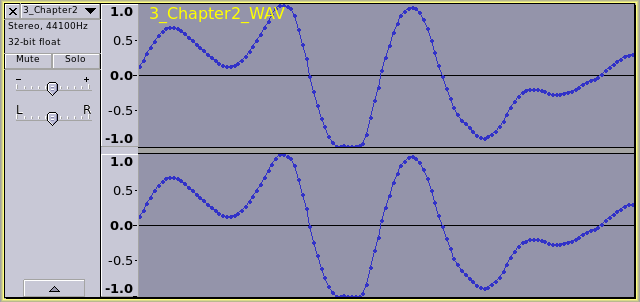
At about 2minutes 52 seconds:
“That while a resting place may seem ideal to you…”
firsttrack000.png
Note the clipping on the negative-going peaks.

Fortunately you have been very lucky on this occasion and this can be repaired quite effectively using “Clip Fix” http://manual.audacityteam.org/o/man/clip_fix.html

Before attempting to “fix” the clipped section, check your original Audacity project (you do have backups of the project saved don’t you?).
Because, by default, Audacity uses “32 it float” format, Audacity is able to handle peaks over 0 dB, so it is possible that the audio in the “project” is over 0 dB but not permanently damaged (not “clipped”). If this is the case, then the peaks can be brought into the “valid” range (below 0 dB) by using the “Amplify” or “Normalize” effect.
http://manual.audacityteam.org/o/man/amplify.html
http://manual.audacityteam.org/o/man/normalize.html


If however it is necessary to repair the clipped peaks, the way that I’d suggest repairing is to select the word “while” and apply Clipfix with the default settings. This will restore the clipped peaks, resulting in peaks over 0 dB (nearly +3 dB), so then you will need to select the entire track and “Normalize” (or “Amplify”) to bring the peak level back to the “valid” range (below 0 dB).

On closer examination, there are several places where the audio is clipped.
If you enable “View > Show Clipping” (http://manual.audacityteam.org/o/man/view_menu.html#show_clipping) you will see red vertical lines where clipping has occurred.

If the audio in the Audacity project is over 0 dB, then it may only require amplifying to fix this, but if the audio in the project is clipped (flat tops/bottoms to the peaks) then each instance will need to be repaired with ClipFix before amplifying down below 0 dB.

After repairing your WAV file with ClipFix, I’m seeing a peak level of +3.6 dB, which indicates that your recording level was at least 6 dB too high.
When setting your recording level, aim for peaks at around -6 dB. That will allow a little “headroom” in the case of any unexpectedly high peaks.

Whoops! Sorry about that. Here’s the correct link: Amazon.com

It’s probably a bit more than I needed, but I decided to “treat” myself.

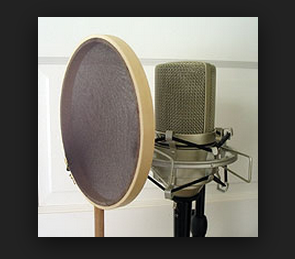
I think maybe glitzy promotional design may nave gotten in the way of functionality. Pop filters don’t work by straining the air on the way to the microphone, they work by deforming slightly during the performance and it’s the deformation that strips off the breathing and pops. Normal vocal sounds vibrate the fabric and go straight through. Thumping or breathing sounds stretch the fabric and have a harder time of it.

That’s why they’re always at least eight inches in diameter, round, and filled with a fabric like Nylon or Dacron. That’s also why you can roll your own with panty hose or stockings and a clothes hanger.

The attached is a embroidery hoop with nylon stocking.

This is Wynonna Judd singing through one.

http://kozco.com/tech/audacity/wynonna2.jpg

They also perform the slightly more hidden task of keeping the performer’s lips from touching the microphone. All microphones have funny sound if you get too close. Close talking is one of the ways to produce the “airplane pilot voice” effect.

Koz
Screen Shot 2014-04-13 at 10.34.37 AM.png