Gerardo,
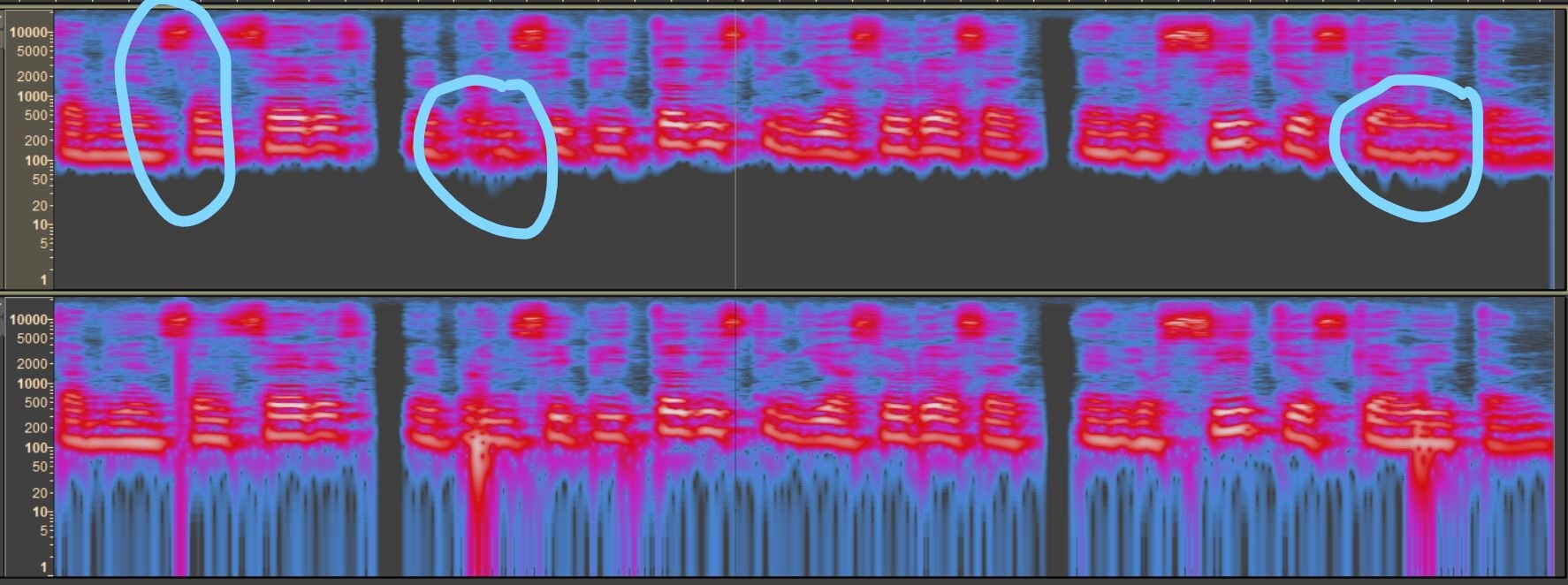
Here is what I have come up with. The noises are reduced, definitely not completely, and the editing probably negatively impacted overall audio quality. But I did not spend a lot of time to get a more precise fix. If you wanted to try multiple fixes on different areas, you could probably narrow it down to a better quality. Also, if you zoom in closer to the bad sections of the audio, you can get the rectangular selection area of the Spectral Edit Multi Tool to fit better into angled areas to clear them up.
My settings for the Spectogram are as follows as I think it gives a clearer picture of the areas in the wave that need repair:

Here are the effects I used:
1 - Filter Curve – 100 Hz Rumble – on the whole audio.
2 - Highlight the area to fix and use Effect > Nyquist > Spectral Edit Multi Tool – you may need to use it multiple times on the same spot. On the click noise, I only used the Multi Tool once and on the Thuds, I used it multiple times. I tried to clean up in between the horizontal white frequency bands on the Thuds and get rid of any other white band residue that was present. I applied the Spectral Edit Multi Tool until the color changed from white to purple/blue since white represents the loudest sound and blue/gray are the quietest sounds.
3 – I Ran Filter Curve – 100 Hz Rumble again.
The repaired areas are circled in blue below and I included a copy of the repaired audio for you to listen to.
Good Luck.
Mike