Thanks, guys.
I’m ready to admit that I’m doing something wrong. I’ll agree that the Earth is flat as long as I get to listen to my music while driving to work. It’s lousy, congested, 45 mins each way.
I tried changing the filenames. One song is Beatles’ “Help” so the filename is help.mp3 , doesn’t get any simpler than that.
The prices for the 3 players that refuse to play are about 20 bucks each but I don’t think that because they are cheap they should not play. The bottom line is that my mp3 files play without a problem by: Honda Accord 2011 (my wife’s car so I cannot take it), my Dell laptop, and a no-brand piece of crap 5 dollar shipping included mp3 player. The same files are refused by 3 supposedly good mp3 players with great Amazon reviews.
mp3 player #4 is on its way.  AGPtEK A02 8GB & 70 Hours Playback, wish me luck.
Also, whoever mentioned that those mp3 players most likely have the same engine is probably right. This would explain why they behave the same way.
Have a look at the links…
The first one may provide a simple fix: create a folder inside the “MP4” folder that contains the music. Easy and simple to test.
The other ones are about fake SD cards. The tricks seems to be that they sell you a card that reads like it’s 4 GB, but it’s 2 GB in reality. Reformat one of the SD cards with your computer and see if that produces errors, or changes the capacity.
Alternatively, use a known good SD card.
Besides, you’re not doing anything wrong. It’s the sellers on evilbay, amazon and other sites. To make a buck, they fake the capacity of the cards. And you should know you can’t trust amazon reviews. You’re not the only one suffering, there are at least hundreds of others out there.
By buying yet another one, you’re playing their game. And possibly losing again…
good mp3 players with great Amazon reviews.
Google: Product Complaints. You’re searching for multiple similar complaints with some words spelled wrong. Those are probably real.
The players have multiple posts all complaining about shoddy construction and very short lifespan. Some of them barely make it out of the packing before they go toes up. I bought an off-brand player at Costco and it was terrible. I almost never take things back, but I took that one back. Unfit for Purpose. Costco only carries name-brand players now.
Do you know anybody with a real Apple iPod? Do your files work right on that?
Do you remember the original thick, heavy iPods with the button and big wheel on the front? I still have mine. It still spins up and plays.
Koz
I tried the folder thing and it did not help.
Even if they sold me a 2gb card instead of 4gb that should not affect the player performance. The files copy Ok, if I double-click a file with player hooked up to my laptop the laptop plays it w/out a problem reading it off the player.
My daughter has an apple ipod. I’ll try my files on it tonight. If they play I might plea to her to lend it to me indefinitely, that would solve my issue.
I’m also curious to see if the next player which is coming tomorrow will play my stuff.
cheers,
Nipo
Yes, that’s very likely.
Perhaps, the cards have still a Fat16 format… 
I would also inspect the ID3 tags, you never know…
The Mp3 diagnostics tool from above sounds promising.
an apple ipod. I’ll try my files on it tonight.
Newer iPods don’t mount on the desktop as a drive like the old ones did. They connect through iTunes and copying music into iTunes invokes the conversion process. So it’s practically guaranteed that would work.
I never do this, but I think if you set iTunes to import MP3 and if you supply MP3, it doesn’t try to convert it to anything else.
If you set iTunes to import MP3 and you supply WAV, it will convert to MP3 (using your preferences and presets). That’s how to make iTunes create an MP3 for you.
Using Fraunhofer.
Koz
Your daughter doesn’t use it any more, right? She has her music collection on her iPhone?
Koz
the ipod is 6 years old and is not functioning well.  My daughter is considering getting a phone.
If the newest mp3 player which i expect today refuses to play I’ll do the itunes thing per Kozikowski.
many thanks again.
Hi All,
Here is the situation.
I have two laptops at home, both dells. Let’s call one “bad”, and the other “good”.
If I create an mp3 file on the bad one by means of Audacity, my mp3 players won’t play it. (I reinstalled Audacity to start from scratch).
If I download an mp3 file off the web and then copy it into my mp3 players they won’t play.
If I do either of these operations on my good dell, the files are fine, they play.
Apparently, the bad dell adds some **** to the files.
What do you think?
Thanks,
Nipo
So how do you get the files onto the MP3 player? Is that transfer from bad Dell to MP3 player the source of the problem?
Gale
I open Chrome, then go a website w/ some music files, click on download, it saves it to my hard drive, then I drag and drop it into the drive of my player.
I guess it is that transfer that does somthing to the file…
Do you have Windows set to show you filename extensions? Most Windows machines shear off the last three letters in the filename “to help you.” So MyMusic.mp3 (the real filename) becomes MyMusic. Unfortunately MyMusic.m4a and MyMusic.aif also turn into MyMusic with slightly different icons. Many of these tricks are OK as long as nothing goes wrong. Having parts of the name missing makes diagnosis and repair harder than they should be.
Hidden File Extensions - Windows
– Start > My Computer > Tools > Folder Options > View > [ ] Hide Extensions for Known File Types (deselect)
– Apply (to this folder) or Apply to All Folders
– OK
Also:
http://www.file-extensions.org/article/show-and-hide-file-extensions-in-windows-10
Koz
You could try moving the downloaded file from the bad Dell to the good Dell, then drag from good Dell to MP3 player. If the computers are networked or you can store the file online, this may work OK. If you have to put the file on a USB stick you may or may not have the same problem.
Gale
Thanks, Gale.
I did the following:
Connected the mp3 player to my bad Dell, then copied a song off the player onto my laptop, then dragged and dropped it under a different name back to the player. It became unplayable. So my Dell is definitely doing something evil to the mp3 files…
The good laptop cannot even play files damaged by the bad laptop. I don’t think it can repair them in any way…
I have Windows 7 on the bad laptop, and windows 10 on the good one
Do the files stay the same size between the machines?
Koz
Is per chance encryption enabled on the bad laptop?
Robert
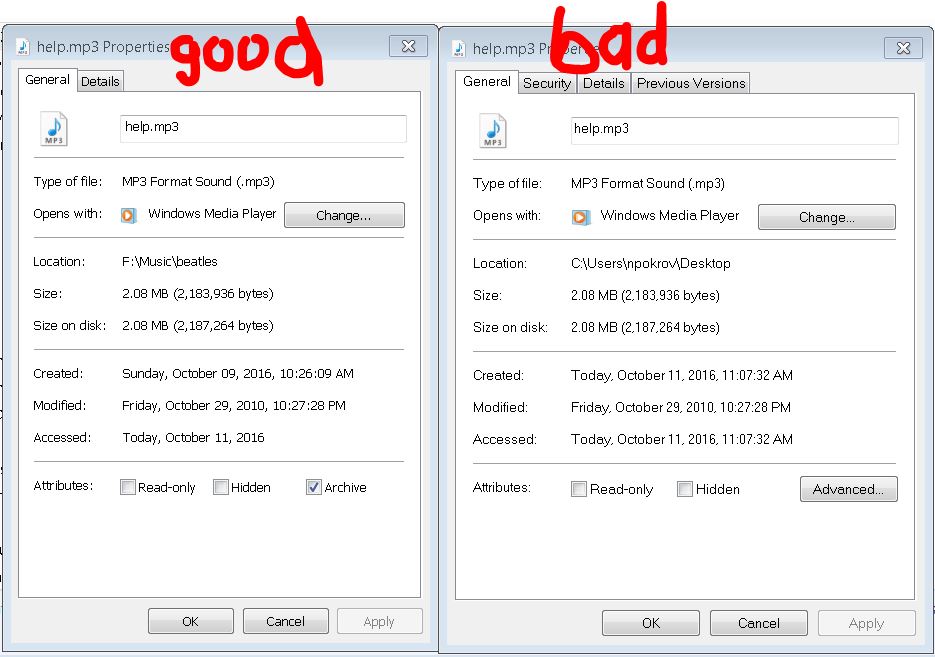
I just checked. See the images below. The file size is exactly the same. However, the file on laptop immediately acquires a whole bunch of stupid attributes while the good file on the player remains pristine.
I cannot post an image here.
PS. I can email the problematic file to any willing party for analysis. It’s only 2megs (Beatles, “Help”), I don’t think it has any viruses (the thing won’t even play).
Maybe, this will work. This is the image I wanted to show.
https://www.facebook.com/photo.php?fbid=1818576255094673&set=a.1818576271761338.1073741826.100008269475839&type=3&theater
Please stop swearing in your messages. This is not an Audacity problem. We don’t actually have to help you with this at all.
I cannot see your image (it’s “unavailable”) even when logged into Facebook. You can attach images in standard image formats. And you could attach an example MP3 up to 2 MB in size. Please see here for how to attach files: https://forum.audacityteam.org/t/how-to-attach-files-to-forum-posts/24026/1
When exactly does the file acquire attributes? When you drag it back to the bad computer after dragging it to the player?
Are you using BitLocker encryption?
Gale
Sorry about that, Gale.
Here is the screenshot of two files.
Yes, attributes are attached as soon as I drag-n-drop.
In the next msg I’ll attach corrupted mp3 file with “I’ll follow the Sun”, ~1.6Mb.
thanks,
Nipo