Resetting the effect.
1) Why might resetting be necessary?
The cross-fade effect fades out the first track, then fades in the next track, then resets itself.
If for any reason the effect is applied to an odd number of tracks (user error  ), then the track count will get out of sync and the plug-in will think that its on a “second track” when it’s actually on the first track.
If this happens, the cross-fade will be completely wrong. The first track will fade in instead of out and the next track will fade out instead of fading in:
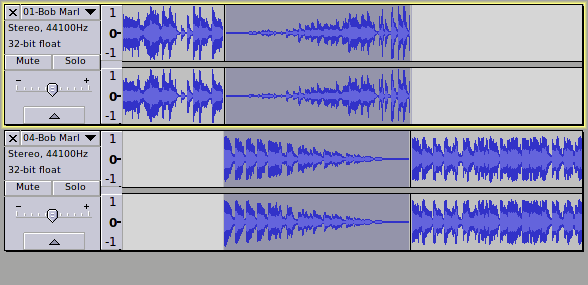
Of course you can use Edit menu > Undo (or Ctrl + Z) to undo the effect, but then you will still need to reset Classic Cross Fade so that it is back in sync.
2) How to reset the effect
Fortunately resetting the Cross Fade Classic is very easy.
Simply select part of one track. Just a short empty section will do. Mono or stereo, it doesn’t matter which:

Apply Cross Fade Classic.
If a section containing audio was selected it will be faded in.
If an empty section of a track was selected, silence (samples at zero) will be produce:
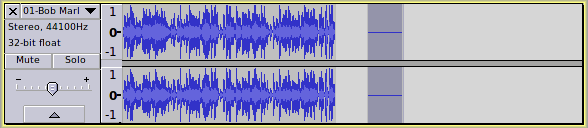
Edit menu > Undo (or Ctrl + Z) to undo the effect.
Cross Fade Classic is now reset.
Usage tips and the plug-in to follow…