Compatability of new versions with old OS

I have an old computer system that I use to capture music. By old, I mean it is old enough to legally drink.

It runs WinXP and has Audacity 1.2.6. loaded.

I am a firm believer in if it ain’t broke, don’t fix it. It is used ONLY to capture my audio . I process it on a different, more modern computer.

I won’t “upgrade” from XP because it is totally adequate for what I want to do with it and if I upgrade it will unleash a whole slew of compatibility issues with drivers etc. I have been through that before and a am unwilling to go through it again.

The Audacity has been on this machine forever. I have not used it much, but the situation has changed. It has a feature which I have not been able to duplicate in my main DAW, which is CuBase.

I am a singer/guitarist. I want to make a demo. I want to make one take, rather than multiple tracks and mixdown, which is my normal technique.

My setup is I have two mics. One for the guitar, one for the vocals. They go into a mixer where I pan one hard to the left and one hard to the right. The mixer goes into my audio interface and then to the computer. I then record the track as a stereo pair. this works fine. So then I split the tracks. The reason I want to split the tracks is so I can EQ and F/X the tracks separately. This also seems to work fine.

I then want to export the audio as 2 tracks, so I can bring it into my main DAW

Where I run into an issue is that I export the audio and when I try to bring it back it’s just noise. Full scale noise at that. Obviously a setup is wrong somewhere, but damned if I see it.

Can anybody out there Help?

So the question then becomes, If I upgrade Audacity, will it still run on XP? If not, how many revs would I need to go back, and do these revs still exist?

Thanks in advance

1 Like

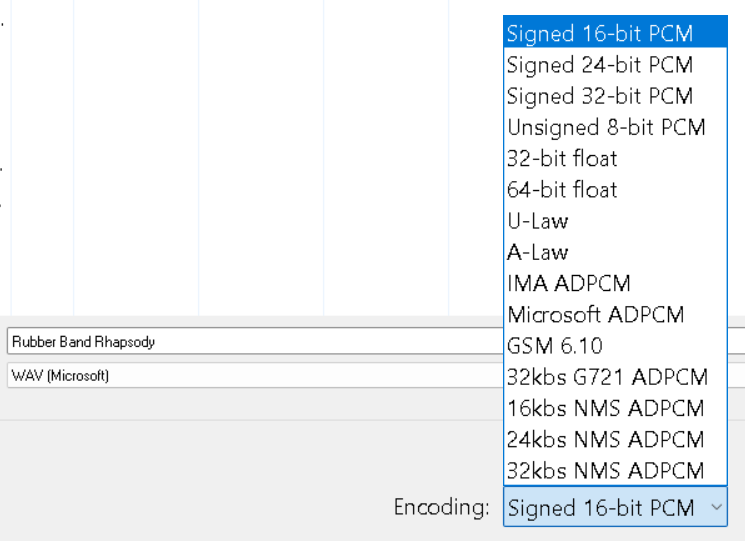
If you export from Audacity as a 32-bit WAV file , some audio software cannot cope with that and render it as full-strength noise. Old (XP vintage) versions of Cubase may not be compatible with 32-bit WAV. The solution is export as 16-bit WAV, which is universally compatible, (there is no audible difference from 32-bit).

The last version of Audacity to officially run on XP is 2.1.3 (2017)

If I were you I would not upgrade : it’s not the solution for the problem you’ve described.

1 Like

I had a cousin problem. I’m one of the senior forum elves, or I was right up until the forum software failed to support my older Mac(s). Writing a couple of checks solved it. I’m still recovering from the differences. What do you mean new Macs don’t directly support classic USB any more?

The Very Latest Software Version (I believe) is 3.7.7. There is no shortage of people having troubles with those last few versions, so my day-to-day audio software is 3.6.2.

Koz

1 Like

Thank you for this. It sounds like what I am seeing. I will try this out later on today.

ALso thanks for the advice on upgrading audacity. Maybe you could give me a clue if there is any other reason to upgrade, assuming the problem that started this post is fixed. Obviously, I am not a power user

On XP can only upgrade to Audacity 2.1.3 (2017). Current (2026) Audacity is 3.7.7 will not run on XP.

Can ask ChatGPT

“list the improvements / fixes in Audacity audio editor from version 1.2.6. to version 2.1.3“.

Sometimes you don’t have a choice. :slightly_frowning_face:

Many years ago my tax software (for the new year) wouldn’t run on my computer so I bought a cheap laptop with Win7. That was quicker and easier than upgrading the OS on my existing computer, and since updating the operating system can be a big project I didn’t want to deal with that while working on my taxes at the same time.

1 Like

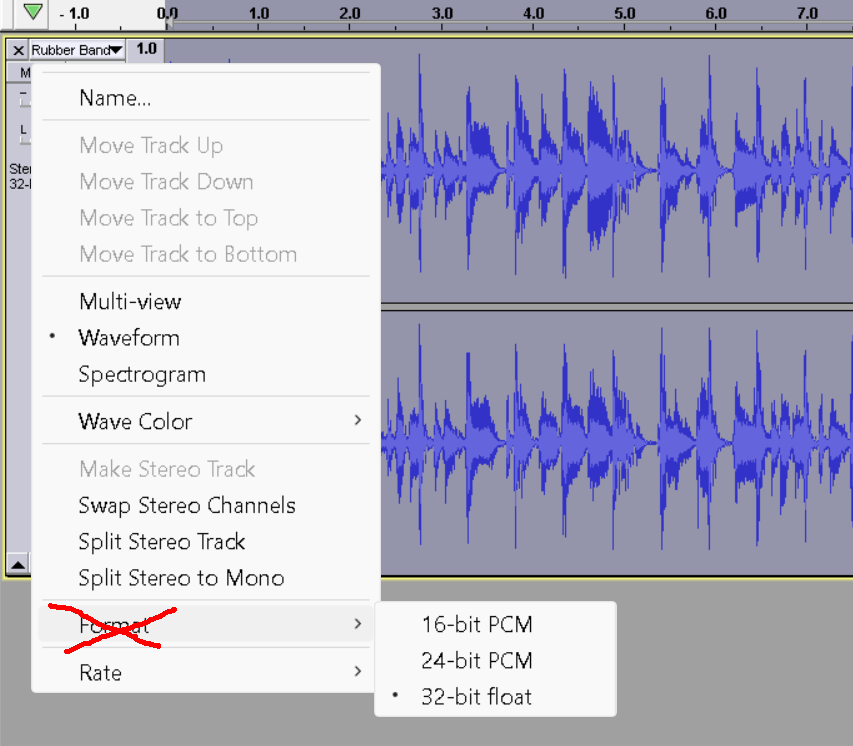
OK, I had been trying to export as 32 bit. so I changed the format to 24 bit and then 16 bit. Esch time when I tried to load the filed I had saved, it came back as noise.

Interesting thing, those files play fine on a different program.

So, the issue must be in how I am importing. What am I missing?

Not this …

Leave that on 32-bit float.

Specify the bit-depth when you export the file as a WAV ….

Ah ha. I was, of course, doing it wrong. I will try this way. Thank you