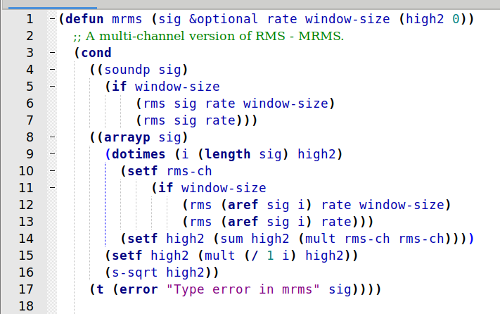
Have you tried testing on tracks where you easily check what the correct values should be?
The “Contrast” tool will give you the RMS level of a selection, so if a track contains a section that is a continuous tone, and that part has the highest RMS, and that section is at least double the window size in the new code, then you can know the expected “highest RMS”.
The easiest way to find the highest peak, is to open the Amplify effect. This effect defaults to the necessary amount of gain to bring the peak to 0 dB.
“sig” is a local variable (it is local to the function “peaks2”. It is also called a “positional argument” of the function. XLISP defun
&key indicates “keyword arguments”. See: XLISP &key
Yes. I would probably have been simpler to only handle mono and stereo, but at some point in the future, Audacity may support tracks with more than 2 channels, so I think it’s a worthwhile exercise to consider how to handle an arbitrary number of channels.
Let’s strip the code down to essentials, and assume that “sig” is always an array of sounds (I’ve ripped out the “IF” so that we can look specifically at what happens in the case of an array of sounds):
(defun peak3 (sig &key (maxlen ny:all) (high 0))
  (dotimes (i (length sig) high)
    (setf high (max high (peak (aref sig i) maxlen)))))
SIG is a positional argument. It is the first argument after the function name, so when we call the function, the first value that we pass will be the value of SIG. Example: if we call the function with:
(peak3 *track*)
Then the value of SIG is TRACK.
As explained in the links above, MAXLEN and HIGH are optional “keyword” arguments. If we call the function without specifying values for these keyword arguments, then they take default values:
maxlen = ny:all (a very big number)
high = 0
Then we have a DO loop, that sets the initial value of i to 0, and increments it on each loop, up to the value (length sig), which is the length of the array (the number of elements in the array, or in other words, then number of channels.
On each loop, we set HIGH to the maximum of HIGH and the peak level of the channel being processed in this loop.
Note that for the first track processed by the effect, HIGH starts off at its default value of zero.
For each subsequent track, we pass the current highest value of previous tracks as the value of HIGH, so within the DO loop, we are looking for the maximum of “the current channel” and "any previous channel in any previous track.