Gamer headsets are rubbish. Mine is trash. Also see noise cancelling aircraft microphones. This is an entertainment quality microphone bought and installed originally for a presentation similar to a TED talk or a show such as the Apple Conference or DefCon Hacker show.
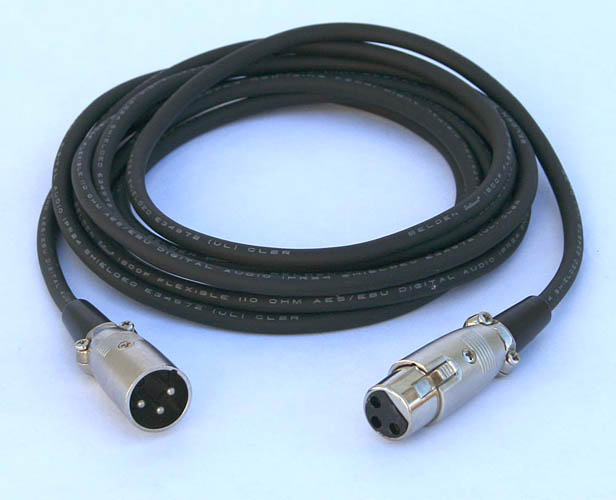
You know it’s the real thing because it plugs in like this…
And the more expensive ones have connections for a radiopack you wear on your butt. Entirely wireless.
getting back to the topic at hand
If you don’t change the capture (microphone) system, then everything else you do is going to be confusing, ticklish, unstable, hard to use, poor quality recovery. We’re only on forum chapter 5. The longest message thread in forum history is by Ian who only wanted to read audiobooks in his apartment in Hollywood. 39 chapters.
Have you tried Audacity’s limiter as a last step before exporting?
No I haven’t. I have read that it’s (and noise gate as well even more so) kind of a brute force thing that could in some cases do more harm than good. I felt I lacked the finesse to use it appropriately.
I recorded a few videos where I used regular Audacity compressor and raised floor from -40db to -30db and so far I’m happy with it. Breathing is occasionally still there but reduced substantially. Might have to re-adjust eq though as a side effect was it made the recording more bass-y oddly enough.
Koz is right that my recording area is bad but I’m trying to make lemonade out of lemons as moving is not currently an option.
Our Limiter is very good, I think.
It is gentle enough to keep distortion at a minimum.
I would personally like to have a noise floor setting integrated with it but this would of course complicate the GUI.
The apparent increase of bass is presumably a pseudo acoustic phenomenon. Increasing the volume makes the bass more perceivable proportionally than the mids, i.e. the equal loudness curve gets flatter, that’s my sensation at least.
It is always a good idea to apply a high pass filter (at 80 to 120 Hz approx) before the compressor.
Chris’ latest version has an option for perceptual compression, it works at least with the highs (bass was still an open problem).
Yes, I’d love to see it improved! I have moved onto Adobe Audition, but CDC is popular and I want people using a great tool Let me check on the license the software was originally released under and then talk to Chris’s family about opening the source (if necessary). Feel free to email me so we can take this offline: feedback which is at TheAudacitytoPodcast.com .
Up to and including version 1.2.6, the plug-ins state:
;;Authored by Chris Capel (http://pdf23ds.net)
;;All rights reserved
;;Permission granted for personal use, without redistribution.
Chris changed the license terms in version 1.2.7b1 (an unfinished experimental version):
;; http://pdf23ds.net/software/dynamic-compressor
;;Copyright (c) 2010 Chris Capel
;;Released under the MIT license. See line 77ish for details.
;;Permission is hereby granted, free of charge, to any person obtaining a copy
;;of this software and associated documentation files (the "Software"), to deal
;;in the Software without restriction, including without limitation the rights
;;to use, copy, modify, merge, publish, distribute, sublicense, and/or sell
;;copies of the Software, and to permit persons to whom the Software is
;;furnished to do so, subject to the following conditions:

;;The above copyright notice and this permission notice shall be included in
;;all copies or substantial portions of the Software.

;;THE SOFTWARE IS PROVIDED "AS IS", WITHOUT WARRANTY OF ANY KIND, EXPRESS OR
;;IMPLIED, INCLUDING BUT NOT LIMITED TO THE WARRANTIES OF MERCHANTABILITY,
;;FITNESS FOR A PARTICULAR PURPOSE AND NONINFRINGEMENT. IN NO EVENT SHALL THE
;;AUTHORS OR COPYRIGHT HOLDERS BE LIABLE FOR ANY CLAIM, DAMAGES OR OTHER
;;LIABILITY, WHETHER IN AN ACTION OF CONTRACT, TORT OR OTHERWISE, ARISING FROM,
;;OUT OF OR IN CONNECTION WITH THE SOFTWARE OR THE USE OR OTHER DEALINGS IN
;;THE SOFTWARE.
This is version 1.2.7b1. Please note that it is an experimental, unfinished project. For production work I would recommend sticking with the 1.2.6 version, but this version has a permissive “free” license as detailed above. compress-1.2.7b1.ny (18.9 KB)
Hi
i was wondering if someone could help me, i’m using audacity 2.1.2 on windows 7 64 bit and im using Chris’s compressor 1.2.6.
i used it for the first time the other night and as soon as i ran it i saw the wave form change and listened to the results and it was perfect, but ive tried using it again and although it goes through the sequence the wave form doesn’t change once its completed, and the resulting file seems the same.
i am using it on a WAV file as its got 6 channel sound, does anyone have any ideas for me to try?, i have tried uinstalling and reinstalling but its still the same #
Chis famously doesn’t like working with a sound track that starts with dead zero, flat line. When I’m cutting a show, I’ll leave a little sound trash on the beginning to give Chris something to ‘chew on’. After Chris finishes, I’ll magnify my way in to the trash segment and cut it off or silence it. There’s word that Chris doesn’t like dead zero at the end, either, but jury’s out on that one.
Thanks for the Advice, I carried out the reset when I reinstalled it, but still no joy.
But can someone explain what the debug button does exactly? I tried it on this particular track and it came back with error messages.
The debug button is intended for use by plug-in developers to show debugging information.
A few plug-ins abuse / re-purpose the debug button as a means of providing additional information for users, though this is not common (and not recommended).
If you copy and paste the debug information in your reply, it may give us a clue as to the problem.
I can’t seem to get this plug-in to install on the latest version of Audacity. It’s like it can’t be seen. Copied file to the correct plug-ins folder but it doesn’t appear anywhere.
Working on a Mac, which is pretty new to me, so maybe it’s just something I am screwing up?
What is the exact location that you copied it to?
On a Mac they need to be in:
~/Library/Application Support/audacity/Plug-Ins
where “~/” means your “home” directory.
A note: When you run it, it doesn’t say “Chris’s Compressor!!!” It says “Compress dynamics”. So it’s easy to miss.
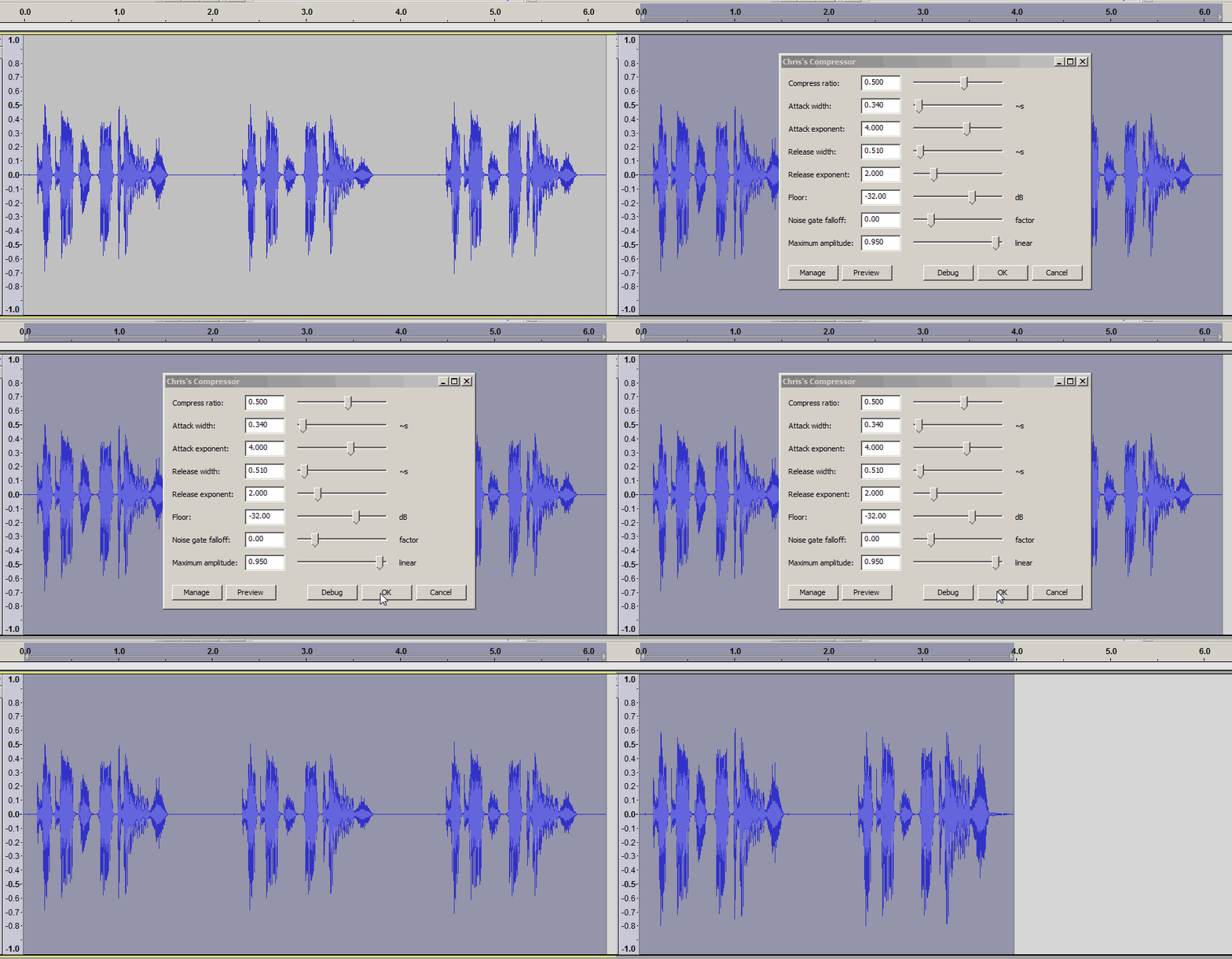
I run it at slightly different settings than factory. I change the first setting Compress ratio from default 0.5 to 0.77. It gives stiffer compression and matches almost exactly the local radio station.
Also there is a Bug Note. Make your show a little too long. Chris doesn’t like running off the end of a performance, so it’s best not to end the show too soon. I usually don’t perform the last end edit, compress, and then cut off the extra.
These are three graphics of how it works. From top to bottom: original work, default and 0.77. Note the high peaks don’t change all that much, but the low volume work gets a serious boost.
Any shortcomings will probably never be fixed because Chris reached “End of Life.”
I am new to Audacity and new to Chris’s compressor too. I am looking for a way to properly normalize human voice so that the soft parts and loud parts appear to be more even. This compressor appears to do the job well. But I ran into a few problems.
‘Noise gate falloff’ doesn’t seem to work no matter how I set it. I’ve tried factor -2 and factor 10 and nothing seems to be different. Am I missing something?
Noise level at the beginning and end of the file seems to be greatly amplify after compression. Is there an easy way to fix this?
I am running Audacity 2.3.0 with Chris’s compressor version 1.2.6 on a Windows 10 machine. Also, I am very new to sound processing. Is this compressor still the recommended way to even the volume? Is there an alternative that might work as well? I’ve tried the default Compressor and Limiter plug-ins but they don’t seem to match the functionalities of Chris’s compressor.
It can sometimes help to add a bit of “padding” at the start / end of the track before applying the effect, then trim off the padding after.
Generating a couple of seconds of silence at each end should be sufficient.
 #