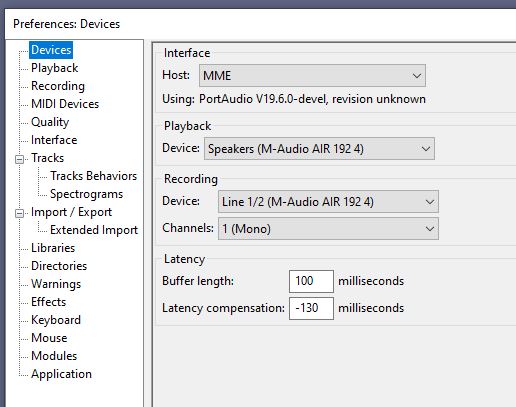
And here are the preferences…
OK I have had a bit of a ‘breakthrough’ but I’m not sure what it indicates.
I decided to use Screencastify (a chrome extension) to capture an example of what Audacity does and show all the preferences and set up…
And guess what… it WORKED!!! I could record a second and third track!!
BUT!!!
I turn off Screencastify and it doesn’t work!
What is going on??? I HAVE to be close to an answer now, surely???
I just went in as admin and checked that all apps have permission to use the microphone and the M-Audio interface was enabled and selected for the input.
Perhaps I will just have to run screencastify everytime I want to record something?! 
So I tried to run Screencastify while I record my second track.
Well… it recorded the second track and I could hear the first track fine… the first time only.
So I try again… and the playback stops working. I can’t get any sound through my phones at all from the recording - but I can hear my voice through the microphone.
PLEASE HELP ME.
That is really strange.
Just as a test:
Start a new project, but before recording anything, set the number of channels to “2 (stereo)” in the Device Toolbar.
This will record a stereo track, but the lower (right) channel will probably be a flat line (because you only have one mic plugged into the left channel).
OK, so you are getting intermittent results.
One thing that could cause this is an incorrect sample rate. I believe you have tried at both 44100 and 48000 and neither one is working for you.
The next thing that comes to mind is a hardware problem. I checked the reviews on Amazon, and while the m-audio air 192/4 has fairly good ratings, there are a number of users that have reported issues with it, so it is worthwhile exploring this avenue before spinning your wheels in another direction.
As Steve suggests, see if you can get the unit to work with ProTools. There are plenty of videos on the internet to help with this. If you cannot get it to work properly with ProTools, it is simply time to return it.
You do have a receipt for this unit?
I have already explained I could not get it to work with ProTools.
Phew - ok.
Thanks.
Hi there,
Having the same issue with recording more tracks …
Everything works but I assume it should do this in other way.
In the Preferences of Audacity you have to mark Play Other Tracks While Recording and Record On A New Track, and Audacity does everything fine.
When I plug my M-Audio 192/8 interface to my Windows 10 HP laptop, Audacity can do Play Other Tracks While Recording only when you mark Listen To This Device into Sound Control Settings, and this is a wrong way because it should work without this option.
Can you tell me how to run M-Audio 192/8 interface in a standard way without marking additional options within PC audio settings ??
Thank you!
Do you have the M-Audio selected as both the Recording device and the Playback device in the Device Toolbar?
Thank you, Steve!
Sure! I did and do everything zillion times, the only way to work M-Audio and Audacity together properly is selecting LISTEN TO THIS DEVICE…
I would like to use this interface for audio measurements, and I was told that I must get the interface work in a standard way for the precise measurements, otherwise I may get a wrong figures …
Actually, Audacity does work properly itself, the issue starts when plugging M-Audio… have you heard any similar stories form other forum-members??? Perhaps, this is the issue with M-Audio …

RESOLVED! There is no issue neither with M-Audio nor Audacity…
Plugging M-Audio into my PC, Windows 10 system automatically runs the interface with the following configuration: Output with Line3/4 and Input through Line1/2 of the interface, I thought it was done in error, so I did always re-check it filling the same Line1/2 into both INPUT and OUTPUT… the worst thing you may generate in your mind…
Good luck, and always check for a very basic/simple errors in your settings !!!
I am sorry, WASAPI has just created LOOPBACK… I had to quit for few minutes, so the issue with M-Audio 192|8 is still in …
Any more cases/experience ??
Well, after dozens of experiments and tryout, I should confirm on the solution which seems to be absolutely strange but it works fully.
To fully use M-Audio 192|8 interface with Audacity, I have to keep opened my Sound Settings, moreover, I have to run TRANSPORT>Rescan Audio Devices in Audacity if any unexpected issue happens …
I would be so thankful if you can tell me on such a strange communication-relation between Audacity’s proper functioning and opened Sound Settings.

It sounds to me like the M-Audio WDM drivers are a bit buggy, but I don’t have a M-Audio 192|8 so I can’t test. If you now have an effective workaround, then I’d suggest that you continue to use that workaround, and keep your computer up to date in the event that a future update improves the situation.
(I have previously used an M-Audio Audiophile USB, and had loads of problems with the WDM drivers)
Thanks, Steve!
I should share your thoughts as I do not have any other issues with neither my new laptop nor Windows 10, this is the first time I am facing such a weird disfunction… and it took 2 days to notice, determine the issue and get it solved, actually all was done by accident after some tryout!
Got emailed to M-Audio (www.inmusicbrands.com) as well, hope they look into the issue… I do not understand how Audacity fans use these interfaces, I found no other published cases on this topic.
I know this is a long-dead thread, but I am currently experiencing the exact same issue. Did you ever resolve this?
I have confirmed I can record multiple tracks in Pro Tools - but audacity is having the same bug. I’m using the M-Audio Air 192|4, as well… and even had the same random bout of success when actively running screencastify. So bizarre.
Since I’ve confirmed that the audio interface works fine with Pro Tools, I’d really love to solve this and get it working with audacity. This is a new setup for my son, so I’d rather not pay for Pro Tools until he is a bit farther down the road in his musical complexity.
Thanks in advance!