What is the output from running:
aplaymidi -l
What is the output from running:
aplaymidi -l
Before I run Qsynth …
fred@fred-desktop:~$ aplaymidi -l
 Port    Client name                      Port name
 14:0    Midi Through                     Midi Through Port-0
 16:0    SB Audigy 4 [SB0610]             Audigy MPU-401 (UART)
 16:32   SB Audigy 4 [SB0610]             Audigy MPU-401 #2
 17:0    Emu10k1 WaveTable                Emu10k1 Port 0
 17:1    Emu10k1 WaveTable                Emu10k1 Port 1
 17:2    Emu10k1 WaveTable                Emu10k1 Port 2
 17:3    Emu10k1 WaveTable                Emu10k1 Port 3
after I have started Qsynth…
fred@fred-desktop:~$ aplaymidi -l
 Port    Client name                      Port name
 14:0    Midi Through                     Midi Through Port-0
 16:0    SB Audigy 4 [SB0610]             Audigy MPU-401 (UART)
 16:32   SB Audigy 4 [SB0610]             Audigy MPU-401 #2
 17:0    Emu10k1 WaveTable                Emu10k1 Port 0
 17:1    Emu10k1 WaveTable                Emu10k1 Port 1
 17:2    Emu10k1 WaveTable                Emu10k1 Port 2
 17:3    Emu10k1 WaveTable                Emu10k1 Port 3
128:0    FLUID Synth (4367)               Synth input port (4367:0)
Well your commands all look OK.
Try opening pavucontrol while Audacity is recording the MIDI file and try adjusting the Playback level of FluidSynth and/or the recording level in Audacity.
I changed Pavucontrol/Playback/Fluidsynth Output from 100% to 60%. This made no difference to the distortion though.
Audacity wont let me change the input level - it says “input volume unavailable - use system mixer”.
Could you post a short audio sample so that we can see what sort of distortion it is. Just a few seconds in WAV format.
https://forum.audacityteam.org/t/how-to-post-an-audio-sample/29851/1
I had Qsynth running (set for 48K) and a terminal window to run aplaymidi -p 128:0 file.mid.
I started Audacity and set it for 48K, with input=Pulse and output=default.
I recorded the same midi twice.
The first time the distortion was so bad you can’t really recognise the tune https://sites.google.com/site/dunfrettin/bad.wav .
I think I reset Qsysnth after that and tried again.
The 2nd time it wasn’t as bad, but still distorted https://sites.google.com/site/dunfrettin/notsobad.wav .
As I suspected, that’s not actually “distortion” in the normal sense - it’s not due to overloading, in fact the recording levels are now a bit low (the screen shot is after amplifying the track). The problem is that there are “gaps” in the recording, which are clearly visible if you zoom in (http://manual.audacityteam.org/o/man/zooming.html):
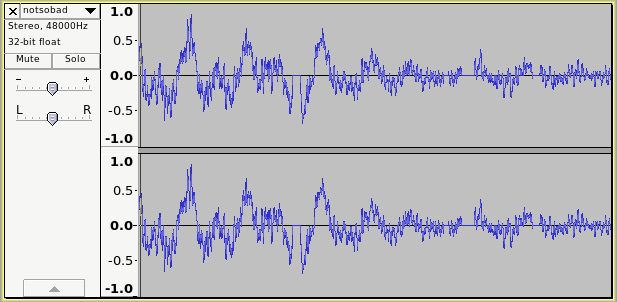
This is occurring because your computer is having difficulty playing the MIDI (with aplaymidi), rendering it to audio (with QSynth), playing through your sound system (with PulseAudio), and recording the audio (with Audacity), all at the same time.
I was sometimes having similar issues on my machine when trying to use 48000 Hz sample rate.
Try rebooting (or at least logging out and back in), then try again setting up at 44100 Hz. Once you get this working it should be easy to set up in the future - getting it working the first time is the tricky part. It works perfectly with 44100 Hz on my machine (not much use to you, other than perhaps encouragement  )
)
If it’s still no go with 44100 Hz, we’ll nee to look at a different solution.
Could you remind me - what sort of computer (a rough idea of the specification and any other details that you think could have relevance).
Well spotted 
A few days ago I tried at 44100 and it was distorted (see earlier in thread) but I tried again anyway and this time it wasn’t as bad (maybe because I didn’t have Pavucontrol running at the same time - or maybe just luck/inconsistency).
Anyway, the big thing I have noticed is that if I play aplaymidi to port 128:0 (Qsynth) there is always at least a bit of “distortion” to my ear, but when I play it to port 17:0 (direct to hardware) there is never any distortion (it sounds perfect). Also, when I play a long midi through Qsysnth (with Audacity not even running) I get a sound blip/distortion whenever I switch windows - this doesn’t happen when I redirect to 17:0.
All of which chimes in with it being a performance issue, like you said. My PC is getting on a bit (AMD 64 3500+, 2GB, Audigy2 sound card).
So I come back to where I finished last time when I had this problem before : I did manage to record using Audacity while using 17:0 (i.e h/w, not Qsynth). The fix I stumbled on then (changing the Audacity input to hw0,0) doesn’t work now though. The O/S has changed from Mint 14 to Ubuntu 14.0.4 (not a huge leap, but an updated kernel) and who knows what has changed with Pulse, drivers etc.
If it’s a driver change, there may be options missing, or they may just be turned off. Have a look in Alsa Mixer. Open a Terminal window and enter:
alsamixer
For the manual, type:
man alsamixer
d’oh  !
!
Capture/Synth was muted. No idea how that happened. Turned it back on and now my original fix works again so I no longer need Qsynth.
Thanks for all the help  .
.
You assured me that your settings were right  ( )
( )
I should have thought about AlsaMixer first  (long time since I’ve used SB MIDI).
Glad it’s working, but a bit of shame that we couldn’t get QSynth working - it can give really good MIDI sounds. It’s the quality of the SoundFont that makes the most difference, and software MIDI synths can use much larger soundfonts than is practical for (inexpensive) hardware.
If ever you want to experiment with software MIDI synthesis, have a look at Timidity++. It can use the same sound fonts as QSynth and is also able to render MIDI direct to WAV files, so it doesn’t matter how slow the computer is because it does not need to do that in real time. Timidity can just work away slowly converting the MIDI to WAV, taking as much time as it needs. On fast computers it can render a batch of MIDI files to WAV much quicker than it would take to play the files.
The trouble with Alsamixer is that I always forget to switch “tabs” between Play and Capture - the Play settings were ok !
The font I’ve been using is 7.2M (CT8MGM.SF2 - think I downloaded it for free from somewhere). I was planning to try loading the Qsynth font (FluidR3_GM.sf2). Its 141M but I think it uses system RAM, not on-board storage, so it might be ok.
I did try Timidy once. Thing is, I mostly want to listen to streamed midi (i.e I do not have the midi file) via Scorch player, so rendering to WAV won’t be an option.
Update : just tried it and it worked . Had to add this line
options snd-emu10k1 max_buffer_size=256 max_synth_voices=256
to /etc/modprobe.d/alsa-base.conf