I cant seem to find a text box function in the DTMF.ny, the built in plugin provides one with the ability for just “typing” the letters/numbers, without spaces.
Does the text boxes have to be tables or whatever? I know there is some way to add text boxes in the prompt somehow…
Do you need that?
;; gauss-filter
(setf sigma 3.0)
(setf width 11)
(setf impulse-response
(do ((ir (make-array width)) (sum 0) (n 0 (1+ n)) (x (- 0 (/ (1- width) 2.0)) (+ x 1.0)))
((>= x (/ width 2.0)) (mult (/ 1.0 sum) (snd-from-array 0 *sound-srate* ir)))
(setf sum (+ sum
(setf (aref ir n) (* (/ 1.0 (sqrt (* 2 pi))) sigma
(exp (- (/ (expt x 2.0) (* 2.0 (expt sigma 2.0)))))))))))
;; apply to track
(convolve *track* impulse-response)
Sorry, it isn’t formatted…
Normally, it would go into a function and the kernel of the filter returned–or the filtered pulse train.
I think I took the DC gain for normalization but it can be changed to e.g. the highest sample=1.
Robert
God once again need to learn my code… Thank you so much!
Not to go off-topic, you seem to have my dad’s first name and middle initial. A good reference.
Gaussian filters will once again make transitions to the shifts more smoother, and will actually create hidden harmonics.
I’ll copy and paste these codings tomorrow. Need to bed.
The J stands for John. A combination of the first names of my grandpas. Although I believe Mom choose Robert because of Robert Mitchum or another actor…
I’ve not followed this topic intensively. The Gauss filter is just a low pass with some nice properties and should actually remove harmonics. If I don’t err, it is used in order to reduce the total energy for broadcasting.
The Gauss is also one of the few wave forms that have the same shape in time and frequency domain–a bell.
It seems to work (tested with audio, with sigma 10 and width 1001).
Robert
In Nyquist plug-ins, the Nyquist programming language provides the processing functions, but it is Audacity (not Nyquist) that creates the graphical interface (if the plug-in has an interface). When writing a Nyquist plug-in, you use “header” commands to tell Audacity that the file is a Nyquist plug-in, what type of plug-in it is, what version of Nyquist plug-in, and what controls (“widgets”) you require (if any) in the interface.
“Header” commands always start with one semicolon. The semicolon is the “comment” character in Nyquist, which tells Nyquist to ignore the rest of that line. When Audacity loads a Nyquist plug-in, it looks at all of the “commented” lines to see if they are header commands. After reading all of the header commands, Audacity creates the necessary interface and runs the Nyquist code.
For example:
;This line is a comment.
;;;This line is also a comment.
;The next line is a header command that tells Audacity to make a text input widget
;control variablename "Text to display before the text box" string "Text after" "Default input"
Header commands are documented here: Missing features - Audacity Support
The compiler does not read nil’s (not in the list) types of formats, as they are ignored by nyquist fully, so basically, it is not reading the 1s and 0s because they are nils. But I could test the space “test” function that steve provided.
I have tried using some other types of formats of strings such as standard-input, and others, but those dont seem to work either. I did however manage to get one of the frequency inputs within the function, but is only changeable in the file. The other frequency was ignored, but programmed the same way as the other.
(read [10 [, 1 [, 0]]])
But if it reads that, then it gives out “true, false” in the output function. instead of “10”. It could output that if that extra code, wasnt there. but it sounds like with that extra code it should read it.
I actually found a much simpler way to generate a binary stream via a readtable macro:
#b<> ==/code]
It would be much easier to define the mark and space as "symbols", as that is what they are defined as and is what I should have mentioned earlier.

I did however manage to get one of the frequency inputs within the function, but is only changeable in the file, and is only treated as a string.  The other frequency was ignored, but programmed the same way as the other.
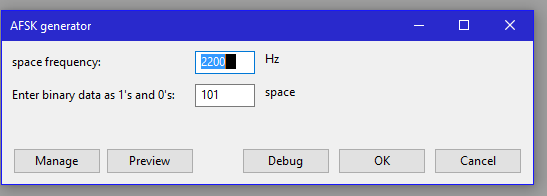
Is there a question in your last post?
Are you talking about this one, or are you referring to another post I made?
I did find a LOT of useful functions, and I tried coding them as best as I could, I also added a frequency range to both the mark/space, and they surprisingly showed up.
Ill show the code I currently have in my file, via some of the text itself. And a photo of the generator itself.
All im doing is analyzing and modifying to fit this plugin. And ive made some headway.
I did have a question regarding how it generates. It does not output to the waveform, instead it outputs the numbers themselves to the output prompt, and it says in the debugger its not reading the NIL argument type. Any reasons there? I did want to do it with 2 mins of silence, to see if I could get the exact samples.
CODE BELOW:
For the mark/space frequency ranges:
;control variablename "mark" string "frequency"  60, 6000
;control variablename "space" string "frequency"  60, 6000
For the samples provider, because in samples it seems “easier” (for me at least), exact periods:
(snd-samples mark 40, 8000)

  (snd-samples space 44, 8800)
for some reason it does not appear.
For the “modified” binary generator:
;control inputstring “Enter binary to modulate” string “space” “101”
(setf outputstring "space")

(dotimes (i (length inputstring) outputstring)
  (cond
    ((char= (char inputstring i) #b1)
      (setf outputstring (format nil "~atrue, " outputstring)))
    ((char= (char inputstring i) #b0)
      (setf outputstring (format nil "~afalse, " outputstring)))))
There needs to be another format type other than nil, its non readable, and its invalid.
Firstly that code is wrong.
The correct syntax for a string input widget is given in the documentation: Missing features - Audacity Support
Do you understand what a “variable” is in computer programming?
You have used “variablename” twice. If your code did work, then first line of your code tells Audacity to set the variable which you have called “variablename” to a value selected by the user, then the second line tells Audacity to set the same variable to a value. To be able to use two string input controls, you must use a different, unique name for each of the variables.
For example (try running this in the Nyquist Prompt, and be sure to enter this code exactly as shown here):
;control hz "First string" string "frequency" "ABC"
;control fred "Second string" string "frequency" "123"
;control mychoice "Select which string to display" choice "First string,Second string" 0

(if (= mychoice 0)
    (print hz)
    (print fred))
Im using verison 4, along with audacity 2.1.x type of software. And, steve, I did look at that exact section before you posted the link to that section of nyquist headers. And I know what a variable is, I just havent done programming in a while and need to get used to it again.
A type of object notable to change/adaptation.
The “initial-value” was opted out for simplicity for the future verisons of audacity, 2.1.x type, which is what im using. Thus only leaving minimum maximum for the two inputs.
If this code is wrong once again (hopefully, not get frustrated) ill use the prompt to generate the “practice strings”. Note, i’m still testing it! I also don’t have a visualizer for coding like visual studio to analyze and fix the “errors” before putting in audacity.
;control variable "mark" string "frequency"  300 4500
;control  variable-name "space" string "frequency"  300 9000
and the other one relating to samples
  (snd-samples mark 40 8000)

  (snd-samples space 44 8800)
If you want steve, you can see the file yourself, ill send it to you in a message or something like that.
That’s where it goes wrong. A “string input” widget does not use minimum / maximum vales. A “string input” widget is for inputting text - the variable is set to the value of the entered text. It does not make sense to have max/min values - what if the user entered “yellow frog” as the input text? It makes to sense to ask if the string literal “yellow frog” is greater than 600 and less than 6000.
In this documentation: Missing features - Audacity Support
;control variable-name "text-left" string "text-right" "initial-string"
Notice there is no minimum or maximum value. The final parameter sets the initial value.
If you want a widget for inputting numeric data, then you need to use one of the numeric widgets, either an integer (whole numbers) or float (floating point) input widget. The documentation is on the same page: Missing features - Audacity Support
I’m going to use floats since that seems more useful. 32 bit floats seem to describe the waveform a bit better, and could actually generate “it”.
Now, on to others, since I don’t want to create any more hassle, the programming for Nils is unreadable(in the binary programming), something else must be used, Because the debugger says it’s an invalid argument type. It’s not readable, and all it does is just generate a rather odd ended curve, even when multiple numbers are used.
**Which was why I said I haven’t programmed in a while. A good 4 months out of the school, just after graduation, seems to be getting in the way of programming plans. I know Nyquist is very simple to program. Just difficult to master.
What do you mean? What are “Nils” ?
What “binary programming”?
I want to have somebody else in this forum explain what I’m talking about to you because obviously, the code I posted in previous posts, (maybe pg 2 or 3 of this topic)were edited for making more sense. And provided some explanation via how the debugger is reading that the format that the two strings (inputstring and outputstring) ex: #\0 and #\1, were formatted as:
NILs, not in the list, or invalid characters. They are ignored by Nyquist usually, and I think I said that at least a good 3 times in some previous posts. The debugger said it was an invalid argument type. If I edited those posts, than contradiction possible here.
You even said that in the decoder that it was “bad”, when clearly it decoded the raw bits. Contradiction there?
Your code was usable, it just has errors in it. Strings print out characters in outputs, and the float prints out 32 bit floats, which I’m going to use instead of strings. String just being readable text as long as in quotations.
OK, I’ll leave this for someone else to reply to, though you may be waiting a while as there are not many Nyquist experts on the forum.
I doubt it, but please feel free to point out the errors.
Perhaps I’m as dumb as Steve (sorry old man) 
I can’t see the actual problem, I have to admit.
Am I right that the input is a string with just zeros and ones?
I presume that you want them to be rendered into another format type and store them e.g. in an array (vector) or list.
That is really not hard to do but there may be too much possibilities to do it…
- Firstly, you could convert the string into a stream object and convert it to a list with characters.
Something like that:
;nyquist plug-in
;version 4
;type generate
;control input "Binary Serie" string "" "10110110abc"
(setq out (make-string-output-stream))
(format out input)
(setf output (get-output-stream-list out))
(setf output (remove-if-not #'(lambda (x) (member x '(#\0 #\1))) output))
(format nil "~a" output)
Note how only zeros and ones are remaining.
Robert
It was originally a stream of strings yes, and you are right about having way too many options for creating a stream of numbers such as binary.
Let’s summarize the purpose of your plug-in before going on:
The GUI should display:
- text box for the message
- mark frequency
- space frequency
- baud
- (optionally) type of FSK
I think the message should be entered as text and not as individual zeros and ones.
This means that we would translate the ASCII characters into integer numbers, then in bytes and finally into individual bits–the symbols as you call it.
AFSK seems to shift between two frequencies, ie we will have a sine tone whose pitch alters. The baud rate determines how long a symbol is, e.g. 1200 symbols per second.
Let’s assume that a mark has 4 cycles and a space 3. Then, the mark frequency would be 4800 Hz and the space frequency 3600 Hz.
A start phase of 0 ° would always result in clean transitions without clicks, am I wrong?
This is at least the case if we replace the previously found binary sequence with the appropriate waveforms for a symbol (3 or for cycles of the required frequency).
It is possible to use frequency modulation directly and one gives a modulation index for the mark frequency.
Anyway, so far we do not have any harmonics in the waveform, as far as I can see and there isn’t the necessity for a gauss filter either.
There are the functions “sampler” and “siosc” which could probably be used to create the wave form–although I’d use the direct way of appending symbols sequentially.
So, where do you want to go from here?
Robert
Now mentioned, I think translating them to ASCII characters seems easier. I did think about that before posting this on here…
remember, this plugin also needs to have various Baud (bits/sec) rates too, various cycles for marks and spaces, and various frequencies for the mark and spaces (Steve described this part I think somewhere as integers)There are ways to make that possible, just need the right coding. the "#" in that context does stands for an ASCII character, in Nyquist readtable functions. Steve did use it for the two 0s and 1s, which I should have found out but deleted and ignored completely ,(sorry Steve) The box can be a bit larger than normal so as to make more room for text.
Phase at 0° (phase-continuous) is usually the default waveform, before the gaussian filter is applied. Usually 1200 Baud AFSK is using 1200 hz and 2200hz (but is actually using 1 mark, 2 spaces, between shifts, hence bell 202 modem, and the usage of the g.f.
Il try what seems simpler.
I’ll use that and see what happens.
I’m just fixing and debugging code to see what fits in this convolved recursive plugin.
OK, based on my previous code, we have the following:
- message (text) as input box (it’s not resizeable btw)
- is converted to ASCII code
- then to bits
The output you’ll see is the bit stream as a list of integers.
;nyquist plug-in
;version 4
;type process
;control message "Message" string "" "Hello"
(setq out (make-string-output-stream))
(format out message)
;
(defun dec2bin (x)
  (do ((i 8 (1- i)) (x x (/ x 2))
       (bits nil (cons (logand x 1) bits)))
      ((zerop i) bits)))
;;;
(setf output (get-output-stream-list out)); string to characters
(setf output (mapcar 'char-int output)); characters to ASCII code
(setf output (apply 'nconc (mapcar #'dec2bin output))); ...and to list of bits
; send to *standard-output*
(format nil "~a" output)
You can now put the frequency/baud controls into it as well.
Optionally, you can have a choice box where you can choose between message as text or as bit stream.
I’m not 100 % sure about the modulation itself.
Either creating a sequence of waveforms or a pulse train that modulates the carrier.
It depends on the sample rate and the other parameters, I guess.
For instance, the standard uses 1200 and 2200 Hz and they do not fit into a sample rate of 44100.
We can overcome this by oversampling and the factor is:
(/ 1200 (gcd (truncate *sound-srate*) 1200))
= 4 for a sample rate of 44.1 kHz.
Robert