Hello, I often work with larger audio files (1.5 to 2.0 GB .wav files).
The files are recordings from rehearsals of our band. I cut pauses between songs,
or extract single songs by moving these parts to separate tracks.
Sometimes I create an empty track B, track A contains the large WAV. I cut a small clip (a few seconds long) somewhere in track A, and I want to move that clip to track B, either by copy/paste or by drag&drop.
At this point Audacity hangs/is blocked for a whole minute or so. It seems like Audacity duplicates the whole WAV first, because when I copy/paste the whole audio content of track A, it takes the same amount of time.
This is really annoying because I need to do this a few dozen times in a single project.
This behavior is not new, I already noticed it a few realeses ago.
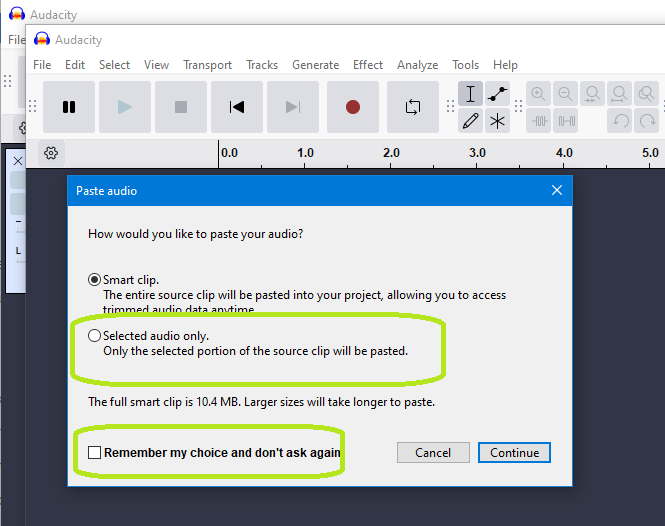
You would be better off creating a new project to past the required parts into, as then you get the option to copy just the selected audio and NOT the whole darn smart clip.
If you copy/paste within a project this option does not exist instead you get the whole “smart clip” pasted i.e not just the selection but rather the whole clip bot with the un-selected audio copied there but hidden (just in case you want to reveal it later). In your use case this will be a large amount of audio that is “hidden”.
You can always then, if you wish or need to, copy the clip from the new project back to your original project.
Thanks for the explanation @waxcylinder. Seems like the “smart clip” is not so smart after all
However, from a technical perspective I don’t understand why the clip is duplicated entirely. I guess there should be only a single instance of one audio clip, and all other occurences of that clip should be only references/views pointing to the original audio in memory.
But maybe that would mean a larger change in the Audactity core. I would appreciate, if it was possible to have the dialog you showed me in the same project, or even as a global setting.
Rather it’s smarter than you want or need it to be.
When this was first introduced several folk requested the ability to be able to turn off smart clips - but Muse, for some reason, decided against this. I was one of those and, like you, would still like to see that but I suspect it will never happen.
We need to be grateful that under the pressure from users Muse did relent a little and enable the dialog (and it’s associated preference setting) that you now see when copying selections to different projects.
My understanding (from what the Muse developers have said) is that this is what happens. Audio is duplicated only if it is changed (for example, Amplified).
I did a quick test of this and my results seem to confirm that the audio is not duplicated.
A project containing a 2-hour stereo track (32-bit float, 44.1k) takes 2.67 GB on disk.
When I cut 7 minutes from the track and paste it into a new track, saving the project with a different name, that second project takes 2.67 GB on disk.
When I Amplify the first track and save the project under yet another name, that third project takes 5.18 GB on disk.
So I don’t think the duplication of audio is what is causing Audacity to become unresponsive for a whole minute. I suspect something else is going on, but I have no idea what.
It would still be worthwhile to try Peter’s work-around. In fact, it might be worth collecting all your clips in a second project to see if that helps.